Concept Lesson · ASA Stateful Firewall
ASA: NAT Concepts and Rule Evaluation
Free Lesson All-Access unlocks every lesson in every course — $489/yr, with $647 of founders bonuses while the window is open, and it carries The Next Year Promise. Reserve founders bonuses →
Walking out of this lesson, you can:
- Tell object NAT from manual NAT — what each can match and where it lands in the rule table
- Predict which NAT rule wins — walking the section order the way the ASA does
- Choose the right translation type — static, dynamic, PAT, or identity — for a given job
This model — rule sections, first match, identity exemptions — is exactly what FTD: NAT Concepts and Rule Evaluation assumes on Secure Firewall.
NAT needs no separate license or feature entitlement. It is base ASA functionality; the platform or ASAv still needs its normal licensing.
Overview
Network Address Translation (NAT) rewrites addresses in a packet’s header as it crosses the firewall, and the ASA decides which rewrite applies by walking a rule table in a fixed order. When that order surprises you, nothing announces it: a site-to-site VPN dies the day someone adds a translation rule, or a published web server answers nothing from the internet. When an unintended rule matches successfully, there is no error to see: the ASA reports the flow it translated, because it cannot know the rule it chose was not the one you meant. Naming the rule that won takes show nat detail or packet-tracer. This lesson gives you the vocabulary, the two rule types, the section order, and the translation patterns — the models that make ASA NAT predictable before you ever touch the CLI. The next two lessons build and verify three of those patterns on the module lab’s firewall using exactly these models.
Terminology: Local vs. Global Addresses
Cisco’s four NAT terms are two words — Local and Global — applied to a host on either side of the firewall. Local is the address as seen from the inside network; Global is the address as seen from the outside. TechNote 4606 is the source document, and the graphic below puts all four on one topology:
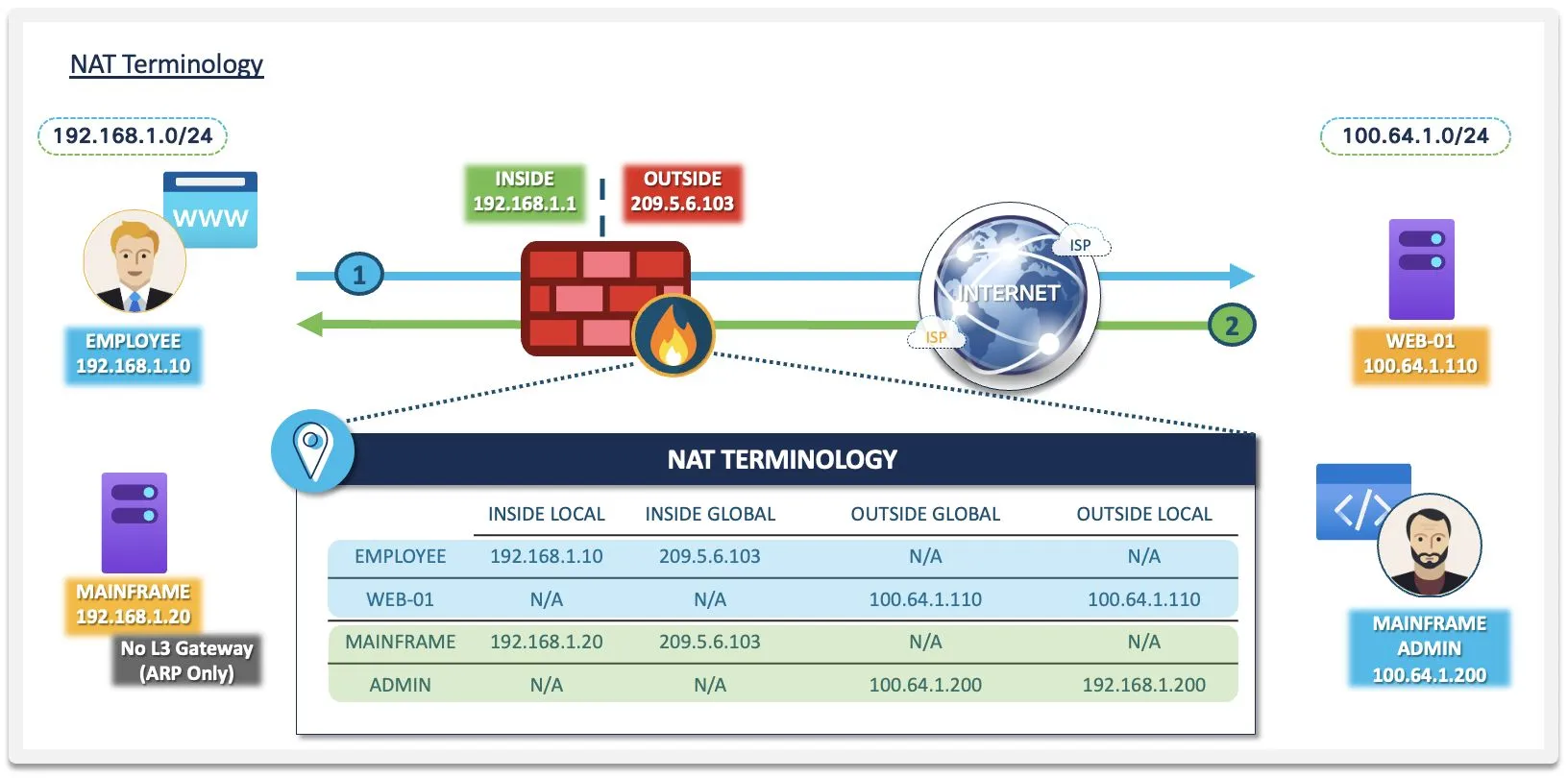
Capture note: the addressing in this terminology graphic and the edge-design graphic further down is illustrative — read 192.168.1.0/24 as “the inside network,” 209.5.6.x as “the firewall’s public side,” and 100.64.1.x as “hosts out on the internet” — illustrative stand-ins, not addressing you’d deploy (100.64.1.x in particular is RFC 6598 carrier-grade NAT space, not internet space). The pattern board’s mapped side, 203.0.113.x, is documentation space. The lab lessons that follow use the lab’s own addressing.
| Term | The address of… | As seen from | Which is the real address? |
|---|---|---|---|
| Inside Local | an inside host, as its owner assigned it | inside | Real |
| Inside Global | that same inside host, after translation | outside | Mapped |
| Outside Local | an outside host, as inside hosts see it | inside | Mapped, if translated |
| Outside Global | that same outside host, as its owner assigned it | outside | Real |
Which two of the four terms name real addresses?
Inside Local and Outside Global. A “real = Local” shortcut is only half true — it holds for the inside pair and fails for the outside pair. The reliable question is perspective: whose address, seen from where?
The graphic draws two flows. Flow 1 is the employee browsing WEB-01: the employee’s real 192.168.1.10 (Inside Local) leaves the firewall as 209.5.6.103, the firewall’s own outside interface address (Inside Global). That is interface PAT, and it is why the mainframe’s row shows the same Inside Global: every inside host that goes out shares the interface address. Flow 2 is the admin reaching the mainframe. The admin host out on the internet owns a real 100.64.1.x address (Outside Global). A rule translates that address as the admin’s traffic enters the firewall, so the mainframe sees it as 192.168.1.200 (Outside Local). The mainframe is why the rule exists: it has no Layer 3 gateway and only answers hosts on its own subnet (it can ARP, not route), so the admin host has to look like one of them.
Outside Local is the address inside hosts use for an outside host. It equals Outside Global unless a rule translates that outside host’s address. That’s why the web server’s row in the graphic shows the same address in both columns, while the remapped admin host’s row differs. (Publishing your own inside server translates the inside pair, not this one.)
The CLI uses a second vocabulary for the same split, and you’ll type it constantly in the next two lessons: the real address is what the host actually has; the mapped address is what NAT substitutes. Per the 9.23 NAT chapter, the real address is “the address that is defined on the host, before it is translated.”
Rule Types: Object NAT vs. Manual NAT
There are exactly two ways to write an ASA NAT rule, and the choice decides what you can match and where the rule lands in the table:
- Object NAT (also called network object NAT, or Auto NAT) — the translation is a property of one network object: this object, crossing from this interface to that one, translates like so. It pairs that one object with its mapped address or pool and never with a destination; the table below gives the direction details.
- Manual NAT (also called twice NAT) — a standalone
natcommand that can match source and destination together and can translate both in one rule — hence “twice.” You decide where it sits.
| Aspect | Object NAT | Manual NAT |
|---|---|---|
| Defined | Inside an object network block | As a standalone nat command |
| Matches | The object’s address — never a source–destination pair | Source and destination together (and ports) |
| Translates | The object’s address, real to mapped, with replies translated back | Source and/or destination |
| Lands in | Among the object rules, sorted by the device | Before every object rule by default, after them with after-auto |
| Ordering control | None — the device sorts them | Full — the rule sits where you put it |
| Use it for | Server publications, shared-address translation — most rules | VPN exemptions, overlapping networks, destination-dependent policy |
Three guidelines from the 9.23 NAT chapter prevent most object NAT surprises:
- One rule per object. “You can only define a single NAT rule for a given object” — to change an object’s translation, edit or remove the rule it already has. Need two translations for one IP? The guide’s own answer: create two objects with different names and the same address.
- No group objects. Object NAT hangs off a single network object; you cannot attach a NAT rule to an
object-group. Manual NAT rules can reference groups. after-autobelongs to manual NAT only. The keyword exists in the standalonenatcommand to push a manual rule after every object rule. Inside anobject networkblock it is not valid syntax — a widely copied wrong example, and the parser rejects it.
Start with object NAT and reach for manual NAT only when the destination matters or you must control ordering. Every manual rule you add is ordering you own forever.
Rule Order: Three Sections, First Match
Beyond the card’s two sort keys for Section 2, the 9.23 NAT chapter adds two tie-breakers: equal address counts sort by the lower IP address, and the same address sorts by object name, alphabetically. So renaming an object can move its rule.
Here is the order running twice on the same source host, with one manual rule in Section 1 and two object rules in Section 2:
Packet: inside host → branch subnet across the VPN
  Section 1   manual: "inside → branch: do not translate"      MATCH → stop
  Section 2   (not evaluated)
  Section 3   (not evaluated)

Packet: inside host → the internet
  Section 1   manual: "inside → branch: do not translate"      no match
  Section 2   object: the DMZ server's rule                    no match
              object: the inside network's rule                MATCH → stop
Section 3 (not evaluated)- Symptom: An object NAT rule works for months, then a manual rule for an unrelated project deploys and the object rule is silently ignored.
- Root Cause: The manual rule landed in Section 1, evaluated before all of Section 2, and its match was broad enough to catch the object rule’s traffic.
- Fix: Narrow Section 1 rules with a destination qualifier so everything else falls through to Section 2 — and read
show nathit counters to see which rule is actually winning.
First match is your debugging tool, not just a hazard. Traffic translating unexpectedly? Walk the table the way the ASA does — Section 1 top to bottom, then Section 2, then Section 3 — and the first matching rule you find is the answer. show nat detail shows the order and the per-rule hit counters that prove it.
Design Choice: Which Translation Pattern
Rule type decides how you write the rule; translation type decides what the rule does to the addresses. There are five patterns: static NAT, dynamic NAT, dynamic PAT, static PAT and identity NAT. The first four differ in three ways, and the board below puts them side by side: how long a mapping lasts, who may start a connection through it, and what gets rewritten.
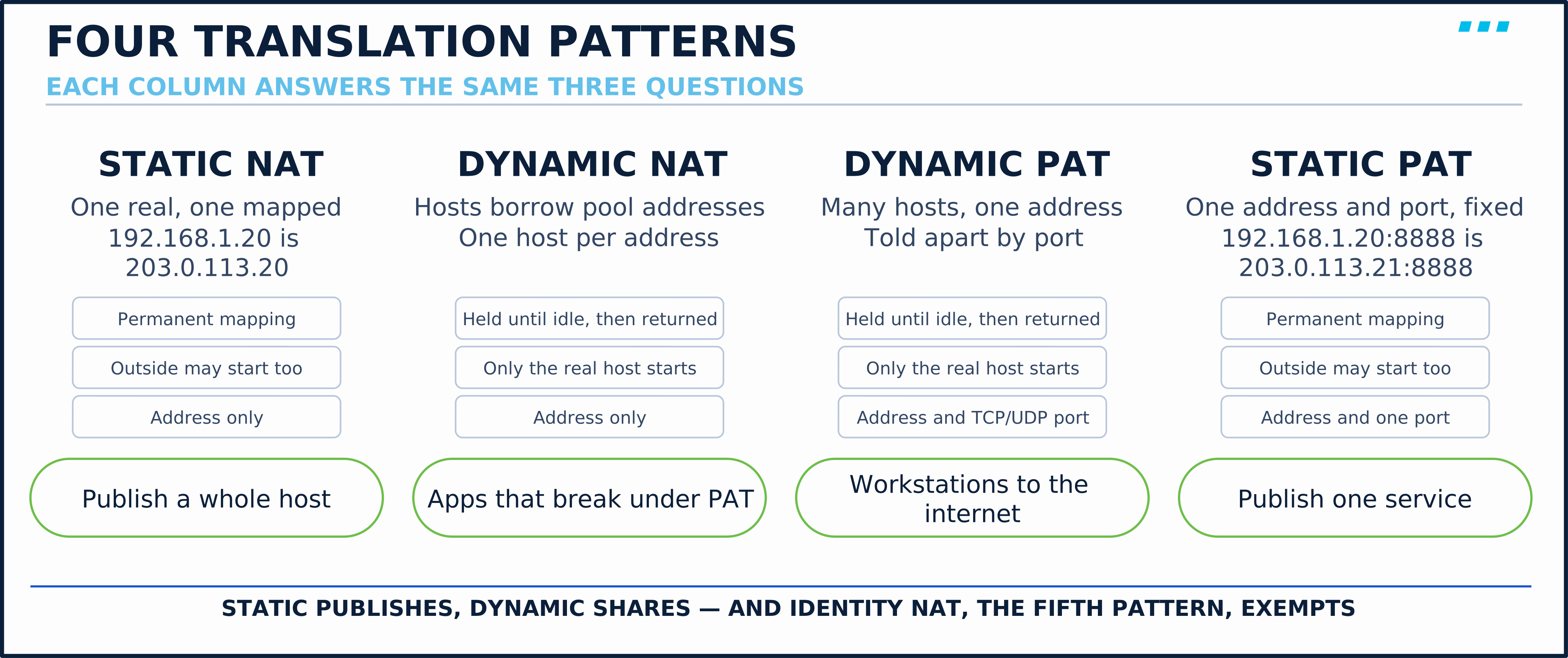
Static NAT is a permanent one-to-one mapping, and the translation applies in both directions from the moment it’s configured (routing and access rules still decide whether traffic is allowed). That two-way property is why, when NAT publishes a server, inbound connections need a static rule: static NAT, or static PAT for a single service. (Manual static rules can be made unidirectional, which the guide calls “mainly useful for testing purposes.”) Each translated host has its own mapped address, permanently.
Dynamic NAT assigns each inside host a whole address from a pool, first come, first served, held until the translation idles out — the same host reuses its entry across connections while it stays active. No ports are rewritten, so one pool address serves one host at a time — which suits applications that break under port translation or policies that want one mapped address per host.
Dynamic PAT (Port Address Translation) translates TCP and UDP source ports as well as addresses, so hundreds of hosts share one address or a small pool, told apart by port; for ICMP, the ASA translates the query identifier instead. The original source port is kept where it can be and reassigned where it can’t.
Static PAT is its permanent sibling: it maps one address, protocol and port to another, so you publish a single service instead of a whole host. TCP and UDP on the same port number are separate mappings.
One timing fact applies to the dynamic patterns: changing a rule does not move existing dynamic translations or established connections onto the new mapping. They keep their old state until they expire or you clear them from the translation table (clear xlate), and clearing an entry interrupts the connections using it.
Identity NAT is the last pattern. Remember the no-match rule from the section order: the 9.23 NAT chapter says “If you do not configure NAT for a given set of traffic, that traffic will not be translated, but will have all of the security policies applied as normal.” So identity NAT is not needed just to leave traffic untranslated; it is for when an explicit rule must match that traffic, most commonly to carve it out of a broader rule:
You will build exactly that rule in the lab in ASA: NAT — Identity Rules, Verification and Troubleshooting, in Section 1, above the PAT rule the next lesson builds.
Design Choice: Objects Do the Heavy Lifting
Every rule in the next two lessons leans on the network objects you built in ASA: Objects & Object Groups — object NAT literally lives inside them. The design payoff shows up at the edge: in the graphic below, the entire perimeter needs just two NAT rules — one dynamic PAT rule sending the inside network out, one static rule publishing the DMZ mail server — while object groups keep the companion access rules readable by bundling the outside web and DNS servers each rule refers to.
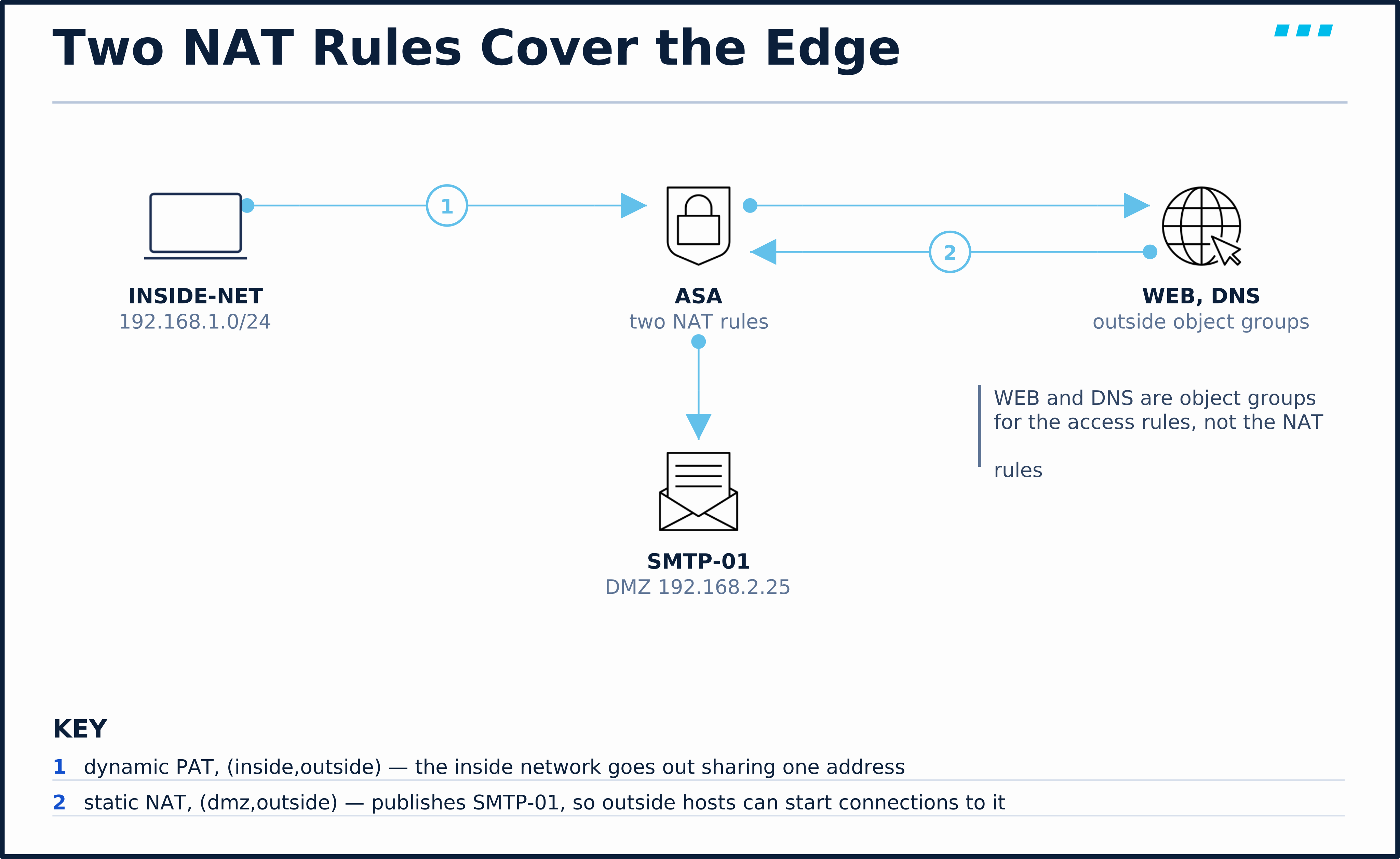
One boundary to respect from the guidelines above: the NAT rules themselves attach to single objects (object NAT takes no groups) — the groups earn their keep in the access rules and in manual NAT matching. Two rules, a handful of objects, and the whole design fits on one screen. That’s the target state for the lab you’re about to build.
🔬 See It in the Lab
You don’t have to take the section model on trust. This is show nat detail on the module lab’s ASA-EDGE-01 once the NAT lessons are finished (the prompt reads /pri/act because the module ends as a failover pair). The command also prints a Section 0 of implicit rules the ASA writes for its own management SSH; they are cut here:
ASA-EDGE-01/pri/act# show nat detail
...
Manual NAT Policies (Section 1)
1 (inside) to (outside) source static HQ-INSIDE HQ-INSIDE  destination static BRANCH-NET BRANCH-NET no-proxy-arp route-lookup
    translate_hits = 0, untranslate_hits = 0
    Source - Origin: 10.10.1.0/24, Translated: 10.10.1.0/24
    Destination - Origin: 10.20.1.0/24, Translated: 10.20.1.0/24

Auto NAT Policies (Section 2)
1 (dmz) to (outside) source static SRV-WEB-01 198.51.100.111
    translate_hits = 0, untranslate_hits = 6
    Source - Origin: 172.16.1.10/32, Translated: 198.51.100.111/32
2 (inside) to (outside) source dynamic INSIDE-NET pat-pool PAT-POOL
    translate_hits = 6, untranslate_hits = 0
    Source - Origin: 10.10.1.0/24, Translated (PAT): 198.51.100.100-198.51.100.110
Every model from this lesson is on the screen:
- Section 1 holds the one manual rule: an identity exemption (
HQ-INSIDEto itself) that applies only towardBRANCH-NET. It sits above everything else because it is manual, which is the whole point of an exemption. Its two trailing keywords are exemption hygiene:no-proxy-arpstops the ASA answering ARP for the rule’s mapped addresses, androute-lookuppicks the egress interface from the routing table instead of the rule. ASA: NAT — Identity Rules, Verification and Troubleshooting explains both when you build the rule. - Section 2 is sorted by the device: the static rule publishing
SRV-WEB-01comes before the dynamic PAT rule, as the sort order says, regardless of which was typed first. - The static rule names two addresses, and access rules use only one. Since ASA 8.3, an access rule for traffic to a translated host names the real address: the permit for the web server matches
172.16.1.10, never198.51.100.111, because the ASA un-translates the destination before the access check. ASA: Global ACLs shows that phase in apacket-tracerrun. - The hit counters tell you direction. The static rule has 6
untranslate_hits(traffic to the published address, translated back to the real address inbound) and notranslate_hits; the PAT rule has the opposite. The counters are cumulative, so to attribute one test flow to a rule, read them before and after it, or runpacket-tracer.
Key Takeaways
Four models cover ASA NAT, and you now have all four:
- Perspective settles the vocabulary — Local is the view from inside, Global the view from outside, and the real address is Local for inside hosts, Global for outside hosts
- Rule type settles expressiveness — object NAT for most rules, manual NAT when the destination matters, one rule per object, no groups in object NAT
- Section order settles conflicts — 1, then 2, then 3, first match ends it, Section 2 sorts itself, and section numbers are table positions, not policy timing
- No-match settles the default — the packet continues untranslated, which is why identity NAT is a deliberate tool, most often an exemption, never an obligation
Up next: you haven’t opened a CLI session yet, and that’s deliberate. ASA: NAT — Static NAT and Dynamic PAT puts these four models to work on ASA-EDGE-01: it publishes the DMZ web server and builds the PAT pool that gets your workstations online, verifying each from both sides of the wire.
Knowledge Check
No grade, no timer. Wrong picks turn coral — change your answer until everything's green.
1 · Your object NAT worked for months, then stopped after a colleague added a manual NAT rule. Why?
Section order is the law: S1 manual (the default landing spot) → S2 auto → S3 manual flagged after-auto, first match takes the packet. A rule that preempted your object NAT is a Section 1 rule.
2 · In ASA NAT vocabulary, the 'local' address is—
Local is a perspective, not a promise of realness — the real address is the Local one for the inside pair but the Global one for the outside pair. Perspective, not privacy.
3 · A packet matches no NAT rule at all. What happens to it?
NAT is optional. Unmatched traffic keeps its addresses and crosses under every other policy as normal — which is why identity NAT is a deliberate tool, most often an exemption, never an obligation.
You just proved the method works — the rest of the mountain is waiting. All-Access unlocks every lesson in every course — $489/yr, with $647 of founders bonuses while the window is open.
Reserve founders rate →📚 Official Documentation — every source behind this page · verified 30 Aug 2026
Revision 9.23 (page updated 2026-07-17) · accessed 20 Aug 2026
Revision Updated 2022-12-09 · accessed 20 Aug 2026