Concept Lesson · ASA Stateful Firewall
ASA: Security Levels
Free Lesson All-Access unlocks every lesson in every course — $489/yr, with $647 of founders bonuses while the window is open, and it carries The Next Year Promise. Reserve founders bonuses →
Walking out of this lesson, you can:
- Predict which flows an ASA passes — before any ACL (Access Control List) exists, using only interface security levels
- Explain what changes the moment an inbound ACL is applied — to an interface that previously relied on the default
This trust-tier model underpins every remaining ASA lesson and the deployment concepts objective 2.1 covers.
None — security levels are base ASA functionality on every platform and license tier.
Overview
Every configured ASA (Adaptive Security Appliance) data interface that forwards traffic carries a name and a security level from 0 to 100. Before any access rule exists, the levels are the access-control policy: comparing the source and destination interfaces’ levels decides which of your networks can open connections toward which. Misread them and the failure is quiet: a new interface that silently drops traffic nothing ever denied, or a segment trusted far more than anyone intended. This lesson covers how the ASA turns two numbers into policy and where that policy stops applying; ASA: DMZ Interface & Verification brings the module firewall’s DMZ (demilitarized zone) interface online to prove it.
Terminology: What Brings an Interface Up
A basic physical routed-mode ASA data interface forwards nothing until it carries, at minimum, four pieces of state:
- Enabled interface — administratively up (
no shutdown) - Interface name — set with
nameif - Security level — 0 to 100;
nameifassigns it for you (inside→ 100, any other name → 0), so it exists even when you never typesecurity-level - IP address — a Layer 3 address in routed mode, or a bridge group and BVI (Bridge Virtual Interface) in transparent mode, as covered in ASA: Deployment Types
You type three of them; the level can come from the name.
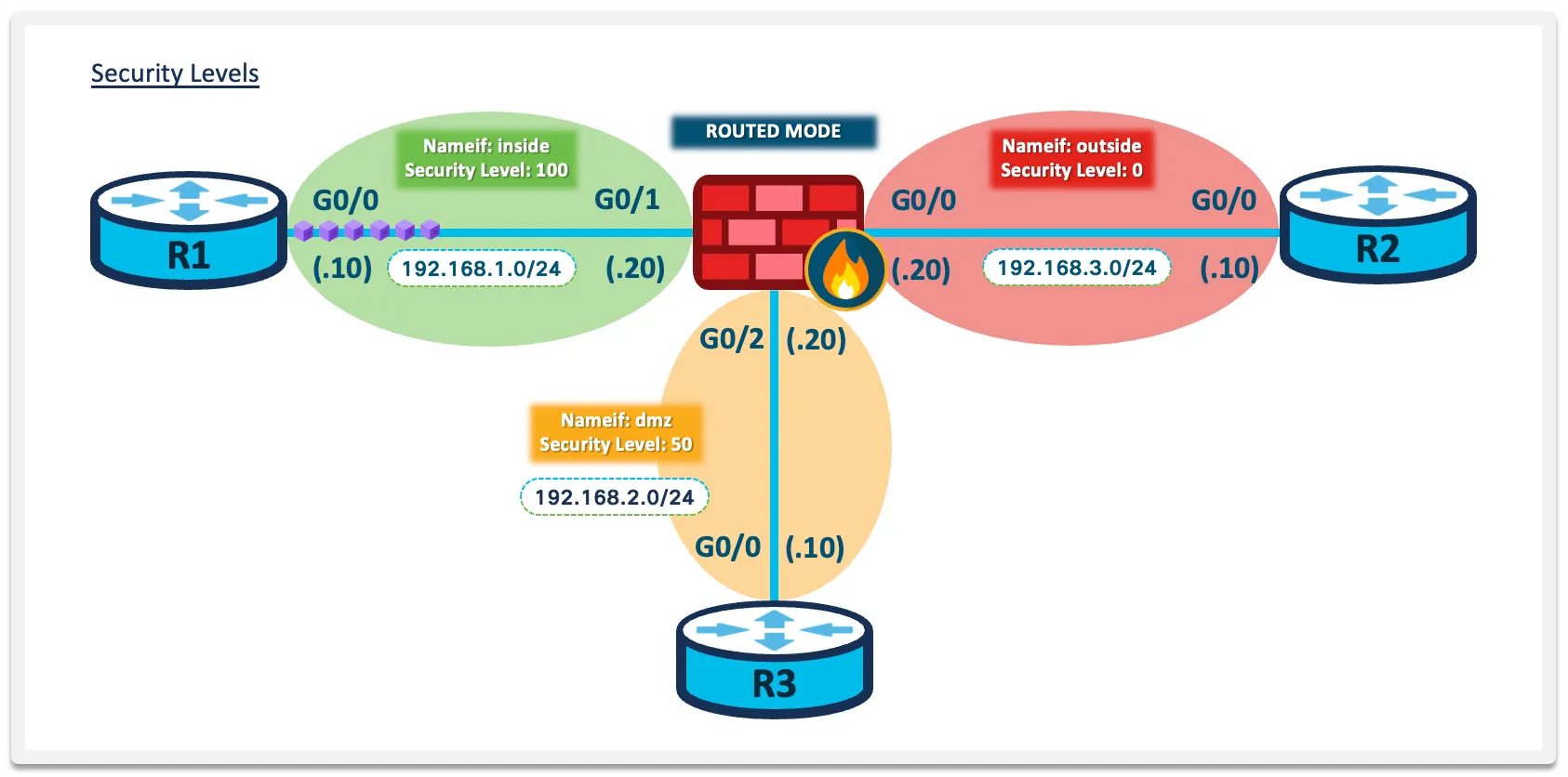
Capture note: the addressing in this lesson’s concept graphics is illustrative — read 192.168.1.0/24 as “the inside network,” 192.168.2.0/24 as “the DMZ,” and the third subnet as “the outside.” The module lab uses its own addressing, shown in See It in the Lab below.
The name is more than a label: ACL bindings, NAT rules, and routes all reference interfaces by nameif, which is why the name is mandatory — and why removing one is destructive.
“Renaming” an interface with no nameif first.
- Symptom: After the rename, ACL bindings, NAT rules, and routes tied to that interface are simply gone.
- Root Cause: Removing a name deletes every command that refers to it (9.23 interfaces chapter).
- Fix: Treat an interface rename like a re-deployment — back up the config first, and expect to rebuild what referenced the old name.
Going deeper: other interface forms carry this state differently. A subinterface also needs its VLAN, EtherChannel members carry it on the logical port-channel interface, and transparent mode splits it between the bridge-group members and the BVI.
The security level states how trusted the network behind the interface is, relative to the firewall’s other interfaces. Higher means more trusted: the employee LAN outranks a DMZ, and a DMZ outranks the internet. Only the comparison matters — 51 beats 50 exactly the way 100 beats 0. Changing a level on a live interface does not re-judge connections already open: the interfaces chapter has you clear them with clear conn if you do not want to wait for them to time out.
Engine Behavior: The High-to-Low Default
With names and levels in place, the ASA enforces a default through-traffic policy with no ACL configured anywhere. Three rules cover it:
- Higher to lower is permitted. Unicast IPv4 and IPv6 traffic from a higher security interface to a lower one is allowed through by default (9.23 access rules chapter).
- Lower to higher is denied — unless an access rule explicitly permits it inbound (the next section shows where one can sit).
- Return traffic for tracked connections ignores both rules. Replies ride the connection entry the outbound packet created, as covered in Stateful Firewalls — the policy is evaluated once, at connection setup.
One caveat on rule 3: it covers connections the ASA tracks. ICMP echo replies, for instance, only ride state once ICMP inspection is enabled, or an access rule admits them.
The classic three-tier design follows directly, and it’s the shape of most ASA deployments you’ll inherit:
- inside (100) — the trusted user LAN
- dmz (50) — public-facing servers, semi-trusted
- outside (0) — the internet, trusted not at all
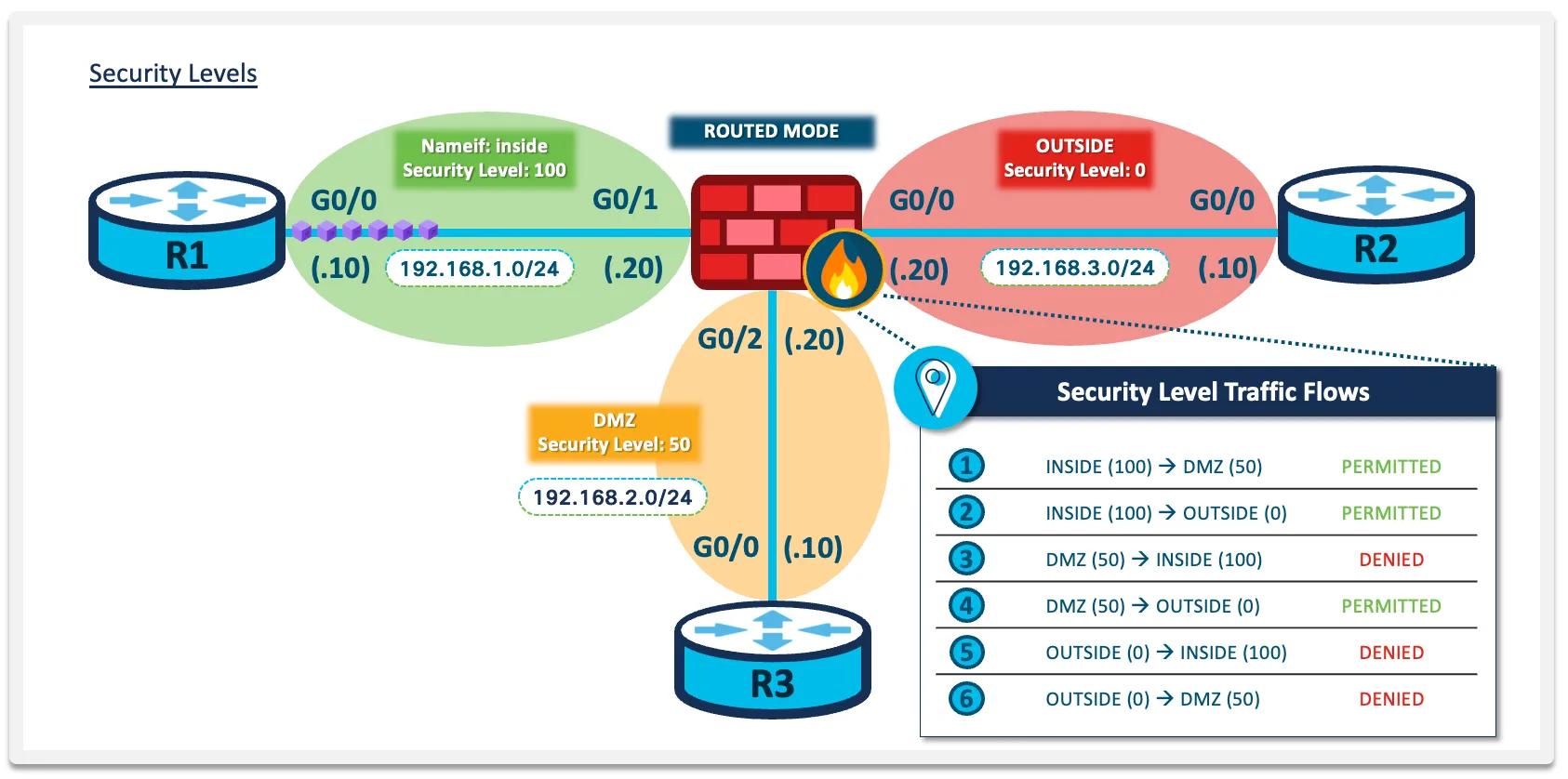
Read the six rows of the graphic against rule 1 and rule 2: every flow toward a lower level is permitted, every flow toward a higher level is denied. That’s the whole model — users reach the DMZ and the internet, DMZ servers reach the internet, and nothing on a less-trusted segment initiates inward.
What can traffic do before a single ACL exists?
Start new connections toward lower security levels, and nothing else (replies to those connections come back on their state). Equal levels are a case of their own, covered below, and are off by default too. A configured ASA on the default level policy behaves like a one-way valve: outbound works, inbound connections don’t. Everything the next three lessons add is refinement of that starting position.
Rule Order: What an ACL Does to the Default
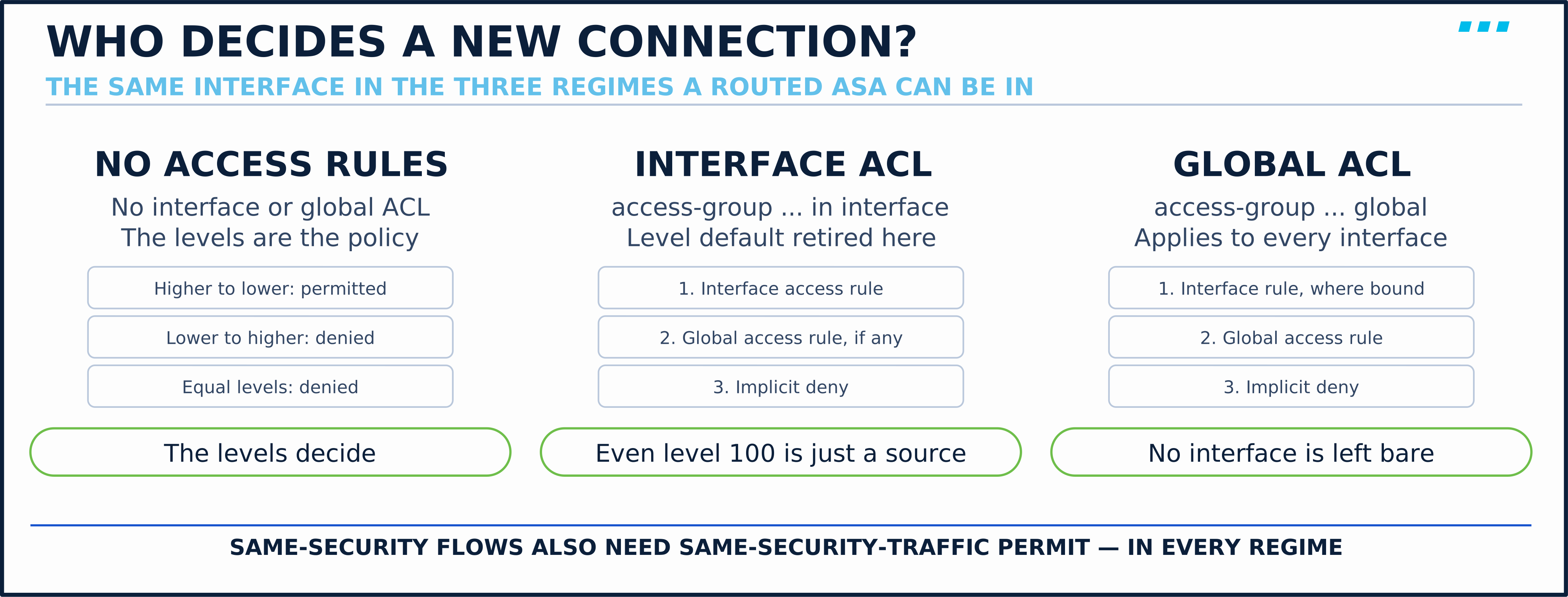
The high-to-low default has a short life in production: it ends at the interface where you apply an inbound access rule. From then on a NEW connection entering that interface is judged in this order (access rules chapter); established connections ride their state entry and skip it:
- Interface access rule
- Global access rule (if configured)
- Implicit deny
Notice what’s missing: once rules are bound, the source interface’s level is no longer consulted. Traffic entering an interface with an inbound ACL passes or drops on the ACL’s terms, even from the most trusted segment on the box. An outbound ACL (access-group … out) is different: it filters traffic leaving an interface and does not retire the level default on the interface the traffic entered.
Do security levels still matter once ACLs are applied?
Not for traffic entering an interface that has one. A global access rule goes further: it applies to every interface, so none is left to the levels. Without one, the levels keep governing the interfaces you’ve left bare, which is why a half-ACL’d firewall behaves so inconsistently.
One check survives in every regime: traffic between two interfaces at the same level also needs the global same-security-traffic permission described below. No ACL replaces it.
Going deeper: Levels have a second, quieter job the ACL never takes over. Some application inspection engines are security-level dependent (interfaces chapter). NetBIOS inspection, for example, is “applied only for outbound connections”, so which side is more trusted decides whether it runs at all; between same-security interfaces, those engines inspect both directions.
Design Choice: Same Security Levels
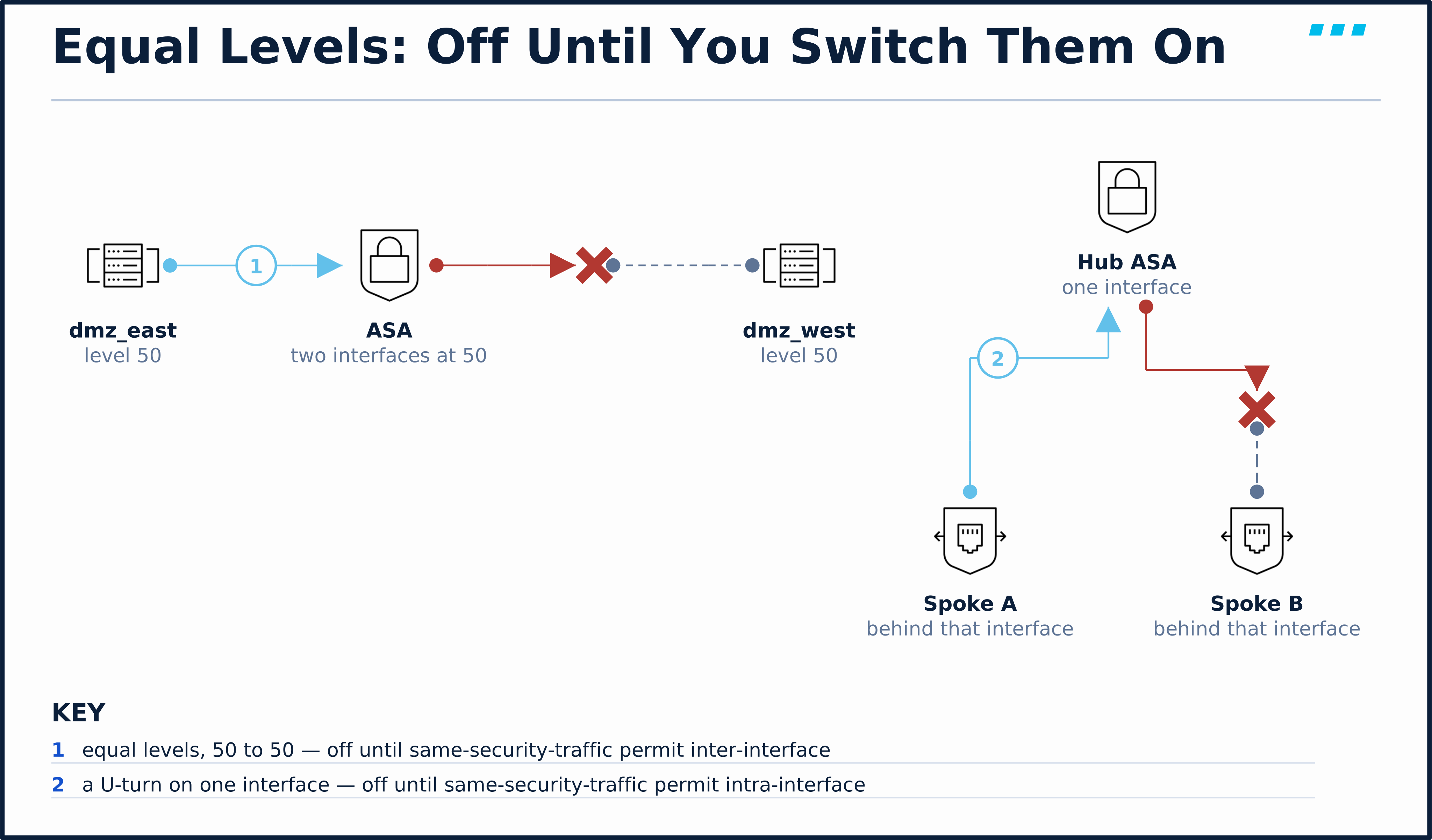
Two interfaces at the same level — say a pair of DMZs — get no default in either direction:
interface gigabitEthernet0/1
 nameif dmz_east
 security-level 50
!
interface gigabitEthernet0/2
 nameif dmz_west
 security-level 50
Traffic between dmz_east and dmz_west is dropped by default, and this is the one place an ACL won’t help: connections between same-level interfaces are subject to a separate check that access rules can’t bypass. Allowing them takes a global command — and its twin covers traffic that enters and exits the same interface:
! Global commands — both off by default
same-security-traffic permit inter-interface
same-security-traffic permit intra-interfaceinter-interface— permits traffic between any two interfaces that share a security level. Typical when you want several equal segments (multiple DMZs, multiple partner links) without ranking them.intra-interface— permits traffic to U-turn out the interface it arrived on. The two common cases are hub-and-spoke topologies where spoke-to-spoke traffic enters and exits the hub’s one interface, and VPN hairpinning for remote-access users.
Both are global switches. Once inter-interface is enabled, new connections are permitted in both directions between every pair of equal-level interfaces, and your ACLs can then restrict within that as usual.
Scope: Managing the ASA Itself
One rule the levels do not touch: you manage the ASA through the interface you arrive at. Per the 9.23 management access chapter, SSH, Telnet, and HTTPS access to an interface other than the one from which you entered the ASA is not supported.
So an inside host can reach the inside interface address, but not the DMZ interface address, no matter what the security levels say.
The one exception is management arriving through a VPN tunnel, where the management-access command designates an interface reachable from the far side. If a “can’t reach the firewall” ticket names an interface the client’s traffic does not enter, this rule is the answer, not the levels.
🔬 See It in the Lab
Your lab is where M4 · Lab 1: Power On the ASA Perimeter left it, because the lessons since, including ASA: Security Contexts, change nothing on it: ASA-EDGE-01 has three named interfaces and not one access rule. Run these on it now; show nameif reads the whole trust ladder in one command:
ASA-EDGE-01# show nameif
Interface                Name                     Security
GigabitEthernet0/0       outside                    0
GigabitEthernet0/1       inside                   100
Management0/0            management               100
ASA-EDGE-01# show running-config same-security-traffic
ASA-EDGE-01# show running-config access-group
ASA-EDGE-01# show running-config interface Management0/0
!
interface Management0/0
 no management-only
 nameif management
 security-level 100
 ip address 10.82.22.185 255.255.255.0
Read it against the lesson:
- Two tiers so far: inside and management at 100, outside at 0. The DMZ joins at 50 in ASA: DMZ Interface & Verification.
- Management0/0 carries through traffic. It reads
no management-only, so it forwards like any data interface, and inside and management are a genuine same-security pair. same-security-trafficprints nothing, so both switches are off.access-groupprints nothing. No access rule is bound anywhere, so the levels are the whole policy: the first regime in the figure above.
Now make the firewall prove both halves of the model. Trace a web connection from an inside host to WS-ADMIN-01, which sits behind the management interface:
ASA-EDGE-01# packet-tracer input inside tcp 10.10.1.100 40000 10.82.22.194 80

Phase: 1
Type: ROUTE-LOOKUP
Subtype: No ECMP load balancing
Result: ALLOW
Elapsed time: 24939 ns
Config:
Additional Information:
Destination is locally connected. No ECMP load balancing.
Found next-hop 10.82.22.194 using egress ifc  management

Phase: 2
Type: ACCESS-LIST
Subtype:
Result: DROP
Elapsed time: 6357 ns
Config:
Implicit Rule
Additional Information:

Result:
input-interface: inside
input-status: up
input-line-status: up
output-interface: management
output-status: up
output-line-status: up
Action: drop
Time Taken: 31296 ns
Drop-reason: (acl-drop) Flow is denied by configured rule, Drop-location: frame snp_classify_table_lookup:6167 flow (NA)/NA
The ACCESS-LIST phase ends at Implicit Rule. There is no access rule to consult, and between two level-100 interfaces the default is deny.
Now the same host and port toward the outside, to R-ISP-01’s loopback. Ping R-ISP-01 first so the ASA has its ARP entry; without one, the trace ends no-v4-adjacency, which is a routing answer, not a policy one:
ASA-EDGE-01# ping 198.51.100.254
Type escape sequence to abort.
Sending 5, 100-byte ICMP Echos to 198.51.100.254, timeout is 2 seconds:
!!!!!
Success rate is 100 percent (5/5), round-trip min/avg/max = 1/2/10 ms
ASA-EDGE-01# packet-tracer input inside tcp 10.10.1.100 40001 203.0.113.254 80

Phase: 1
Type: INPUT-ROUTE-LOOKUP
Subtype: Resolve Egress Interface
Result: ALLOW
Elapsed time: 21027 ns
Config:
Additional Information:
Found next-hop 198.51.100.254 using egress ifc  outside

...

Phase: 8
Type: FLOW-CREATION
Subtype:
Result: ALLOW
Elapsed time: 11736 ns
Config:
Additional Information:
New flow created with id 17, packet dispatched to next module

...

Phase: 10
Type: ADJACENCY-LOOKUP
Subtype: Resolve Nexthop IP address to MAC
Result: ALLOW
Elapsed time: 1956 ns
Config:
Additional Information:
Found adjacency entry for Next-hop 198.51.100.254 on interface  outside
Adjacency :Active
MAC address 5254.0030.fd81 hits 5 reference 1

Result:
input-interface: inside
input-status: up
input-line-status: up
output-interface: outside
output-status: up
output-line-status: up
Action: allow
Time Taken: 97311 ns
Same source host, same destination port, same empty rule set. The two traces reach different destinations out different interfaces, and the difference that decides the verdict is the egress interface’s level. Every phase the second trace ran reads ALLOW. The phases cut for length, 2 to 7 and 9, are NAT, IP-OPTIONS, QOS and a second route lookup, and none of them is an ACCESS-LIST phase. From 100 to 0 there is no access check to fail, so the flow is created and allowed.
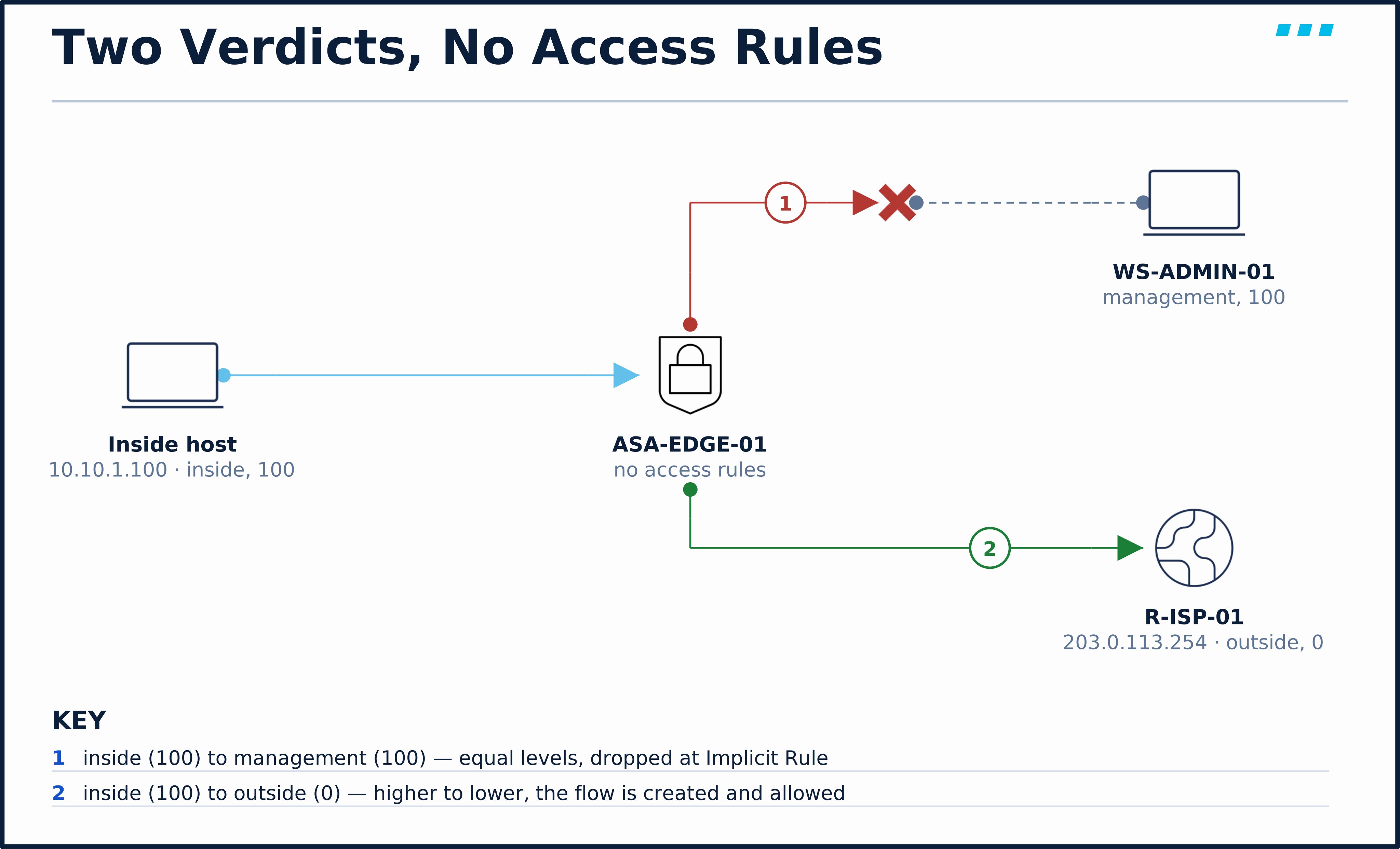
By the end of the module this box carries a DMZ at 50 and both access-group forms; ASA: Global ACLs traces what that changes.
🎥 [Video: The security-level trust ladder — show nameif read against the module baseline, whiteboarding the six flows on the traffic-flows graphic, the rule-order boundary an ACL creates, same-security-traffic and why no ACL fixes that stall, and the one management-access rule. Matches video.script_outline. Runtime: ~5 minutes]
Key Takeaways
One level per interface, compared between the two interfaces a connection crosses, and a short list of rules that make up the default through-traffic policy before the first inbound ACL:
- New connections: higher → lower passes, lower → higher drops, equals drop both ways — the whole default policy, no ACL required; replies ride state.
nameif insidegets 100 free; everything else gets 0 — set levels explicitly and the defaults never bite.- An inbound interface ACL retires the default on that interface — from then on, the access-rule chain decides, and equal levels still need
same-security-traffic. - Management access follows the wire, not the trust ladder — you manage the ASA only at the interface your management traffic enters, regardless of level.
Security levels provide the default through-traffic access policy until an inbound access rule is bound to an interface; after that, they decide almost nothing about traffic entering it. Knowing which regime each interface is in is half of ASA troubleshooting — the other half is watching it happen, which is next.
Up next: with no access rules, the model predicts three verdicts for new connections among the three data tiers — inside reaches everything, outside reaches nothing, dmz sits in between — and predictions are cheap until you prove them on a real box. ASA: DMZ Interface & Verification builds the DMZ tier live and makes the firewall testify to all three with packet-tracer.
Knowledge Check
No grade, no timer. Wrong picks turn coral — change your answer until everything's green.
1 · With no ACLs configured, traffic from inside (level 100) to outside (level 0) — and the reverse — behaves how?
The high-to-low default: higher level may initiate to lower; lower to higher is denied without an ACL.
2 · What does naming an interface nameif inside do to its security level?
The one magic name: inside gets 100 free; everything else starts at 0.
3 · You apply an access-list inbound on an interface. What happens to the security-level default in that direction?
An inbound interface ACL replaces the level default in that direction — unmatched traffic falls to the global rule if one exists, then the implicit deny. A surprise deny for high-to-low traffic people expect to pass.
4 · Two interfaces sit at the same security level — say a pair of DMZs at 50. With no other configuration, what happens to traffic between them, and what turns it on?
Same-security interfaces get no default in either direction, and it's the one place an ACL can't help — only the global same-security-traffic command does.
5 · An admin is logged into the ASA's inside interface. Can they also manage it at its DMZ interface address, since inside outranks dmz?
Management access isn't governed by security levels at all — it's tied to the interface the management traffic enters, with management-access as the sole VPN exception.
You just proved the method works — the rest of the mountain is waiting. All-Access unlocks every lesson in every course — $489/yr, with $647 of founders bonuses while the window is open.
Reserve founders rate →📚 Official Documentation — every source behind this page · verified 30 Aug 2026
Revision 9.23 (page updated 2026-07-17) · accessed 20 Aug 2026
Revision 9.23 (page updated 2026-07-17) · accessed 20 Aug 2026
Revision 9.23 (page updated 2026-07-17) · accessed 20 Aug 2026