Configuration Lesson · ASA Stateful Firewall
ASA: High Availability (HA)
Free Lesson All-Access unlocks every lesson in every course — $489/yr, with $647 of founders bonuses while the window is open, and it carries The Next Year Promise. Reserve founders bonuses →
Walking out of this lesson, you can:
- Describe the ASA’s high-availability models, active/standby, active/active and clustering, and what each costs
- Build an active/standby failover pair and read
show failoverwell enough to trust it - Say how long a failover takes, and why, from measurements on a pair you failed on purpose
The lab pair ran unregistered ASAv 9.24(1) at the 100 Kbps unlicensed rate, and failover formed and failed over normally. Production pairs must meet the failover licensing rules in the 9.24 guide.
Overview
One firewall is one failure away from an outage for everything behind it. High availability (HA) on the ASA puts a second unit beside the first, keeps it in sync, and moves the traffic when the first stops. This lesson describes the ASA’s HA models, builds the simplest of them, active/standby failover, on the lab’s two ASAs, and then breaks it three ways to measure what a failover actually costs.
Terminology: The High-Availability Models
HA comes at two levels. Interface HA keeps one firewall connected when a cable or port fails: a redundant interface pairs two ports, one active at a time, and an EtherChannel bundles several ports that all carry traffic. System HA keeps the service running when a whole firewall fails, and that’s this lesson’s subject:
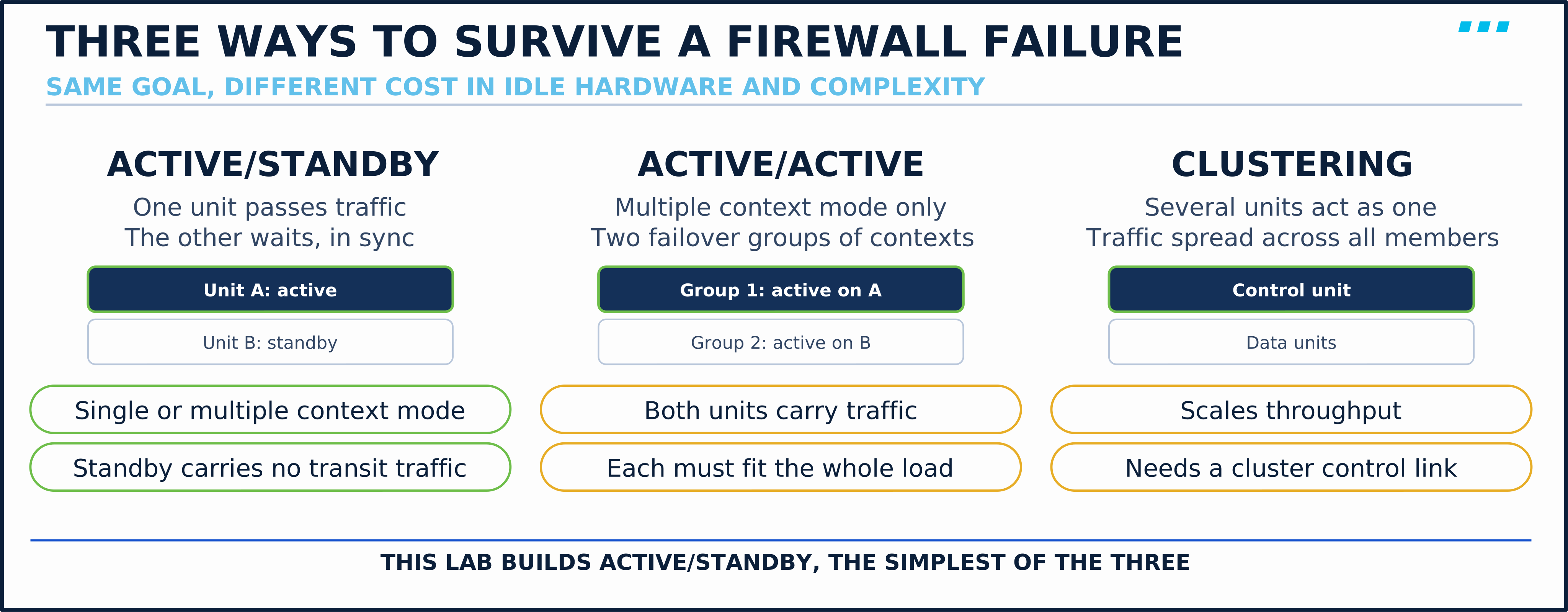
The ASA 9.24 failover chapter defines the first two:
- Active/standby — “One device functions as the Active unit and passes traffic. The second device, designated as the Standby unit, does not actively pass traffic.”
- Active/active — “only available to ASAs in multiple context mode.” The contexts are split into at most two failover groups, and the units can each be active for a different group.
Clustering is a different mechanism, not a failover mode: several units share one logical configuration and distribute eligible traffic among them. It’s the option when aggregate throughput has outgrown one unit, within its feature and traffic-distribution limits; it doesn’t make a single flow faster than one member.
Terminology: Primary, Secondary, Active, Standby
Two pairs of words describe each unit, and mixing them up is the most common confusion in failover:
| Word | What it is | Changes? |
|---|---|---|
| Primary / secondary | The unit’s configured identity (failover lan unit primary) | Never, without reconfiguration |
| Active / standby | Which unit passes traffic right now | Every failover |
The primary is active when both healthy units start together. After a failover, the secondary can be active for as long as it stays healthy. Active/standby has no preemption, so a repaired primary returns as the standby.
Before any of it works, the two units must match. The chapter requires the same model, the same number and types of interfaces, the same modules and RAM, the same context mode and firewall mode, and the same major and minor software version.
Two links carry the pair’s own traffic:
- Failover link — hellos (keepalives), unit state and configuration replication.
- State link — connection state, for stateful failover. It can share the failover link’s interface, as it does in this lab.
The standby replicates the active unit’s running configuration, hostname included. Once the pair forms, both consoles show the same prompt, and show failover’s This host: line is how you tell them apart, until you configure prompt hostname priority state, which the lab does at the end.
Engine Behavior: How the Standby Decides
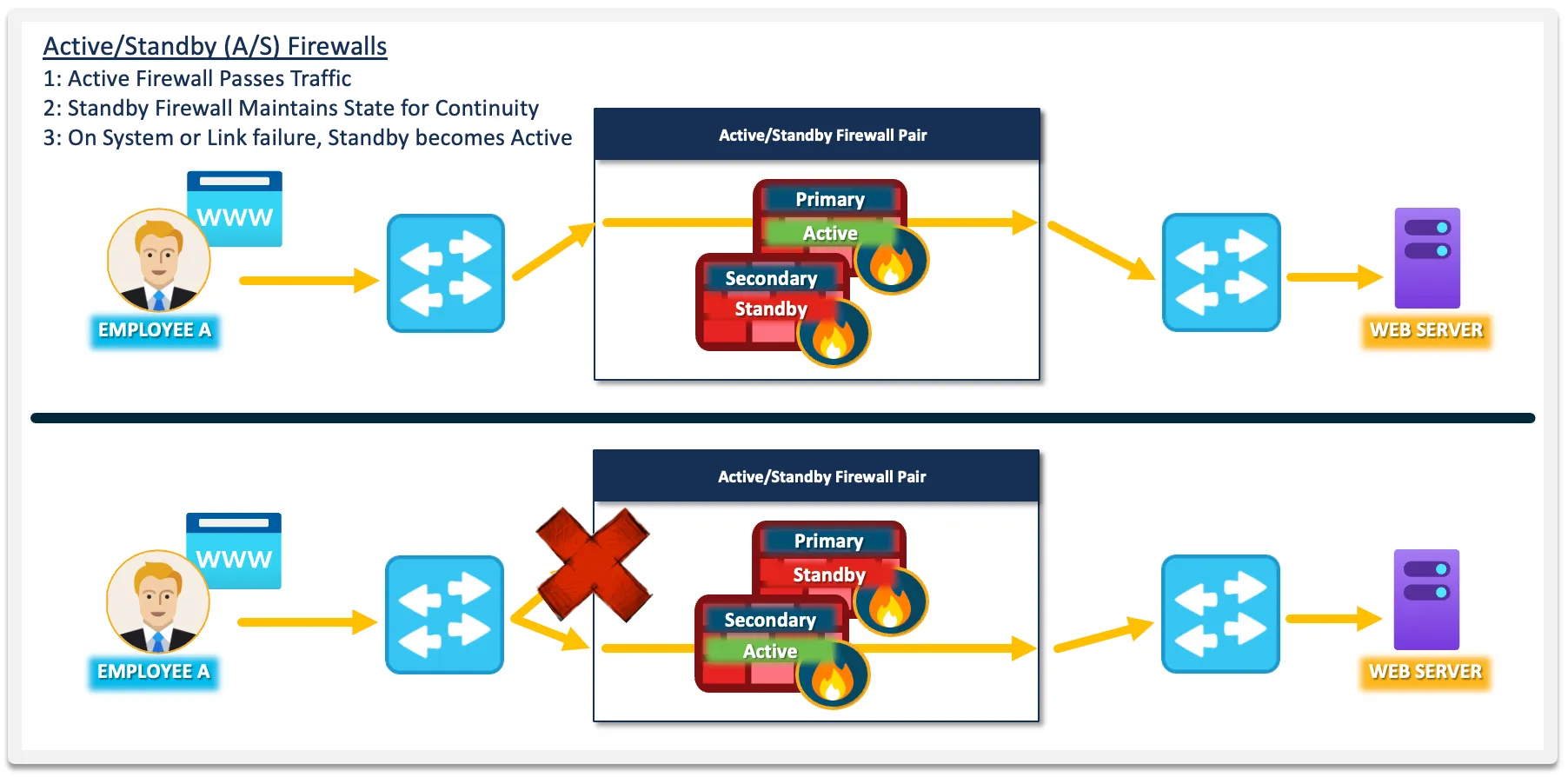
The units exchange hellos over the failover link, by default one every second (the unit poll time). Detection runs in two stages. After three consecutive hellos are missed, a unit starts testing: per the chapter, it “sends LANTEST messages on each data interface” to see whether the peer is still alive elsewhere. If nothing has been heard from the peer by the end of the unit holdtime, 15 seconds by default, the peer is declared failed and the standby takes over.
Interfaces are monitored too, with a 5-second poll and a 25-second holdtime. By default, “a single interface failure causes failover.” monitor-interface <name> and failover interface-policy change which interfaces count and how many failures it takes.
When the standby takes over, it takes the active addresses with it. The chapter is exact: “The active unit always uses the primary unit’s IP addresses and MAC addresses.” One exception is worth knowing: a secondary that boots and never finds its primary becomes active with its own MACs, and hosts then have to re-learn. A configured virtual MAC (failover mac address, or mac-address on the interface) removes that case. Hosts keep the same gateway address and the same MAC, so their ARP entries stay valid; the Layer 2 network only has to learn which port that MAC now lives behind. The standby addresses belong to whichever unit is standby.
With stateful failover, the active unit replicates its connection state as it changes. The chapter lists what’s replicated, including “the NAT translation table,” “TCP and UDP connections and states” and “the ARP table,” and what isn’t, including “the user authentication (uauth) table.” A TCP session that was open before the failover is already in the new active unit’s table. HTTP connections are the documented exception: they aren’t replicated unless you enter failover replication http.
How long does a failover take?
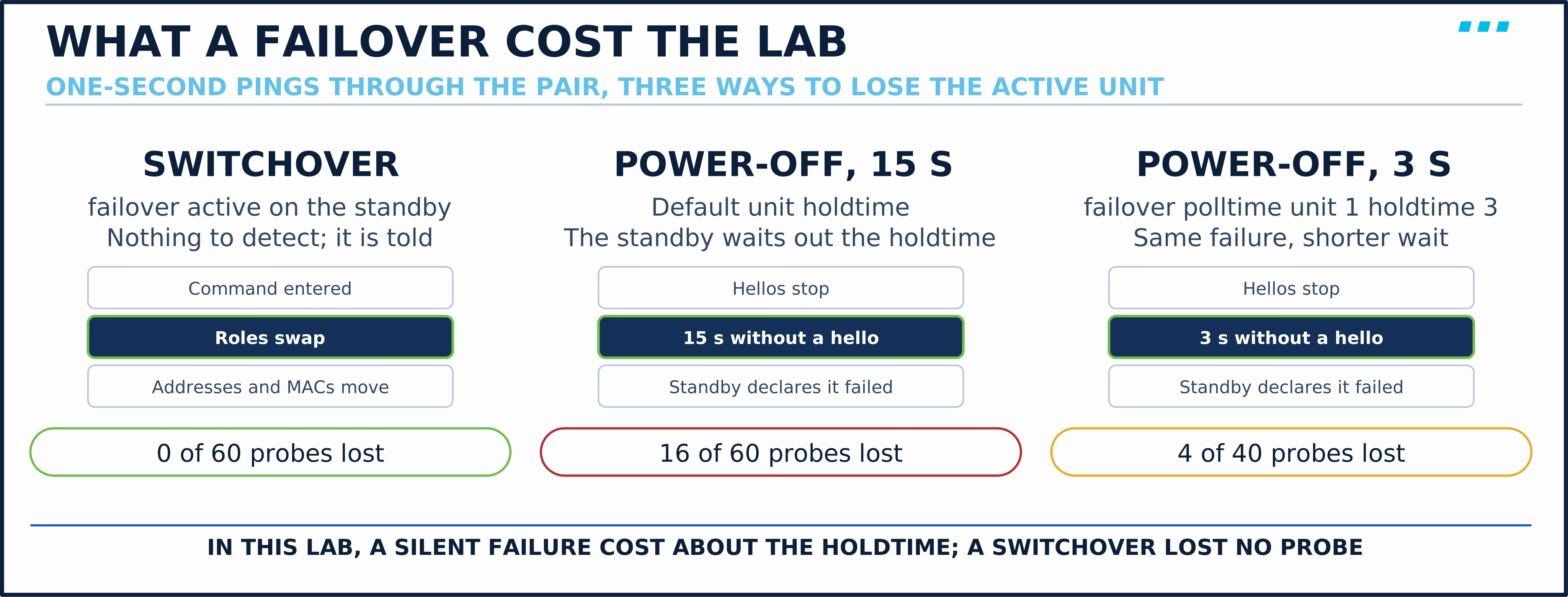
When a unit dies silently, detection is governed mainly by the holdtime. The standby only acts once it stops hearing hellos, and forwarding then has to converge. Other failures, such as a monitored interface going down, follow their own timers. An operator-initiated switchover, where the standby is told to become active, lost no one-second probes in the lab, which doesn’t rule out a sub-second pause.
🔬 Lab Starting State
This lesson starts where ASA: Advanced Access Policies — Modular Policy Framework (MPF) ended, and it’s the first to power on the second ASA. Check before you start:
- ✅ Lab powered on:
ASA-EDGE-01,WS-ADMIN-01,WS-INSIDE-01,SRV-WEB-01,R-ISP-01 - ✅
ASA-EDGE-02powered on too, booted fromlabs/SCOR/asa-stateful-firewall/lab14/start-configs/ASA-EDGE-02.cfg(its prompt readsASA-EDGE-02>) - ✅
show run service-policyonASA-EDGE-01returnsservice-policy global_policy global, with theWEB-SERVERclass in it - ✅
show failoveronASA-EDGE-01beginsFailover Off
Not all checkboxes green? Load labs/SCOR/asa-stateful-firewall/lab14/start-configs/ onto the lab; it holds this lesson’s exact starting state for both units.
ASA-EDGE-02 needs 2 GB of RAM and one vCPU, the same as ASA-EDGE-01. It isn’t blank: its start-config already names it the secondary and defines the failover link, so it can find its peer. Everything else it will learn from ASA-EDGE-01.
Lab Reference
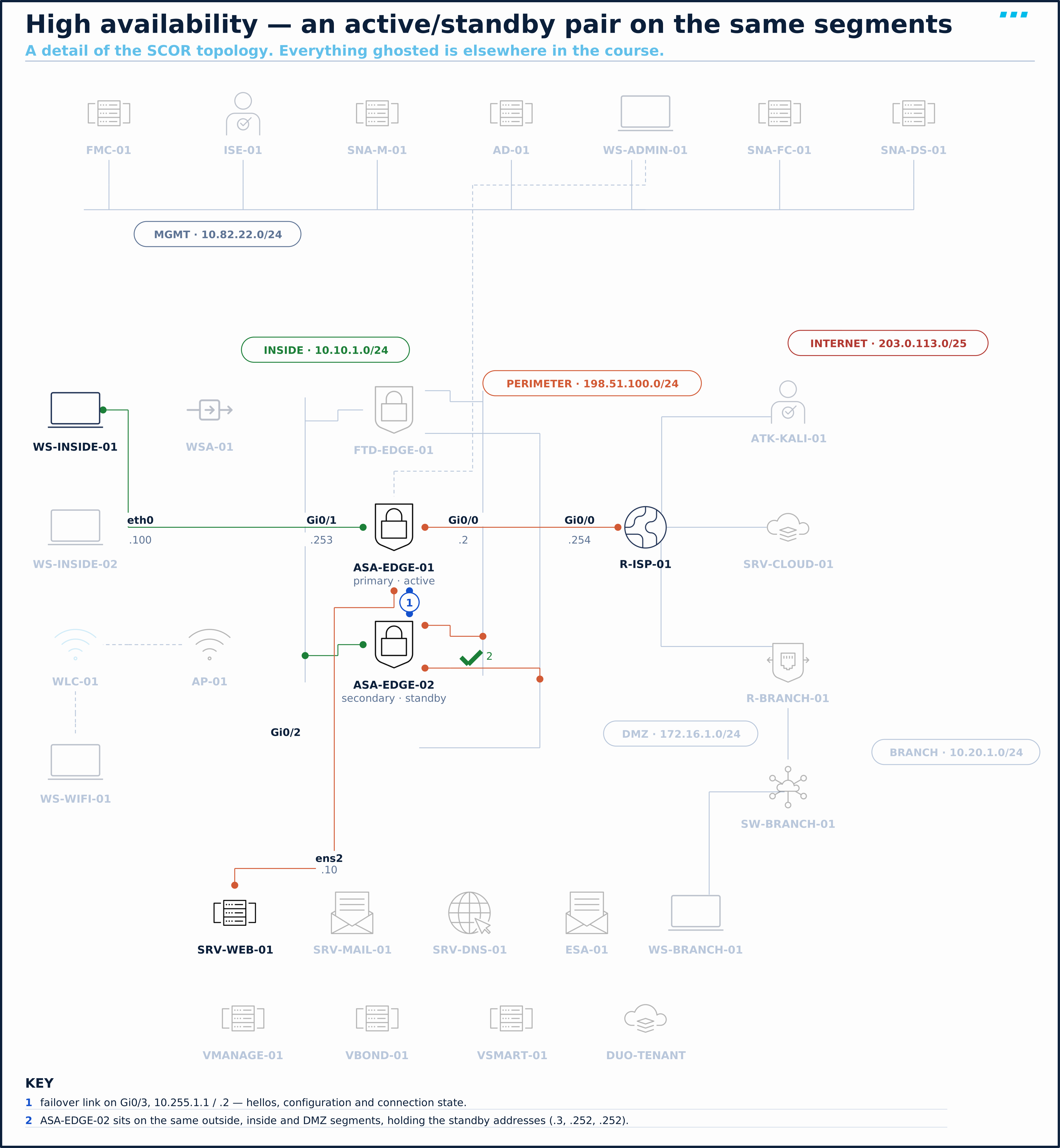
This lesson uses the SCOR lab topology. All examples reference these specific devices and IP addresses.
| Device | Interface | Active address | Standby address | Zone |
|---|---|---|---|---|
ASA-EDGE-01 / ASA-EDGE-02 | GigabitEthernet0/0 (outside) | 198.51.100.2 | 198.51.100.3 | Perimeter |
ASA-EDGE-01 / ASA-EDGE-02 | GigabitEthernet0/1 (inside) | 10.10.1.253 | 10.10.1.252 | Inside |
ASA-EDGE-01 / ASA-EDGE-02 | GigabitEthernet0/2 (dmz) | 172.16.1.253 | 172.16.1.252 | DMZ |
ASA-EDGE-01 / ASA-EDGE-02 | Management0/0 (management) | 10.82.22.185 | 10.82.22.186 | Management |
ASA-EDGE-01 / ASA-EDGE-02 | GigabitEthernet0/3 (failover link) | 10.255.1.1 | 10.255.1.2 | Failover |
WS-INSIDE-01 | eth0 | 10.10.1.100 | — | Inside |
R-ISP-01 | Gi0/0 / Loopback0 | 198.51.100.254 / 203.0.113.254 | — | Perimeter / Internet |
SRV-WEB-01 | ens2 | 172.16.1.10 | — | DMZ |
On the data interfaces, “active” and “standby” addresses belong to roles, not units: the active unit holds the active address, whichever unit that is.
Topology
| # | Scenario | What it proves |
|---|---|---|
| 1 | Form the pair | Standby addresses, the failover link, and what replicates |
| 2 | Fail it on purpose | A manual switchover, a power failure, and what the holdtime costs |
Configuration
Scenario 1: Form the Pair
The perimeter is one box. The business wants a second firewall ready to take over, with no change to the addresses anyone uses. The lone ASA confirms the starting point:
ASA-EDGE-01# show failover
Failover Off
Failover unit Secondary
Failover LAN Interface: not Configured
Reconnect timeout 0:00:00
Unit Poll frequency 1 seconds, holdtime 15 seconds
Interface Poll frequency 5 seconds, holdtime 25 seconds
Interface Policy 1
Monitored Interfaces 4 of 311 maximum
MAC Address Move Notification Interval not set
Failover unit Secondary on a unit that has never been configured is just the default. The four monitored interfaces are its named ones, already watched.
| Parameter | Value |
|---|---|
| Primary / secondary | ASA-EDGE-01 / ASA-EDGE-02 |
| Failover and state link | FAILOVER, GigabitEthernet0/3, 10.255.1.1 / standby 10.255.1.2, /29 |
| Standby addresses | .3 outside, .252 inside and DMZ, .186 management |
| Link protection | A failover key, the same on both units |
On ASA-EDGE-01, give every interface its standby address first. The standby unit needs one on each interface to be monitored and managed:
! Step 1: a standby address on each interface
ASA-EDGE-01(config)# interface GigabitEthernet0/0
ASA-EDGE-01(config-if)# ip address 198.51.100.2 255.255.255.0 standby 198.51.100.3
ASA-EDGE-01(config-if)# interface GigabitEthernet0/1
ASA-EDGE-01(config-if)# ip address 10.10.1.253 255.255.255.0 standby 10.10.1.252
ASA-EDGE-01(config-if)# interface GigabitEthernet0/2
ASA-EDGE-01(config-if)# ip address 172.16.1.253 255.255.255.0 standby 172.16.1.252
ASA-EDGE-01(config-if)# interface Management0/0
ASA-EDGE-01(config-if)# ip address 10.82.22.185 255.255.255.0 standby 10.82.22.186! Step 2: the failover link, carrying state as well
ASA-EDGE-01(config-if)# interface GigabitEthernet0/3
ASA-EDGE-01(config-if)# no shutdown
ASA-EDGE-01(config-if)# exit
ASA-EDGE-01(config)# failover lan unit primary
ASA-EDGE-01(config)# failover lan interface FAILOVER GigabitEthernet0/3
INFO: Non-failover interface config is cleared on GigabitEthernet0/3 and its sub-interfaces
ASA-EDGE-01(config)# failover link FAILOVER GigabitEthernet0/3
ASA-EDGE-01(config)# failover interface ip FAILOVER 10.255.1.1 255.255.255.248 standby 10.255.1.2! Step 3: protect the link, and turn failover on
ASA-EDGE-01(config)# failover key SL-failover-key-01
ASA-EDGE-01(config)# failover
ASA-EDGE-01(config)# endSL-failover-key-01 is a disposable lab secret. A production key is long, unique, and kept out of documentation, and the failover network stays isolated even with it.
Alone, the primary waits for its mate:
ASA-EDGE-01# show failover | include Failover|host|Last
Failover On
Failover unit Primary
Failover LAN Interface: FAILOVER GigabitEthernet0/3 (up)
Last Failover at: 15:48:21 UTC Sep 26 2026
	This host: Primary - Negotiation
Other host: Secondary - Not DetectedASA-EDGE-02’s start-config already carries the matching link definition, as the secondary. It needs the same key, and failover:
ASA-EDGE-02# show run failover
no failover
failover lan unit secondary
failover lan interface FAILOVER GigabitEthernet0/3
failover link FAILOVER GigabitEthernet0/3
failover interface ip FAILOVER 10.255.1.1 255.255.255.248 standby 10.255.1.2
no failover wait-disable
ASA-EDGE-02# configure terminal
ASA-EDGE-02(config)# failover key SL-failover-key-01
ASA-EDGE-02(config)# failover
ASA-EDGE-02(config)# end
ASA-EDGE-02# .

	Detected an Active mate
Secondary: Switching to Ok for reason Detected an Active peer.

Warning: ASAv platform license state is Unlicensed.
Install ASAv platform license for full functionality.
Configuration between unit doesn't match. Going for config sync.Beginning configuration replication from mate.
...
End configuration replication from mate.

ASA-EDGE-01#
Look at the last line. That’s still ASA-EDGE-02’s console, and its prompt now reads ASA-EDGE-01#. The secondary took the primary’s shared running configuration, hostname included, along with every ACL, NAT rule and service policy this module built. It keeps only its own unit-specific failover settings, such as failover lan unit secondary. Nothing but the failover lines was typed into it.
Verification
On the active unit, the full picture:
ASA-EDGE-01# show failover
Failover On
Failover unit Primary
Failover LAN Interface: FAILOVER GigabitEthernet0/3 (up)
Reconnect timeout 0:00:00
Unit Poll frequency 1 seconds, holdtime 15 seconds
Interface Poll frequency 5 seconds, holdtime 25 seconds
Interface Policy 1
Monitored Interfaces 4 of 311 maximum
MAC Address Move Notification Interval not set
Cipher in use: 3DES/AES
Version: Ours 9.24(1), Mate 9.24(1)
...
Last Failover at: 17:52:05 UTC Sep 26 2026
	This host: Primary - Active
		Active time: 826 (sec)
		slot 0: ASAv hw/sw rev (/9.24(1)) status (Up Sys)
		  Interface outside (198.51.100.2): Normal (Monitored)
		  Interface inside (10.10.1.253): Normal (Monitored)
		  Interface management (10.82.22.185): Normal (Monitored)
		  Interface dmz (172.16.1.253): Normal (Monitored)
	Other host: Secondary - Standby Ready
		Active time: 0 (sec)
		  Interface outside (198.51.100.3): Normal (Monitored)
		  Interface inside (10.10.1.252): Normal (Monitored)
		  Interface management (10.82.22.186): Normal (Monitored)
		  Interface dmz (172.16.1.252): Normal (Monitored)

Stateful Failover Logical Update Statistics
	Link : FAILOVER GigabitEthernet0/3 (up)
	Stateful Obj 	xmit       xerr       rcv        rerr
	General		111        0          104        0
	sys cmd  	104        0          104        0
	...
	TCP conn 	0          0          0          0
	UDP conn 	0          0          0          0
	ARP tbl  	6          0          0          0
	...
Read it top to bottom:
| Line | What it tells you |
|---|---|
Cipher in use: 3DES/AES | The key is protecting the failover link |
Version: Ours 9.24(1), Mate 9.24(1) | The software matches, as it must |
This host: Primary - Active / Other host: Secondary - Standby Ready | Identity and role, per unit; Standby Ready is the state you want; anything else means it isn’t confirmed ready, even if only briefly during a sync |
Each interface Normal (Monitored) | The active addresses on this host, the standby addresses on the other |
| Stateful statistics | The state link is up and replicating; ARP tbl already shows updates |
show failover state confirms the configuration is in sync:
ASA-EDGE-01# show failover state

               State          Last Failure Reason      Date/Time
This host  -   Primary
               Active         None
Other host -   Secondary
               Standby Ready  None

====Configuration State===
	Sync Done
====Communication State===
	Mac set
Scenario 2: Fail It on Purpose
A pair nobody has failed is a pair nobody should trust. Three tests, each with traffic running from WS-INSIDE-01: a held telnet session to the ISP router (a synthetic TCP flow that exists only in this isolated lab) and a ping at one per second. Tests 2 and 3 start a fresh ping each.
WS-INSIDE-01:~$ (sleep 120 | telnet 203.0.113.254 > /tmp/tel.txt 2>&1 &)
WS-INSIDE-01:~$ (ping -c 60 198.51.100.254 > /tmp/ping.txt 2>&1 &)
Test 1: a manual switchover. First, on the standby unit’s console, look at its connection table:
ASA-EDGE-01# show failover | include host
	This host: Secondary - Standby Ready
	Other host: Primary - Active
ASA-EDGE-01# show conn
13 in use, 13 most used

TCP outside  203.0.113.254:23 inside  10.10.1.100:51194, idle 0:00:14, bytes 700, flags UxIO
The standby already has the telnet session: that’s stateful failover, before any failover has happened. Now make it active:
ASA-EDGE-01# failover active

	Switching to Active
ASA-EDGE-01# show failover | include host|Last Failover
Last Failover at: 18:07:12 UTC Sep 26 2026
	This host: Secondary - Active
Other host: Primary - Standby ReadyWS-INSIDE-01:~$ tail -3 /tmp/ping.txt
--- 198.51.100.254 ping statistics ---
60 packets transmitted, 60 packets received, 0% packet loss
round-trip min/avg/max = 3.733/5.390/8.628 msNot one of the one-second pings was lost, so any pause was shorter than the probe interval. The new active unit took the active addresses and MACs, and the connection table was already in place.
Test 2: a power failure. A handover is polite; a dead unit isn’t. Start a fresh ping, then take the active unit, now ASA-EDGE-02, away without warning:
- On
WS-INSIDE-01:(ping -c 60 198.51.100.254 > /tmp/ping2.txt 2>&1 &) - In CML, select
ASA-EDGE-02and Stop it. (In the lab run, at 18:09:16.) - On
ASA-EDGE-01’s console, read what happened:
ASA-EDGE-01# show failover | include host|Last Failover|Failed
Last Failover at: 18:09:33 UTC Sep 26 2026
	This host: Primary - Active
	Other host: Secondary - Failed
ASA-EDGE-01# show failover history
...
18:09:33 UTC Sep 26 2026
Active Config Applied      Active                     HELLO not heard from peer
(failover link up, no response from peer)WS-INSIDE-01:~$ tail -3 /tmp/ping2.txt
--- 198.51.100.254 ping statistics ---
60 packets transmitted, 44 packets received, 26% packet loss
round-trip min/avg/max = 3.393/4.927/6.599 msSixteen of the one-second pings were lost. For this silent power-off, the 15-second holdtime set the detection time, and the takeover took a moment more. HELLO not heard from peer is the reason, in the unit’s own words.
Test 3: a shorter holdtime. Sixteen seconds is a long outage for a perimeter. While ASA-EDGE-02 is still down, tighten the unit holdtime to 3 seconds on the active unit; it replicates to the standby when it rejoins:
ASA-EDGE-01(config)# failover polltime unit 1 holdtime 3
ASA-EDGE-01(config)# end
ASA-EDGE-01# show failover | include Poll
Unit Poll frequency 1 seconds, holdtime 3 seconds
Interface Poll frequency 5 seconds, holdtime 25 seconds
Bring the stopped unit back. Start ASA-EDGE-02 in CML. It boots as ASA-EDGE-02, with failover off: its failover configuration had only ever been in its running configuration, and nobody saved it. Rejoin it, then save on the active unit:
ASA-EDGE-02# show failover | include Failover
Failover Off
Failover unit Secondary
Failover LAN Interface: FAILOVER GigabitEthernet0/3 (up)
ASA-EDGE-02# configure terminal
ASA-EDGE-02(config)# failover key SL-failover-key-01
ASA-EDGE-02(config)# failover
ASA-EDGE-02(config)# end
...
End configuration replication from mate.ASA-EDGE-01# write memory
Building configuration...
...
[OK]write memory on the active unit also saves the standby, as long as the standby is connected. The next block ran on ASA-EDGE-02’s console, although its replicated prompt says ASA-EDGE-01#. It’s the standby’s own startup-config, now carrying the pair and its own failover lan unit secondary:
ASA-EDGE-01# show startup-config | include ^failover|^hostname|polltime
hostname ASA-EDGE-01
failover
failover lan unit secondary
failover lan interface FAILOVER GigabitEthernet0/3
failover polltime unit 1 holdtime 3
failover key *****
failover link FAILOVER GigabitEthernet0/3
failover interface ip FAILOVER 10.255.1.1 255.255.255.248 standby 10.255.1.2
With the pair whole again and saved, repeat the power-off, this time on ASA-EDGE-01, the active unit:
- On
WS-INSIDE-01:(ping -c 40 198.51.100.254 > /tmp/ping3.txt 2>&1 &) - In CML, Stop
ASA-EDGE-01. - On the survivor’s console, whose replicated prompt also reads
ASA-EDGE-01#:
ASA-EDGE-01# show failover | include host|Last Failover|Poll
Unit Poll frequency 1 seconds, holdtime 3 seconds
Interface Poll frequency 5 seconds, holdtime 25 seconds
Last Failover at: 18:14:52 UTC Sep 26 2026
	This host: Secondary - Active
Other host: Primary - FailedWS-INSIDE-01:~$ tail -3 /tmp/ping3.txt
--- 198.51.100.254 ping statistics ---
40 packets transmitted, 36 packets received, 10% packet loss
round-trip min/avg/max = 3.367/5.012/6.637 msFour pings lost instead of sixteen, for the same kind of failure.
Afterwards: bring the primary back. Start ASA-EDGE-01 in CML. When it has booted, it rejoins from its saved configuration, without taking the active role back:
ASA-EDGE-01# show failover | include host|Last Failover
Last Failover at: 18:16:40 UTC Sep 26 2026
	This host: Primary - Standby Ready
	Other host: Secondary - Active
ASA-EDGE-01# failover active

	Switching to Active
ASA-EDGE-01# show failover | include host|Last Failover
Last Failover at: 18:18:05 UTC Sep 26 2026
	This host: Primary - Active
	Other host: Secondary - Standby Ready
ASA-EDGE-01# write memory
No preemption: the returning primary waits as standby until you move the role back, which you do in a quiet moment, with failover active on the unit you want active.
Last step: make the consoles tell you where you are. On the active unit:
ASA-EDGE-01(config)# prompt hostname priority state
ASA-EDGE-01/pri/act(config)# end
ASA-EDGE-01/pri/act# write memory
...
[OK]
The setting replicates, and the standby’s console now reads ASA-EDGE-01/sec/stby#.
Troubleshooting
Symptom: The second unit never joins: Other host: Secondary - Not Detected.
show failoveron both units. (Both should showFailover Onand the failover LAN interface(up).)show run failoveron both. (Thefailover lan interface,failover interface ipandfailover keymust match; one unit must beprimary, the othersecondary.)- If one shows
Failover Off:failoverwas never entered there, or the unit rebooted before its configuration was saved. Fix: enterfailoveron it, and once it showsStandby Ready,write memoryon the active unit to save both.
Symptom: The pair forms, but the standby shows something other than Standby Ready.
show failover state. (Should endSync Done; the last failure reason names the problem.)show failoveron the active unit. (An interface marked other thanNormalon the other host points at a missing standby address or a cabling fault.)- If an interface has no standby address: the standby can’t test it. Fix: add
standby <ip>to that interface’sip addressline.
Symptom: The two consoles look identical and you can’t tell which unit you’re on.
show failover | include host. (TheThis host:line names the unit and its role.)- Use it before every change: shared configuration is entered on the active unit, and replicates. Only unit-specific failover settings, like the ones
ASA-EDGE-02started with, are configured locally on each unit. - Make it permanent with
prompt hostname priority state: the prompts becomeASA-EDGE-01/pri/act#andASA-EDGE-01/sec/stby#.
Symptom: A failover took far longer than expected.
show failover history. (The reason and the timestamps show when the standby acted.)show failover | include Poll. (A 15-second unit holdtime is the default.)- If the holdtime is the cost: lower it deliberately. A very short holdtime can fail over on a brief stall of a busy unit, so test the value you choose under load.
💾 Lab End State
ASA-EDGE-01 and ASA-EDGE-02 are an active/standby failover pair over Gi0/3, with ASA-EDGE-01 (primary) active, a failover key, a 3-second unit holdtime, standby addresses on every interface, and prompts that show each unit’s priority and state. Both units’ startup-configs carry the pair. The full running configuration of the active unit, captured from the live device, is configs/SCOR/asa-high-availability/asa-edge-01-end-state.txt; the standby runs the same shared configuration, apart from its unit-specific failover lines.
🏢 Production Considerations
| Dimension | This lab | Production |
|---|---|---|
| Failover and state link | One shared virtual link | Dedicated ports, directly cabled or on an isolated VLAN; a separate state link when connection volume is high |
| Link protection | failover key | IPsec (failover ipsec pre-shared-key) or the older key method, not both. Prefer IPsec where the failover network can’t be fully trusted; neither replaces keeping it isolated |
| Holdtime | 3 seconds, measured | Tune per platform and load; a too-tight value fails over on a busy unit’s hiccup |
| Upgrades | Not tested | A pair allows upgrading one unit at a time, following the release’s supported upgrade path |
| Licensing | Unregistered ASAv | Per the guide’s failover licensing rules for the platform |
The standby that wasn’t. A pair runs for a year; on the day the active fails, the standby sits in Failed state and takes nothing over. Common cause: Nobody watched show failover. The standby lost an interface months earlier and has not been Standby Ready since. Fix: Monitor the pair’s state, alert on anything other than Active / Standby Ready, and fail the pair over on purpose in each maintenance window.
I don’t sign off an HA pair until I’ve pulled the power on the active unit with a ping running and counted the loss. The manual switchover is the flattering test. Zero lost probes there say forwarding moved within a probe interval; the connection already in the standby’s show conn is what says the state sync works; and neither says the detection of a dead unit is fast.
Key Takeaways
- System HA on the ASA is active/standby, active/active (multiple context mode only) or clustering; active/standby is the simplest, and leaves the standby’s forwarding capacity unused in normal operation.
- Primary and secondary are identities; active and standby are roles. There is no preemption: a repaired primary returns as standby.
- The standby replicates the active’s configuration, hostname included;
This host:inshow failovertells the consoles apart. - In a failover of an established pair, the active unit takes the active addresses and MACs, so hosts’ ARP entries stay valid; a virtual MAC covers the secondary-boots-alone exception.
- In the lab, a manual switchover lost no pings; a silent power-off lost 16 one-second pings at the default 15-second holdtime and 4 at a 3-second holdtime.
write memoryon the active unit saves both units while the standby is connected; an unsaved standby reboots without its failover configuration.
Up next: M4 · Lab 5: ASA Perimeter Policy, the module’s end-to-end lab.
Knowledge Check
No grade, no timer. Wrong picks turn coral — change your answer until everything's green.
1 · In an active/standby pair, the primary unit fails, the secondary takes over, and the primary is repaired and powered back on. Which unit is active afterwards?
In the lab, ASA-EDGE-01 (primary) came back as Primary - Standby Ready with the secondary still active, and stayed that way until failover active was entered on it.
2 · A pair runs the default unit holdtime of 15 seconds. The active unit loses power. Roughly how long does traffic stop?
The standby only declares the peer failed when hellos stop for the holdtime. At 15 seconds the lab lost 16 of 60 pings; with the holdtime at 3 seconds, 4 of 40.
3 · What must two ASAs share before they can form an active/standby pair?
The 9.24 failover chapter lists the hardware and software that must match; licensing requirements come on top of those.
You just proved the method works — the rest of the mountain is waiting. All-Access unlocks every lesson in every course — $489/yr, with $647 of founders bonuses while the window is open.
Reserve founders rate →📚 Official Documentation — every source behind this page · verified 26 Sept 2026
Revision Updated 2026-09-23 · accessed 26 Sept 2026