Concept Lesson · ISE Architecture & Deployment
Zero-Touch Provisioning: Image and VM User Data Bring-Up, the Config File & Automated Onboarding
Free Lesson All-Access unlocks every lesson in every course — $489/yr, with $647 of founders bonuses while the window is open, and it carries The Next Year Promise. Reserve founders bonuses →
1.4 asks you to describe zero-touch provisioning. Walking out of this lesson, you can:
- Say what ZTP automates — setup, patches, hot patches and service enablement — and since which release
- Describe both delivery methods — the ISE-ZTP image file and VM user data — and which one wins when both are present
- Place the image correctly for an ISO install, a pre-installed OVA and an appliance
- Read a ZTP configuration file, and recognise the pre-checks and the failure screen
None. ZTP is part of the installer; it needs no licence of its own.
Overview
Every ISE node starts life at the same console prompt, asking the same set of questions: hostname, address, gateway, DNS, NTP, time zone, credentials. Typed by hand, that wizard is where a transposed octet or an unreachable NTP server stops an install that then has to be corrected and run again.
Zero-touch provisioning (ZTP) moves those answers into a file that the node reads by itself. This lesson covers what that file holds, the two ways ISE can find it, and what the node checks before it trusts it — then builds the course’s third ISE node that way.
Terminology: What ZTP Replaces
The console setup wizard is the manual path. Its answers are the node’s identity on the network: hostname and domain; IP address, netmask and default gateway; a primary name server and NTP server, with optional extras of each; the time zone; whether SSH is on; and the admin username and password.
ZTP, available from ISE 3.1, takes the same answers from a configuration file called ise-ztp.conf. It also does things the wizard does not:
- Installs a patch and hot patches from a repository, in the same unattended run
- Turns on services such as ERS, OpenAPI and pxGrid
- Adds an SSH public key for the admin account
ZTP doesn’t replace the setup program; it answers it from a file instead of a keyboard. By default the same network checks run on those answers — unless the file switches them off, which comes up below.
Design Choice: Two Ways to Hand ISE the File
ISE looks for its configuration in one of two places.
| Image file | VM user data | |
|---|---|---|
| What it is | A small ext4 image, volume label ISE-ZTP, holding ise-ztp.conf (Hyper-V takes an .iso instead) | The whole ise-ztp.conf, base64-encoded — encoded, not encrypted |
| Where it goes | The VM’s or appliance’s CD/DVD drive | The VM’s advanced configuration parameter guestinfo.ise.ztp |
| Platforms | VMware, KVM, Hyper-V (as an .iso), Nutanix AHV, SNS appliances | VMware ESXi 7.0 and later only |
| If both are present | Ignored | Used |
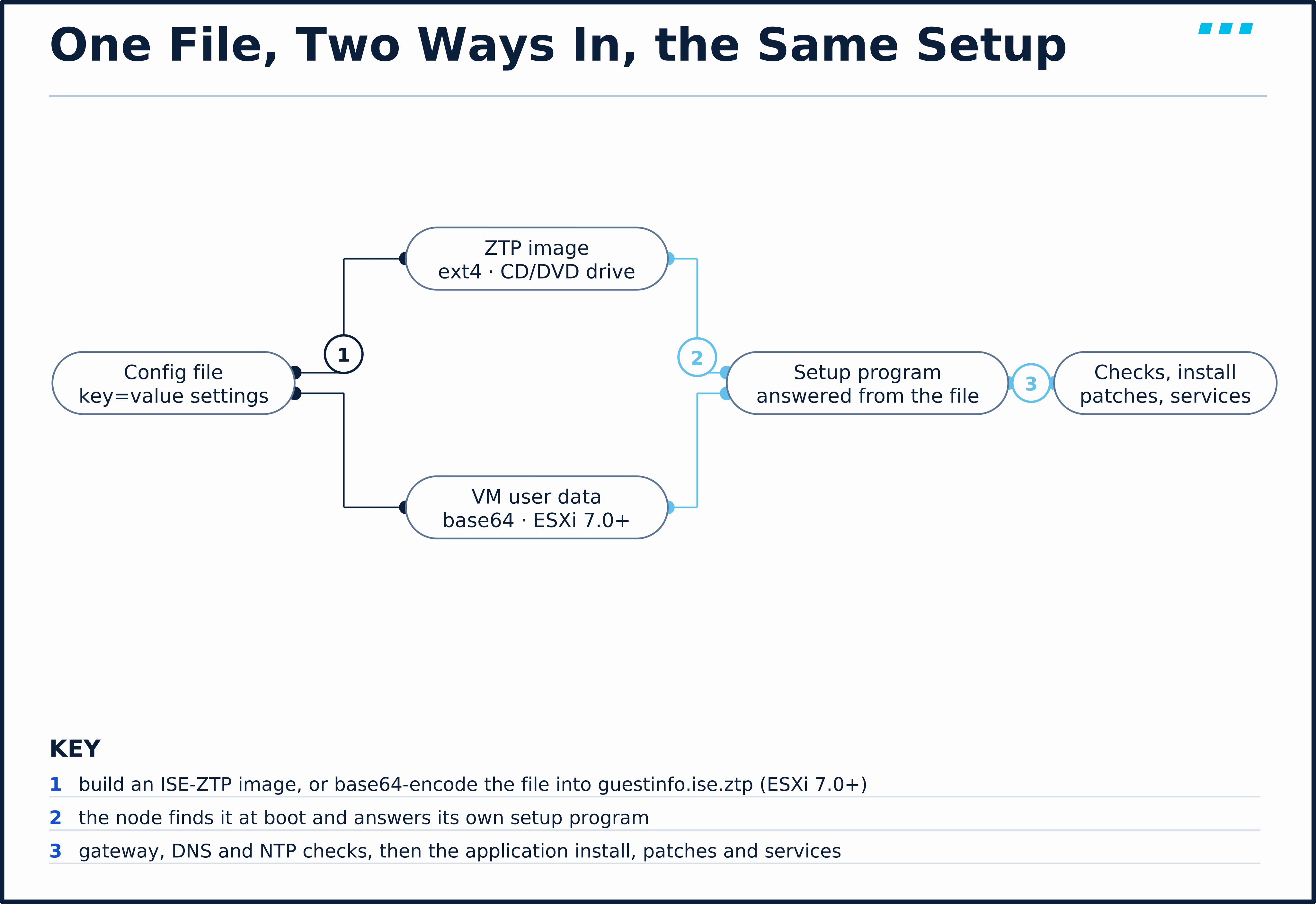
Cisco publishes the script that builds the image, create_ztp_image.sh, in the ISE 3.5 Installation Guide’s ZTP section. It runs on RHEL, CentOS or Ubuntu. In short, it:
- Creates a 1,440 KB empty file
- Formats it as ext4 with the label
ISE-ZTP - Loop-mounts it and copies your file in as
ise-ztp.conf
The loop mount needs root privileges — run it with sudo.
For Hyper-V, Cisco says to use an .iso and a Generation 2 VM rather than an .img.
Design Choice: Which Drive Gets the Image
Where the image goes depends on what else is booting the node:
| Starting point | Primary CD/DVD | Secondary CD/DVD |
|---|---|---|
| Fresh install from the ISO | ISE installation ISO | ISE-ZTP image |
| Pre-installed OVA | ISE-ZTP image | — |
| SNS appliance | ISE ISO, through CIMC Virtual media | ISE-ZTP image, through CIMC Virtual media — Cisco says to map it before the ISO |
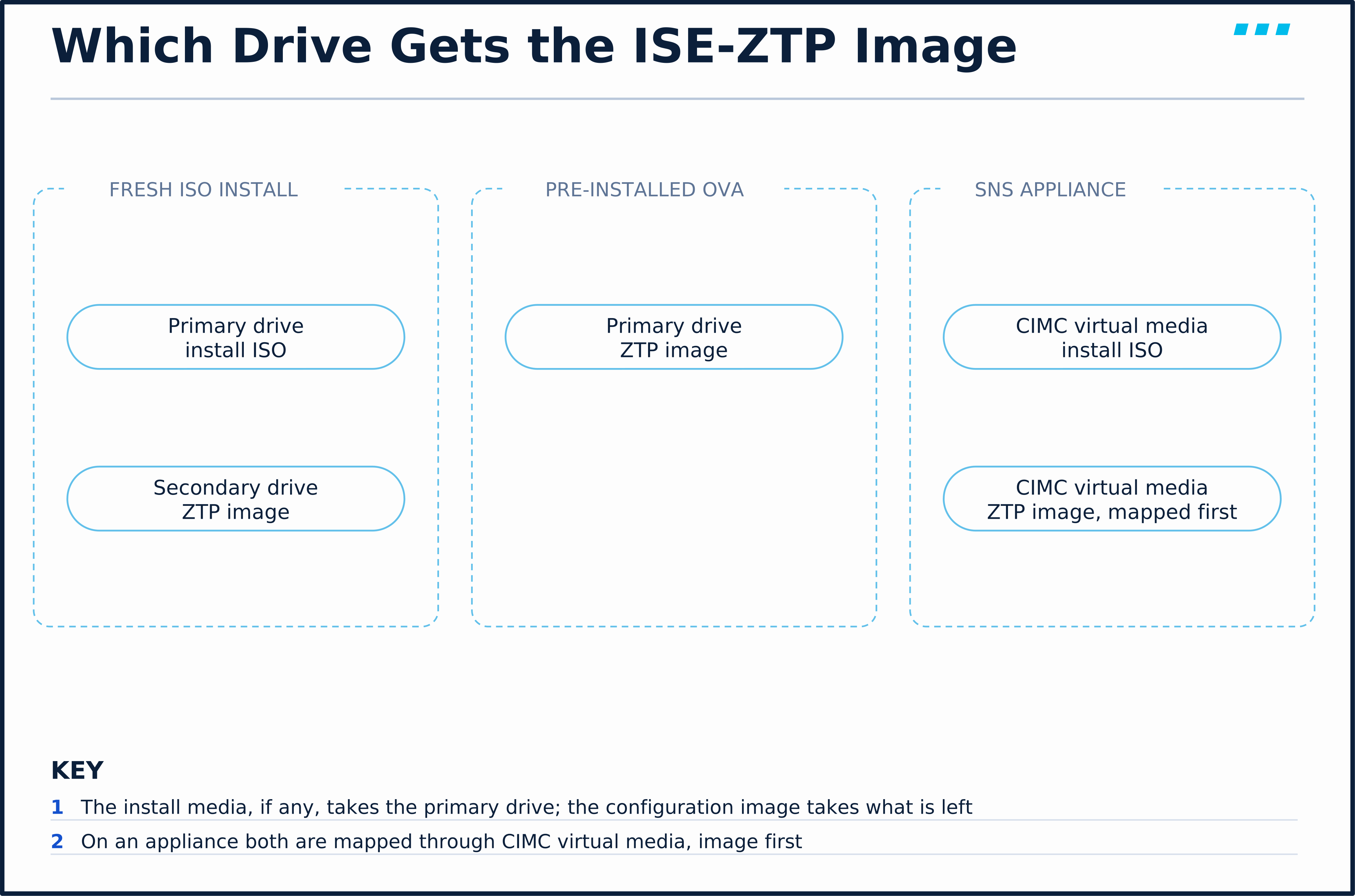
The logic is the same in every row: the install media, if any, takes the primary drive, and the configuration image takes what is left; on an appliance, Cisco asks for the image to be mapped first. A node that was already installed and is sitting at the setup prompt can also be finished by ZTP: power it off, map the image, power it on.
You deploy a pre-installed ISE OVA on ESXi 8.0 and would rather not build an image at all. Is there an option?
Yes — VM user data. Base64-encode ise-ztp.conf and set it as guestinfo.ise.ztp under VM Options › Advanced › Configuration Parameters. The name must be exact; any other key is ignored.
Terminology: The Configuration File
ise-ztp.conf is plain key=value text. Cisco’s installation guide lists the required settings by name — hostname, IP address, netmask, default gateway, DNS domain, primary name server, NTP server, time zone, SSH, username and password — but not the key spellings. Those come from the sample in the Cisco Community ZTP article, and they are the keys this course’s lab file uses:
| Required setting | Key |
|---|---|
| Hostname | hostname |
| IP address, netmask, gateway | ipv4_addr, ipv4_mask, ipv4_default_gw |
| DNS domain, primary name server | domain, primary_nameserver |
| NTP server | primary_ntpserver |
| Time zone | timezone |
| SSH | ssh (true / false) |
| Username, password | username, password |
No single Cisco page gives both halves of that table — it reconciles the installation guide’s setting names with the Community article’s key spellings.
Optional keys group into four kinds:
- Networking — a second and third name server or NTP server, and IPv6
- Access —
public_key, for the SSH behaviour below - Repository and patching —
repository_name,repository_protocol,repository_server_name,repository_path, apatch, and a comma-separated list ofhotpatches - Services —
ers,openapi,pxgrid,pxGrid_Cloud, and, on ISE 3.5,management_interface, which selects the management interface on SNS 3700 and 3800 appliances
Getting a key’s spelling right is not the same as getting its value right. Three rules catch people:
patchis singular andhotpatchesis plural — the community article warns the patch installation fails if either is misspelled- The repository protocol is lowercase
http, notHTTP, or the patch files cannot be downloaded - Repositories must allow anonymous access — TFTP, HTTP, HTTPS or NFS with no username or password — and the repository ZTP creates is not visible in the GUI afterwards
Engine Behavior: The Pre-Checks, and How ZTP Fails
Once the node has brought its interface up with the settings from the file, and before setup completes, it tests the network it has just been given: it pings the gateway and the name server, and it has to synchronise with the NTP server. These are the checks the wizard runs too.
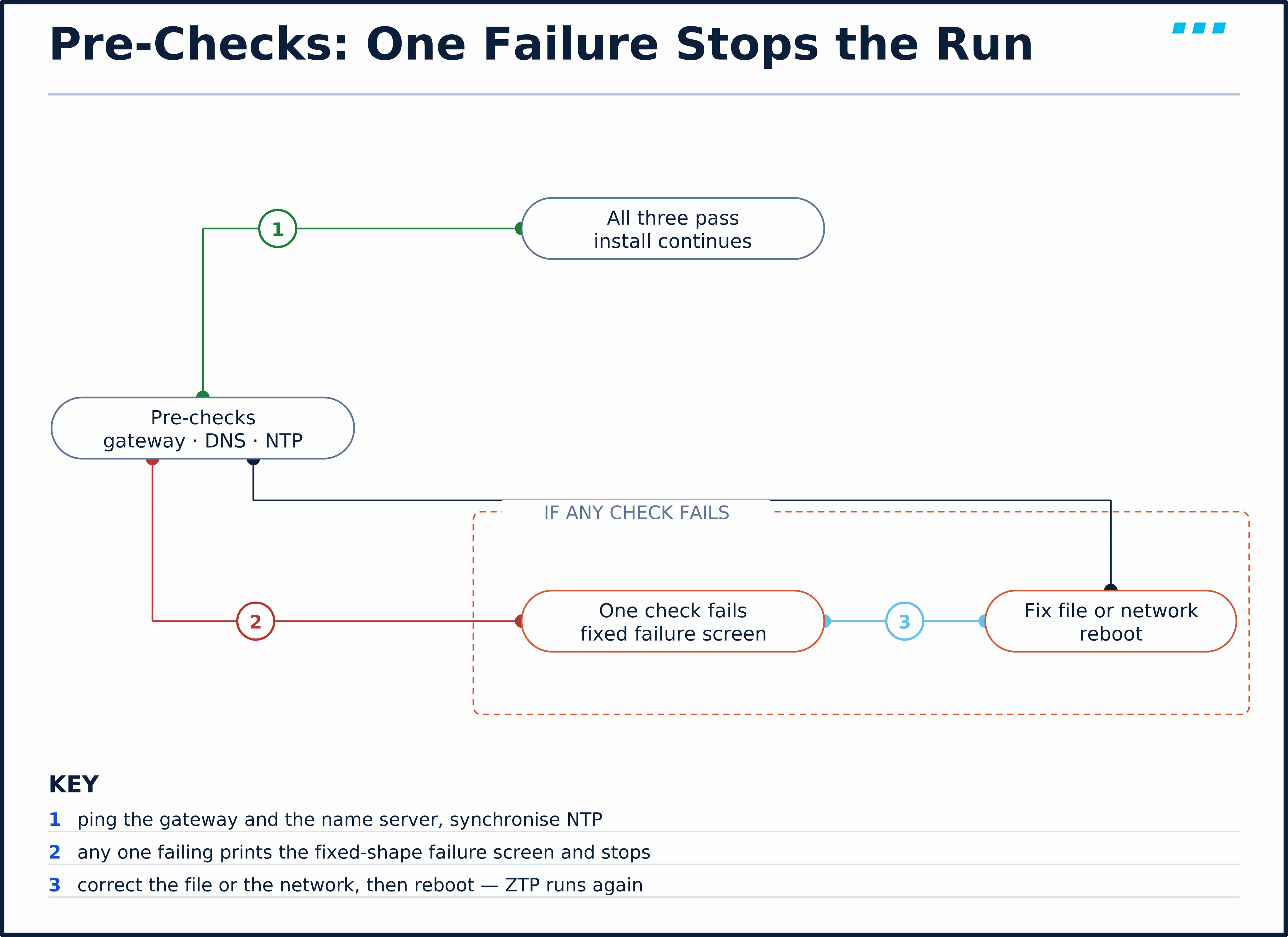
A failed check stops the run on the console with a fixed shape:
==============================================================================
                       Cisco ISE Installation Failed
==============================================================================
Error: Gateway setup failed.
Check the setup details in your configuration image and reboot Cisco ISE
with proper ZTP configuration.
==============================================================================
That is from this course’s lab, captured on the serial console of a node whose ZTP run had keystrokes typed into it part-way through. The fix is the one the screen gives: correct the file, or the network, and reboot so ZTP runs again.
Each check can be switched off — SkipIcmpChecks, SkipDnsChecks, SkipNtpChecks, each false by default. Use them for an isolated lab only. Cisco’s setup guidance is explicit that an install with no NTP reachability can leave a node unusable until it is re-installed.
- Symptom: You attach the image, power on, see
localhost login:and decide ZTP did nothing — then typesetupyourself. - Root Cause: ZTP starts shortly after the login banner, not before it, and it drives the same setup program. Anything you type lands in that program alongside ZTP’s answers. In this course’s lab that mix ended in the “Gateway setup failed” screen above, and a second run with nothing typed completed.
- Fix: Give it a few minutes. Cisco says to follow the installation logs on the serial console during ZTP and the VM console once the setup prompt appears — watch both, type nothing.
Engine Behavior: What Changes After a ZTP Install
One security behaviour is on by default for a node built by ZTP, and a second applies when the file carries a public key:
- First-login password change — the password sat in plain text in the file, so by default the GUI requires a new one on first login
- Public-key login — if
public_keyis set, password login over SSH is disabled; Cisco documentsno service sshd PubkeyAuthenticationas the way to revert
After the services start, unmount the image from the CD/DVD drive. A left-behind image is a plain-text password sitting wherever the image is stored.
🔬 See It in the Lab: Build ISE-03 From a File
This builds ISE-03 (10.82.22.167), the node the next lesson registers into the deployment, without typing a single answer on its console. AD-01 (10.82.22.160) answers the node’s DNS and NTP checks. Starting state:
- ✅
AD-01(10.82.22.160) resolvesise-03.securitylessons.labto 10.82.22.167 and back, and answers NTP - ✅
ISE-03exists as a VM that has never been powered on, with a serial port for its console - ✅ You can reach the hypervisor that runs it, to attach a disk image and open the VM console
Step 1 — write the file. The course’s copy is configs/SISE/sise-zero-touch-provisioning/ise-ztp.conf; the password line holds the lab password:
hostname=ise-03
ipv4_addr=10.82.22.167
ipv4_mask=255.255.255.0
ipv4_default_gw=10.82.22.1
domain=securitylessons.lab
primary_nameserver=10.82.22.160
primary_ntpserver=10.82.22.160
timezone=UTC
ssh=true
username=admin
password=<lab password>
ers=true
openapi=true
Step 2 — build the image with Cisco’s script. Copy create_ztp_image.sh from the installation guide, then run it as root, and check the label it wrote:
$ sudo ./create_ztp_image.sh ise-ztp.conf ise-03-ztp.img
Image created ise-03-ztp.img
$ blkid ise-03-ztp.img
ise-03-ztp.img: LABEL="ISE-ZTP" UUID="32b81d8c-f264-420f-995f-9151d3c26778" BLOCK_SIZE="4096" TYPE="ext4"This lab departs from Cisco’s documented procedure in one place, so don’t copy it into production or an exam answer. The lab’s ISE nodes are built from a pre-installed ISE 3.5 disk image rather than Cisco’s OVA, and the ISE-ZTP image is attached as a small second virtual disk rather than a CD/DVD. The node found it and ran ZTP from it, as the log below shows — but that is a measurement of this lab, not a supported method. Cisco’s procedure is the CD/DVD or CIMC virtual-media mapping in the table above.
Step 3 — attach it and power on. In this lab, attach the image to ISE-03 as a second virtual disk before its first power-on (on Cisco’s OVA, map it to the primary CD/DVD drive instead), then start the VM and open its console. About two and a half minutes after power-on, the setup program appears and answers itself — every line below was typed by ZTP from the file, not by a person:
Press 'Ctrl-C' to abort setup
Enter hostname[]: ise-03
Enter default DNS domain[]: securitylessons.lab
Enter IPv4/IPv6 address[]: 10.82.22.167
Enter IP netmask[]: 255.255.255.0
Enter IP default gateway[]: 10.82.22.1
Do you want to configure IPv6 address? Y/N [N]: N
Enter primary nameserver[]: 10.82.22.160
Add secondary nameserver? Y/N [N]: N
Enter NTP server[time.nist.gov]: 10.82.22.160
Add another NTP server? Y/N [N]: N
Enter system timezone[UTC]: UTC
Enable SSH service? Y/N [N]: Y
Enter username[admin]: admin
Enter password:
Enter password again:
Bringing up network interface...
Pinging the gateway...
Pinging the primary nameserver...
Testing VM disk I/O performance...
Average I/O bandwidth writing to disk device: 398 MB/second
Average I/O bandwidth reading from disk device: 639 MB/second
I/O bandwidth performance within supported guidelines
That is the proof of the Key Insight at the top of this lesson: ZTP does not skip the wizard, it answers it. The two Pinging lines are the gateway and name-server checks, followed by a disk performance test; the NTP synchronisation isn’t printed at this stage. From here the node installs the ISE application exactly as a hand-built one does — just under an hour in this lab — so do not touch the console while it runs; keystrokes typed during a ZTP run go into the same setup program.
Step 4 — confirm ZTP did it. Once SSH answers, log in to ISE-03 and read ZTP’s own entries in the system log. The output also repeats each line with a short timestamp and prints three long getty status lines between the third and fourth lines below; those are left out here:
ise-03/admin#show logging system ade/ADE.log | include ZTP
2026-09-26T10:11:37.124325+00:00 ise-03 root[865]: ZTP configuration image found
2026-09-26T10:11:37.214141+00:00 ise-03 root[892]: ISE Installation configured with ZTP
2026-09-26T10:12:37.447890+00:00 ise-03 root[1779]: ZTP: allow_setup_autologin.sh
2026-09-26T10:12:37.660245+00:00 ise-03 root[1820]: ZTP: allow_setup_autologin.sh completed
2026-09-26T17:15:49.166557+00:00 ise-03 root: Unmapping ZTP config Image
2026-09-26T17:45:09.732545+00:00 ise-03 root: info:[application:operation:cpminitialsetup.sh] ISE ZTP config file exists.Hence Triggering patch , hotpatch installations configured
Read it top to bottom: the image was found, the install was switched to ZTP, and allow_setup_autologin.sh is how ZTP gets at the setup program — it logs the console in automatically and runs setup there. The last line is the initial application setup checking the same file for patches and hot patches to install. The first timestamps are seven hours behind the rest, which is consistent with the node’s clock being corrected once it synchronised.
Step 5 — check the result. The configuration the node ended up with is the file’s. The first lines of show running-config:
ise-03/admin#show running-config
interface GigabitEthernet 0
 ip address 10.82.22.167 255.255.255.0
 ipv6 enable
 ipv6 address autoconfig
!
ntp server 10.82.22.160
hostname ise-03
icmp echo on
ip domain-name securitylessons.lab
ip default-gateway 10.82.22.1
ip name-server 10.82.22.160
Further down the same output carry service sshd enable and clock timezone UTC, from ssh=true and timezone=UTC.
Step 6 — log in to the GUI. Browse to https://ise-03.securitylessons.lab/admin/ and log in as admin with the password from the file. ISE doesn’t let you in yet:

That’s the first-login password change Cisco enables by default for ZTP installs, because the password sat in plain text in the file. In this lab ISE also refused the old password as the new one, so ISE-03’s GUI admin password now differs from the lab’s standard one.
The log says “Unmapping ZTP config Image”. Can you leave the image attached?
Detach it anyway. Cisco’s procedure tells you to unmount the ZTP image from the drive once services start. Detaching doesn’t delete it, though: the image, the source file and any guestinfo.ise.ztp value all still hold the bootstrap password. Remove the setting, delete or lock away the image, and use a bootstrap password you change at first login — which ISE forces anyway.
💾 Lab End State
ISE-03 (10.82.22.167) is installed and set up by ZTP from configs/SISE/sise-zero-touch-provisioning/ise-ztp.conf, standalone, with its GUI password reset. The next lesson registers it into the deployment.
🎥 [Video: the setup wizard and the typo it invites; ise-ztp.conf; the ISE-ZTP image against guestinfo.ise.ztp and which wins; which drive the image goes in for an ISO, an OVA and an appliance; the pre-checks and the failure screen on the serial console; patches, services and the forced password change; ISE-03 built with nothing typed. Matches video.script_outline. Runtime: ~8 minutes]
Key Takeaways
How ZTP gets its instructions:
- ZTP answers the setup wizard from a file.
ise-ztp.confcarries the same identity settings, plus optional patches, hot patches, services and an SSH key. Available from ISE 3.1. - Two delivery methods. An ext4 image labelled
ISE-ZTPin a CD/DVD drive, or the base64 file inguestinfo.ise.ztpon ESXi 7.0 and later. User data wins when both are present. - The drive depends on the install. ISO in the primary and image in the secondary for a fresh install; image in the primary for a pre-installed OVA; CIMC virtual media for an appliance.
What happens once it runs:
- The same checks still run. Gateway, DNS and NTP are tested; a failure prints “Cisco ISE Installation Failed” and you fix the file and reboot.
- Watch, don’t type. ZTP drives the setup program itself; follow the serial and VM consoles and keep your hands off the keyboard.
- Clean up. By default the password must be changed at first GUI login, and the image should be detached once the node is up.
Up next: Build a Distributed Deployment: Register Nodes, Assign Personas, Verify Replication & Promote the Secondary — the node you just built joins the deployment — registration, personas and replication.
Knowledge Check
No grade, no timer. Wrong picks turn coral — change your answer until everything's green.
1 · A VMware VM has both an ISE-ZTP image in its CD drive and a guestinfo.ise.ztp value set, and the two contain different IP addresses. Which one does ISE use?
Cisco's ZTP documentation states that when both the .img file and VM user data are configured on a VM, the user data option is the one considered.
2 · You are installing ISE from the ISO on a new ESXi VM and want ZTP to run. Where does the ISE-ZTP image go?
An ISO install needs the ISO in the primary drive, so the configuration image goes in the secondary. For a pre-installed OVA there is no install media, and the image goes in the primary drive instead.
3 · A ZTP run stops with 'Cisco ISE Installation Failed — Error: Sync with NTP server failed'. What is the intended fix?
The failure screen itself tells you to check the setup details in the configuration image and reboot with a proper ZTP configuration. The pre-checks can be skipped with SkipNtpChecks and its siblings, but Cisco's setup guidance warns that an offline, unsynchronised install can leave the system unusable.
4 · Why does an ISE node built by ZTP ask for a password change at the first GUI login?
The ZTP configuration file holds the password in plain text, so by default Cisco requires a reset at the first GUI login of a ZTP-built node.
You just proved the method works — the rest of the mountain is waiting. All-Access unlocks every lesson in every course — $489/yr, with $647 of founders bonuses while the window is open.
Reserve founders rate →📚 Official Documentation — every source behind this page · verified 26 Sept 2026
Revision Updated September 10, 2026 · accessed 26 Sept 2026
Revision Updated September 10, 2026 · accessed 26 Sept 2026
Revision Edited 2024-08-27 · accessed 26 Sept 2026