Design Lesson · ISE Architecture & Deployment
Sizing ISE: Appliance SKUs, VM Resource Profiles, Session Scale & Licence Tiers
Free Lesson All-Access unlocks every lesson in every course — $489/yr, with $647 of founders bonuses while the window is open, and it carries The Next Year Promise. Reserve founders bonuses →
1.3 asks you to describe hardware and virtual machine performance specifications. Walking out of this lesson, you can:
- Size in sessions, and read Cisco’s ceilings per deployment shape and per PSN
- Name the SNS 3700 and 3800 appliances and what separates small, medium and large
- Build a VM that matches an appliance — vCPU, memory, reservations, disk by persona
- Separate what licensing decides from what hardware decides
The lab runs on the built-in 90-day, 100-endpoint evaluation licence. The last section covers what production needs.
Overview
ISE sizing usually goes wrong in the same direction: a VM size is chosen first, from whatever the hypervisor had free, and the endpoint count is discovered later. The mistakes don’t cost the same. An undersized VM can be given more CPU and memory later. A disk that turns out too small can only be grown by reinstalling. And an oversized VM can’t be shrunk without reimaging.
This lesson sizes the other way round: sessions first, then the deployment shape, then the platform, then the licence. It closes on the course lab’s own nodes, which are deliberately far below every production profile.
Terminology: The Unit Is a Session
Cisco’s capacity figures are counts of concurrent active sessions, and the definition is simple: each endpoint with a unique MAC address counts as one session. A laptop on wired and wireless at once is normally two, because each interface has its own MAC address.
Two ceilings apply at the same time:
- The deployment ceiling — set by the nodes that run Administration and Monitoring, and by the shape
- The per-PSN ceiling — how many sessions one Policy Service node carries
A design has to fit under both. Adding PSNs adds aggregate Policy Service capacity, but changes neither the per-PSN ceiling nor the deployment ceiling.
Scale & Limits: The SNS Appliances
The Cisco Secure Network Server (SNS) families covered by ISE 3.5’s guidance are the 3700 series, supported from ISE 3.1 patch 6 and 3.2 patch 2, and the 3800 series, based on the UCS C225 M8, supported from ISE 3.3 patch 7. Within each family, the last two digits read small, medium, large:
| Appliance | CPU | Memory | Cisco’s note |
|---|---|---|---|
| SNS 3715 / 3815 | 12 cores / 16 cores | 32 GB / 64 GB | The 3815 is “ideal for small deployments” |
| SNS 3755 / 3855 | 20 cores / 24 cores | 96 GB / 128 GB | — |
| SNS 3795 / 3895 | 20 cores / 24 cores | 256 GB | The 3895 is “recommended for PAN and MnT personas” |
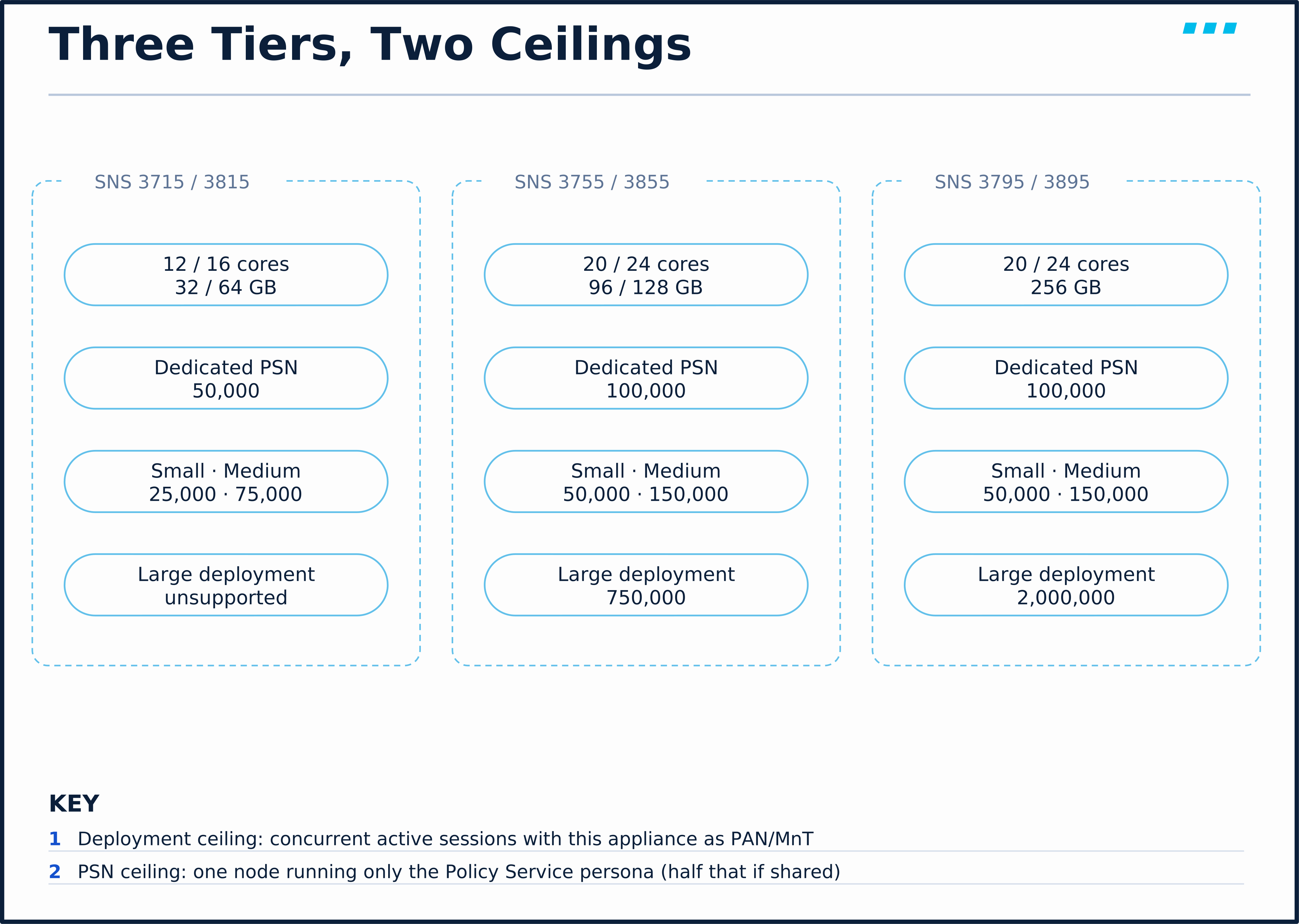
The session ceilings from Cisco’s Performance and Scalability Guide, Tables 3 and 4:
| Platform | Small deployment | Medium deployment | Large deployment | Dedicated PSN | Shared PSN |
|---|---|---|---|---|---|
| SNS 3715 / 3815 | 25,000 | 75,000 | Unsupported | 50,000 | 25,000 |
| SNS 3755 / 3855 | 50,000 | 150,000 | 750,000 | 100,000 | 50,000 |
| SNS 3795 / 3895 | 50,000 | 150,000 | 2,000,000 | 100,000 | 50,000 |
Three things the table teaches, all from the same guide:
- A shared PSN is rated at half a dedicated one. Taking Administration and Monitoring off a node doubles its rated concurrent sessions — the table’s capacity, not a promise of twice the authentication rate.
- The largest appliance buys nothing as a PSN. Cisco notes that the 3795/3895 add RAM and disk speed that suit PAN and MnT, and “provide no additional value when used only as a dedicated PSN”.
- The small appliances can’t anchor a large deployment, and Cisco says the 32 GB ones, as the PAN or MnT of a small or medium deployment, should carry only RADIUS or only TACACS+ workloads.
You need 120,000 concurrent sessions. Which shape and which PAN/MnT appliance?
A medium deployment on SNS 3755/3855 or 3795/3895 as the PAN/MnT pair. Per the Performance and Scalability Guide, only those reach 150,000 in the medium shape, and 120,000 is past the small ceiling on every platform. Then add dedicated PSNs until the per-PSN ceiling, with N+1 spare, covers the load.
Design Choice: A VM Is an Appliance With Reservations
Cisco’s rule for virtual ISE is that a VM should have the same resources as the SNS appliance whose performance you expect. Three details turn that into a build:
- vCPU is twice the physical cores, because of hyperthreading — the SNS 3715 profile is 24 vCPUs
- CPU and memory are reserved wherever the platform supports reservations, with the limits set to Unlimited — “not reserving enough resources can significantly affect ISE performance and stability”
- Resources only go up. Moving up to a larger supported profile later needs no reimage; decreasing CPU or RAM means reimaging
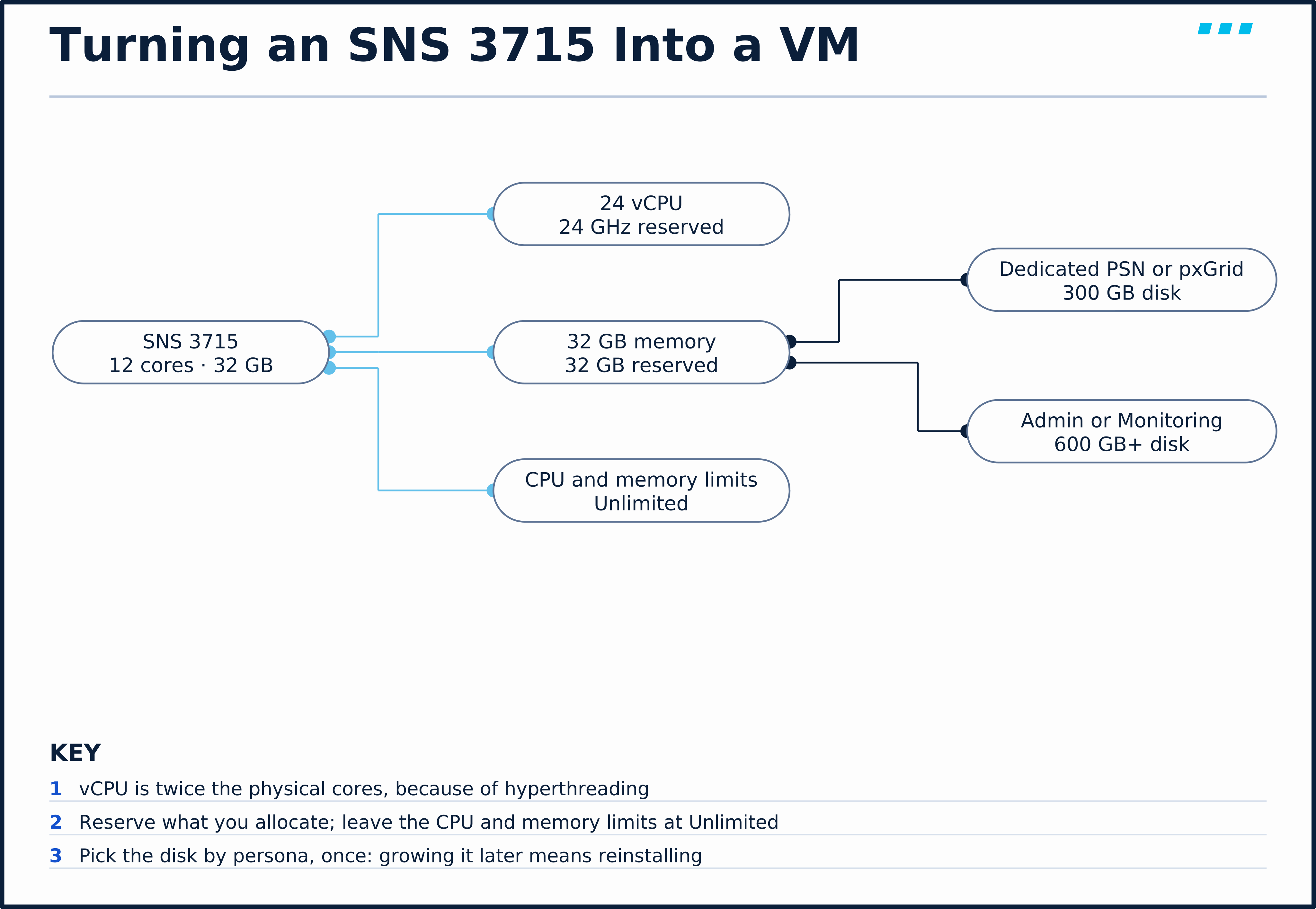
Cisco’s OVA templates set the vCPU count and memory, and each carries a matching reservation — the Small (SNS 3715) template, for instance, reserves 24 GHz of CPU and 32 GB of memory. From Cisco’s hardware requirements page:
| OVA template | vCPU | Memory |
|---|---|---|
| Extra Small (PSN only) | 8 | 32 GB |
| Small (SNS 3715) | 24 | 32 GB |
| Medium (SNS 3755) | 40 | 96 GB |
| Large (SNS 3795) | 40 | 256 GB |
| Small (SNS 3815) | 32 | 64 GB |
| Medium (SNS 3855) | 48 | 128 GB |
| Large (SNS 3895) | 48 | 256 GB |
The Extra Small profile can run only the Policy Service persona.
On VMware, the platform requirements that catch people are:
| Requirement | ISE 3.5 |
|---|---|
| Hypervisor | ESXi 7.0, 8.0 or 9.0 |
| Network adapter | E1000E or VMXNET3 |
| Disk controller | Paravirtual or LSI Logic Parallel |
| Disk sectors | 512n or 512e only — 4Kn isn’t supported |
| Storage speed | At least 50 MB/s write and 300 MB/s read |
| Snapshots | Not a backup — Cisco warns that enabling the snapshot feature on the VM “might corrupt the configuration” |
The same rule — match an appliance, reserve what you allocate — applies on the other hypervisors ISE 3.5 supports:
| Platform | ISE 3.5 support | Watch for |
|---|---|---|
| KVM | QEMU 2.12.0-99 or later | — |
| Microsoft Hyper-V | Azure Stack HCI 23H2 or later | ZTP there takes an .iso, not an .img |
| Nutanix AHV | AOS 6.8 and 7.0, AHV 10.0 | AHV has no CPU reservation feature |
| Red Hat OpenShift | 4.19 or later | — |
| AWS, Azure and other clouds | Instance types mapped to SNS profiles — the previous-generation SNS 3615 maps to c5.4xlarge on AWS | No cloud profile exists for the SNS 3800 series |
Below the small appliances, Cisco’s Performance and Scalability Guide also rates an Extra Small 8 vCPU / 32 GB VM in two forms: PSNLite, a dedicated PSN on 300 GB rated at 12,000 sessions, and ISELite, a standalone node on 600 GB rated at 1,000 sessions (from ISE 3.4). Neither runs on an SNS appliance.
Scale & Limits: Disk by Persona
Disk is sized by what the node runs, not by the appliance:
| Node runs | Production minimum | Maximum |
|---|---|---|
| Policy Service only, or pxGrid only | 300 GB | 2.4 TB |
| Anything with Administration or Monitoring (including standalone) | 600 GB | 2.4 TB |
The reason is the log store: on any node with the Monitoring persona, 60 percent of the disk is set aside for logs. Cisco’s disk space guidelines put the rule of thumb at about 1 GB of logs a day for 25,000 endpoints. Two more rules are easy to miss: ISE must sit on a single disk, and growing that disk after installation means a fresh install. Disks of 2 TB or more also need the VM’s firmware set to EFI.
The disk rule is the one that bites months later. Do the arithmetic before you pick the template: at the rough 1 GB a day per 25,000 endpoints in Cisco’s disk space guidelines, a 600 GB Monitoring node keeps about 360 GB for logs — roughly a year of history at 25,000 endpoints and a quarter of that at 100,000 — a sizing estimate, not a retention guarantee. If the retention your auditors want doesn’t fit, the answer is a bigger disk at install time, because growing it later means reinstalling.
Design Choice: What the Licence Decides
Hardware sets how many sessions a node can carry. The licence sets which features those sessions can use, and how many endpoints may use them. ISE 3.5 uses smart licences only — the reservation options on the Licensing page are forms of smart licensing — and the old Base, Plus and Apex licences are gone.
| Licence | What it adds |
|---|---|
| Essentials | Network access with RADIUS — 802.1X, MAC authentication bypass (MAB), web authentication — plus guest access and Passive ID |
| Advantage | Everything in Essentials, plus profiling, bring-your-own-device (BYOD) onboarding with the built-in CA, TrustSec segmentation, and context sharing over pxGrid |
| Premier | Everything in Advantage, plus posture and mobile device management (MDM) compliance |
| Device Administration | TACACS+ device administration — one licence per PSN that runs it |
| VM | One per virtual or cloud ISE node |
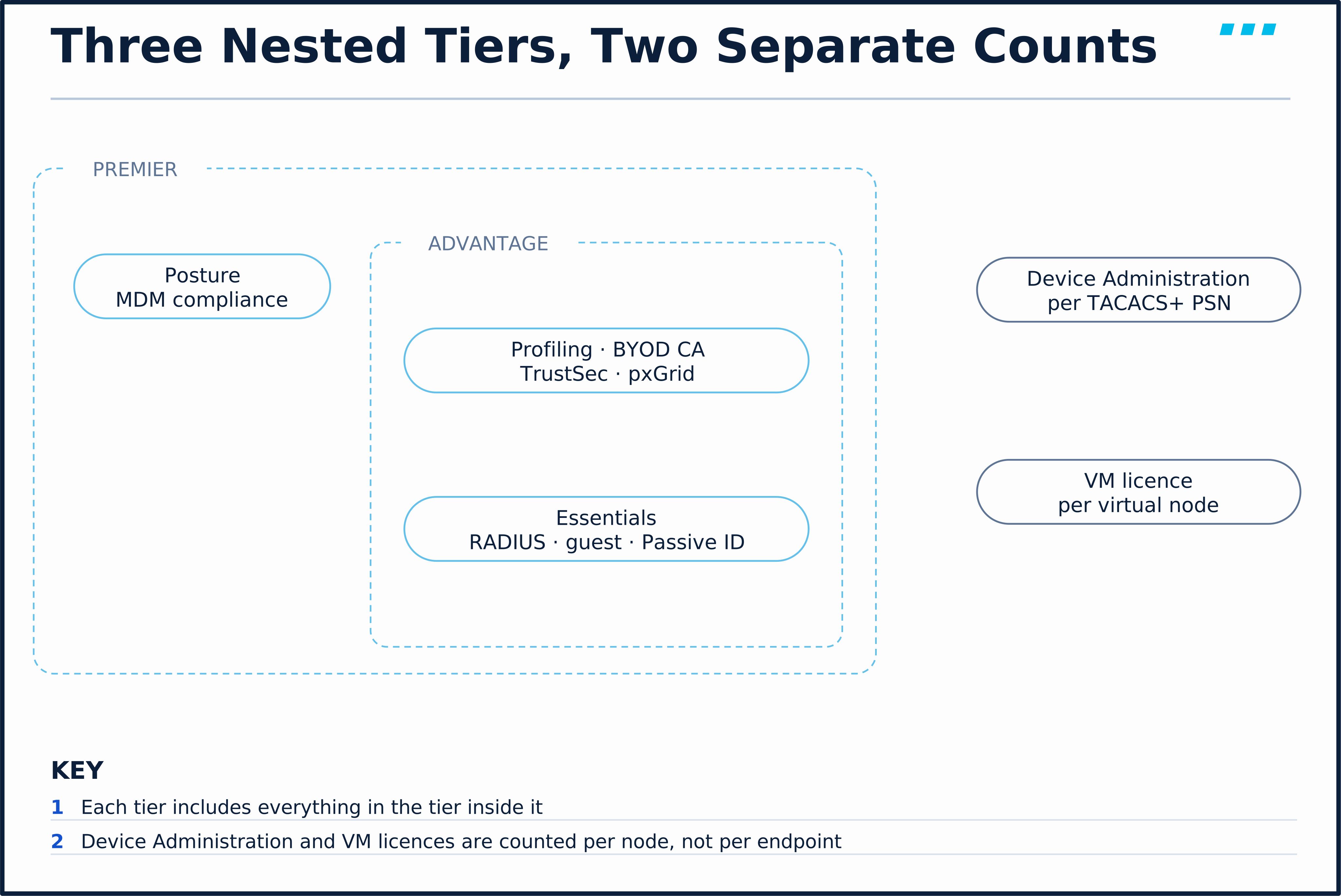
The tiers are nested: each includes the one below it. ISE 3.5 also starts counting some Advantage features — pxGrid, pxGrid Direct, profiling and TrustSec — by the number of active endpoints using each; going over produces a License Over Consumption message but no enforcement.
The evaluation licence is not a licence tier for a lab to grow into. It enables every feature for 90 days but only up to 100 endpoints, and when it expires administrators can see only the Licensing window.
Design Choice: A Worked Example
A campus that peaks at 30,000 concurrent sessions in one data centre, needing redundancy, profiling and TACACS+ for its switches, sized against the ceilings in the Performance and Scalability Guide:
- Shape. 30,000 sessions is under the small ceiling of 50,000, so two nodes running every persona — as long as the platform allows it.
- Platform. An SNS 3715 pair tops out at 25,000 in the small shape, so it’s too small. SNS 3755 or 3855, or VMs matching them, give 50,000 small.
- PSN headroom. Each node is a shared PSN rated at 50,000 on those platforms (Table 4), so one node can carry the whole load when the other fails.
- Disk. Both nodes run Administration and Monitoring: 600 GB minimum each, more if log retention needs it.
- Licences. Advantage for profiling, covering the endpoints that use it; Device Administration for each PSN that runs TACACS+; and a VM licence per node if they’re virtual.
If the campus grows past 50,000 — the small ceiling in the guide — the next step is the medium shape: the same pair as PAN/MnT, with dedicated PSNs added beside them.
🔬 See It in the Lab: The Lab’s Own Nodes
This reads ISE-01 (10.82.22.161) as it runs in the course lab. Nothing here changes configuration.
Step 1 — what platform does ISE think it is on? From WS-ADMIN-01, SSH to ISE-01 and run show inventory. (The serial-number line is left out below.)
ise-01/admin#show inventory
inventory
          NAME: "ISE-VM-K9    chassis", DESCR: "ISE-VM-K9     chassis"
          Manufacturer: VMware, Inc.
          Product Name: VMware Virtual Platform
          Total RAM Memory: 16139444 kB
          CPU Core Count: 4
          CPU 0: Model Info: Intel(R) Xeon(R) Gold 6152 CPU @ 2.10GHz
          CPU 1: Model Info: Intel(R) Xeon(R) Gold 6152 CPU @ 2.10GHz
          CPU 2: Model Info: Intel(R) Xeon(R) Gold 6152 CPU @ 2.10GHz
          CPU 3: Model Info: Intel(R) Xeon(R) Gold 6152 CPU @ 2.10GHz
          Hard Disk Count(*): 1
          Disk 0: Device Name: /dev/sda:
          Disk 0: Capacity: 300GiB
          NIC Count: 1
          NIC 0: Device Name: eth0:
          NIC 0: HW Address: 00:0c:29:1c:18:8e
          NIC 0: Driver Descr: Intel(R) PRO/1000 Network Driver
          (*) Hard Disk Count may be Logical.
Read it against the tables above. The product ID is ISE-VM-K9 — a virtual node, which in production needs a VM licence. Four vCPUs and 16 GB is half the Extra Small profile, and a 300 GB disk is below the 600 GB minimum for a node running Administration and Monitoring. This is a lab-scale node, and it would not meet Cisco’s production minimums for any persona.
Step 2 — how much of it is in use? Run show memory:
ise-01/admin#show memory
memory total memory:       16139444 kB
       free memory:          330268 kB
       cached:          2638200 kB
       swap-cached:       101020 kB
       output of free command:
                     total        used        free      shared  buff/cache   available
       Mem:       16139444    12539412      328332     1669116     3271700     1568568
       Swap:       9241312      451900     8789412
With the deployment idle, 12.5 of 16 GB is already used, about 1.5 GB is reported available, and 452 MB of swap is occupied. That is why nothing measured on this lab — authentication rates, report times — is a statement about ISE’s real performance.
Step 3 — the disk check at install. You won’t repeat this one; it happened when ISE-01 was built. The setup program tests storage before it installs anything, and ISE-01’s console showed:
Testing VM disk I/O performance...
Average I/O bandwidth writing to disk device: 475 MB/second
Average I/O bandwidth reading from disk device: 679 MB/second
I/O bandwidth performance within supported guidelines
Both are above Cisco’s floor of 50 MB/s write and 300 MB/s read, which is why setup carried on.
Step 4 — the licence. In the GUI, open Administration › System › Licensing.

The banner reads Evaluation Mode 89 Days, and both PANs identify as ISE-VM-K9. No licence is registered: the lab runs on the evaluation, so every feature works and the evaluation supports up to 100 endpoints.
The lab’s nodes fail every production minimum. Why is that acceptable here?
Because nothing in this course measures ISE’s capacity. Cisco’s resource check at install time applies only to ISO installs, and this lab’s nodes come from a pre-installed disk image, so they boot at lab scale. The lab only needs ISE to run its features for a handful of endpoints. A production design uses the tables in this lesson, not the lab.
🎥 [Video: sizing backwards from a VM size; the session as the unit and the two ceilings; the SNS 3700/3800 tiers as three repeated boxes; turning an appliance into a VM with reservations and a persona-sized disk; what the licence decides; the lab’s own node read with show inventory and show memory. Matches video.script_outline. Runtime: ~9 minutes]
Key Takeaways
Sizing the platform:
- Size in sessions. One endpoint with a unique MAC address is one session; a design must fit under both the deployment ceiling and the per-PSN ceiling.
- Shape changes the ceiling as much as hardware. SNS 3755/3855 appliances support a 50,000-session small deployment, a 150,000-session medium one, and a 750,000-session large one when they fill its dedicated PAN and MnT roles (Performance and Scalability Guide).
- A dedicated PSN carries twice a shared one. The largest appliances add nothing as PSNs; put them in the PAN and MnT roles.
Building it:
- A VM is an appliance with reservations. Twice the cores as vCPU, the same memory, CPU and memory reserved where the platform allows it; moving up to a larger supported profile needs no reimage, moving down does.
- Disk follows the persona. 300 GB for PSN or pxGrid only; 600 GB or more for anything with Administration or Monitoring, because Monitoring keeps 60 percent for logs.
- The licence decides features, not capacity. Essentials, Advantage and Premier are nested; Device Admin is per PSN, and each virtual node needs a VM licence. The evaluation is every feature for 100 endpoints and 90 days.
Up next: M2 · Lab 1: Add the Identity Sources — Active Directory, LDAP & the Certificate Chain — the identity sources the rest of the course authenticates against.
Knowledge Check
No grade, no timer. Wrong picks turn coral — change your answer until everything's green.
1 · A single-site deployment of two SNS 3755 nodes running every persona needs to grow past its current load. What is the small-deployment ceiling for that pair, per Cisco's Performance and Scalability Guide?
Table 3 of the Performance and Scalability Guide rates SNS 3755 and 3855 at 50,000 sessions in a small deployment. The same appliances support 150,000 as the PAN/MnT of a medium deployment and 750,000 in a large one — the shape changes the ceiling as much as the hardware does.
2 · You build a VM to match an SNS 3715 (12 cores, 24 threads, 32 GB). How many vCPUs does Cisco's OVA template reservation table give it?
Cisco allocates twice the physical core count as vCPUs because of hyperthreading; the Small (SNS 3715) OVA template has 24 CPUs with a 24 GHz CPU reservation, and 32 GB of memory.
3 · Which node can be deployed on a 300 GB disk and still meet Cisco's production minimum?
Cisco's disk table sets 300 GB as the minimum for a node running only the Policy Service or only the pxGrid persona; anything with Administration or Monitoring needs at least 600 GB, because 60 percent of a Monitoring node's disk is reserved for logs.
4 · A deployment licensed only for Essentials wants to profile endpoints and share context over pxGrid. What is missing?
The tiers are nested. Essentials covers RADIUS AAA, guest and Passive ID; Advantage adds profiling, BYOD with the built-in CA, TrustSec and context sharing such as pxGrid; Premier adds posture and MDM compliance. Device Admin and VM licences are separate counts, not feature tiers.
You just proved the method works — the rest of the mountain is waiting. All-Access unlocks every lesson in every course — $489/yr, with $647 of founders bonuses while the window is open.
Reserve founders rate →Sat the exam and passed? Tell us on the day →
📚 Official Documentation — every source behind this page · verified 26 Sept 2026
Revision Updated September 8, 2026 · accessed 26 Sept 2026
Revision Updated September 10, 2026 · accessed 26 Sept 2026
Revision Updated September 10, 2026 · accessed 26 Sept 2026
Revision Updated September 10, 2026 · accessed 26 Sept 2026
Revision Updated September 10, 2026 · accessed 26 Sept 2026
Revision Updated September 23, 2026 · accessed 26 Sept 2026
Revision Updated July 7, 2026 · accessed 26 Sept 2026