Design Lesson · ISE Architecture & Deployment
ISE Deployment Models: Standalone, Distributed, Node Groups & Dedicated MnT
Free Lesson All-Access unlocks every lesson in every course — $489/yr, with $647 of founders bonuses while the window is open, and it carries The Next Year Promise. Reserve founders bonuses →
1.2 asks you to describe deployment options; 1.1’s personas are the parts those options are built from. Walking out of this lesson, you can:
- Use node, persona and role precisely — the three words every ISE design conversation turns on
- Name the four deployment shapes — standalone, small, medium, large — and the session count and node count that separate them
- Say what survives when the primary PAN fails, and what PAN auto-failover needs that manual promotion does not
- Explain why a Monitoring node is dedicated in larger deployments, and what a PSN node group is actually for
None beyond the lab’s built-in 90-day evaluation. The deployment model is not a licensed feature; each virtual node needs a VM licence in production.
Overview
“How many ISE nodes do we need?” is the first question in every ISE design, and it is usually answered with a number instead of a shape. The number is the wrong half. Two deployments with four nodes each can have completely different failure behaviour depending on which node runs what.
This lesson gives you the vocabulary to describe a deployment exactly, the four shapes Cisco supports and the limits that separate them, and what each shape does when a node dies. The last section reads the course lab’s own deployment table and names its shape.
Terminology: Node, Persona, Role
Three words carry every ISE deployment conversation, and they are not interchangeable:
- Node — one ISE instance, physical appliance or virtual machine
- Persona — a set of services a node runs: Administration, Policy Service, Monitoring, pxGrid
- Role — standalone, primary or secondary, and it applies only to the Administration and Monitoring personas
The personas themselves were the subject of the previous lesson (ISE Personas: PAN, MnT, PSN & pxGrid Controller — What Each Node Actually Runs); here is the one-line version of each, because every shape below is a rearrangement of them:
| Persona | Short name | What it does | How many |
|---|---|---|---|
| Administration | PAN | Holds the configuration and replicates it to the other nodes (a Dedicated MnT node excepted) | At most 2 |
| Monitoring | MnT | Collects logs from every node; reports and Live Logs read from it | At most 2 |
| Policy Service | PSN | Makes the access decisions — RADIUS, TACACS+, posture, guest, profiling | At least 1 |
| pxGrid | — | Shares session context with other systems | Up to 4 in a large deployment |
A node’s role only exists because the Administration and Monitoring personas can be paired. There is no “primary PSN” — Policy Service nodes are peers, and the network device’s RADIUS server list decides which one it asks.
Design Choice: Standalone — One Node, Every Persona
A standalone deployment is a single node running the Administration, Policy Service and Monitoring personas together. It is what you have the moment you finish installing ISE: the node is standalone, and you cannot edit its personas until it becomes the primary node of a deployment.
Cisco’s own guidance is blunt: do not use a standalone deployment in production, because there is nothing to fail over to. It’s the right shape for a lab, a proof of concept, or the staging hour of a production build before the second node exists.
Design Choice: Small, Medium and Large
Once there is a second node, the deployment is distributed: administration and monitoring stay centralised on at most two nodes each, and policy decisions spread across Policy Service nodes. Cisco’s Performance and Scalability Guide sorts distributed deployments into three sizes.
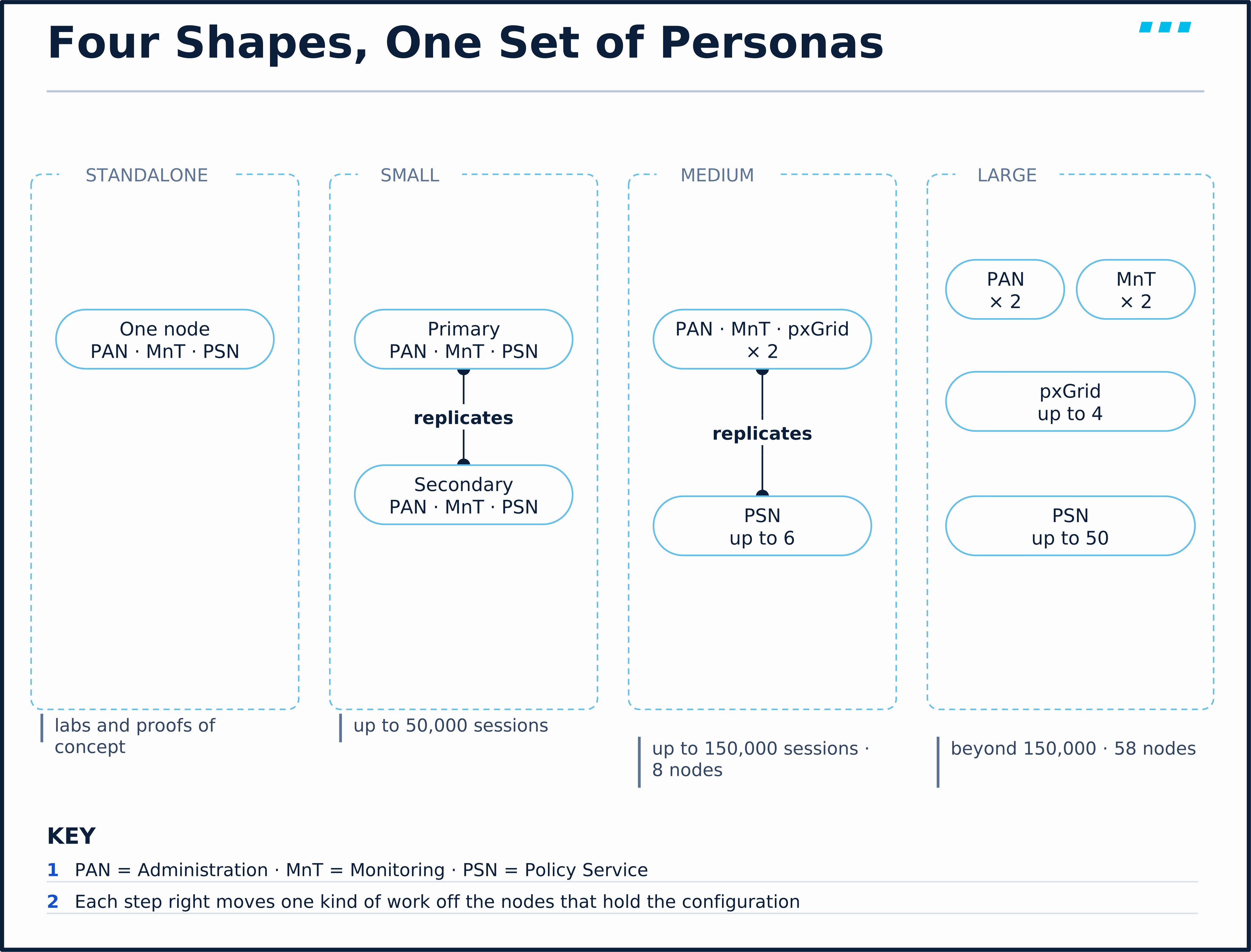
| Small | Medium | Large | |
|---|---|---|---|
| Shape | Two nodes, each running every persona (pxGrid where used); one primary, one secondary | PAN, MnT and pxGrid share two nodes; PSNs are dedicated | PAN, MnT, pxGrid and PSN each on dedicated nodes |
| Policy Service nodes | Both nodes (plus one optional extra node) | Up to 6 | Up to 50 |
| Maximum nodes | 2, plus one optional PSN, pxGrid or health check node | 8 | 58, as 2 PAN + 2 MnT + 50 PSN + 4 pxGrid |
| Choose it for (selection criteria) | Up to 50,000 concurrent active sessions | Up to 150,000 | More than 150,000 |
Read the table as a progression. Each step moves one kind of work off the nodes that hold the configuration:
- Small keeps everything together and buys redundancy by duplicating the whole node.
- Medium takes the Policy Service persona off the Administration and Monitoring nodes. Cisco is explicit that a medium deployment cannot run the Policy Service persona on a node that runs Administration or Monitoring.
- Large then separates Administration from Monitoring as well, and Cisco says to register the Monitoring nodes as Dedicated MnT at that size.
A small deployment is approaching 50,000 sessions. Does adding a third node as a dedicated PSN raise its limit?
No. Cisco’s Performance and Scalability Guide allows one extra PSN, pxGrid or health check node in a small deployment and says it does not change the small deployment’s scale limits. The limit is set by the two nodes that still carry every persona; to go past it you move to the medium shape.
Hardware sets the ceiling inside each shape. The session figures above are Cisco’s selection guide; the sizing lesson later in this module shows how a given appliance or VM profile caps them further.
Design Choice: Dedicated MnT
The Monitoring persona writes every authentication, accounting and posture record from every node, and 60 percent of a Monitoring node’s disk is set aside for that log store. Cisco recommends not running the Monitoring and Policy Service personas on the same node, and in a large deployment recommends the Dedicated MnT option, which disables every other persona on the node and stops configuration replication to it.
The reasoning is the same as keeping a syslog server off the firewall it collects from: when authentication volume spikes, the node writing the logs shouldn’t also be the node answering the requests.
Cisco’s Administrator Guide describes the Monitoring pair as offering active standby rather than high availability, and the secondary doesn’t take over the primary role by itself. When the primary MnT has been down for more than five minutes, the PAN starts reading monitoring data from the secondary; the secondary’s role changes only when an administrator changes it. (The ISE 3.5 Installation Guide words this loosely as automatic promotion; the Administrator Guide’s deployment chapter is the precise one.)
Failure Modes: When the Primary PAN Goes Down
In a two-PAN deployment the primary PAN is active and the secondary Administration persona is on standby: it receives every configuration change but doesn’t act on it administratively. Other personas on that node, such as its Policy Service, keep working. What matters is what the rest of the deployment can still do while no PAN is active.
| Keeps working | Stops until a PAN is primary again |
|---|---|
| RADIUS authentication of existing endpoints (internal users, Active Directory) | Registering a new sponsored or self-registered guest |
| Posture | Learning a new endpoint through profiling |
| BYOD onboarding with the internal CA | |
| pxGrid — the server stops handling client registration and subscription |
The pattern: Policy Service nodes keep authenticating from the configuration already replicated to them. What stops are the operations that need an active PAN — creating guest accounts, recording newly profiled endpoints, issuing certificates from the internal CA, and pxGrid’s registration and subscription.
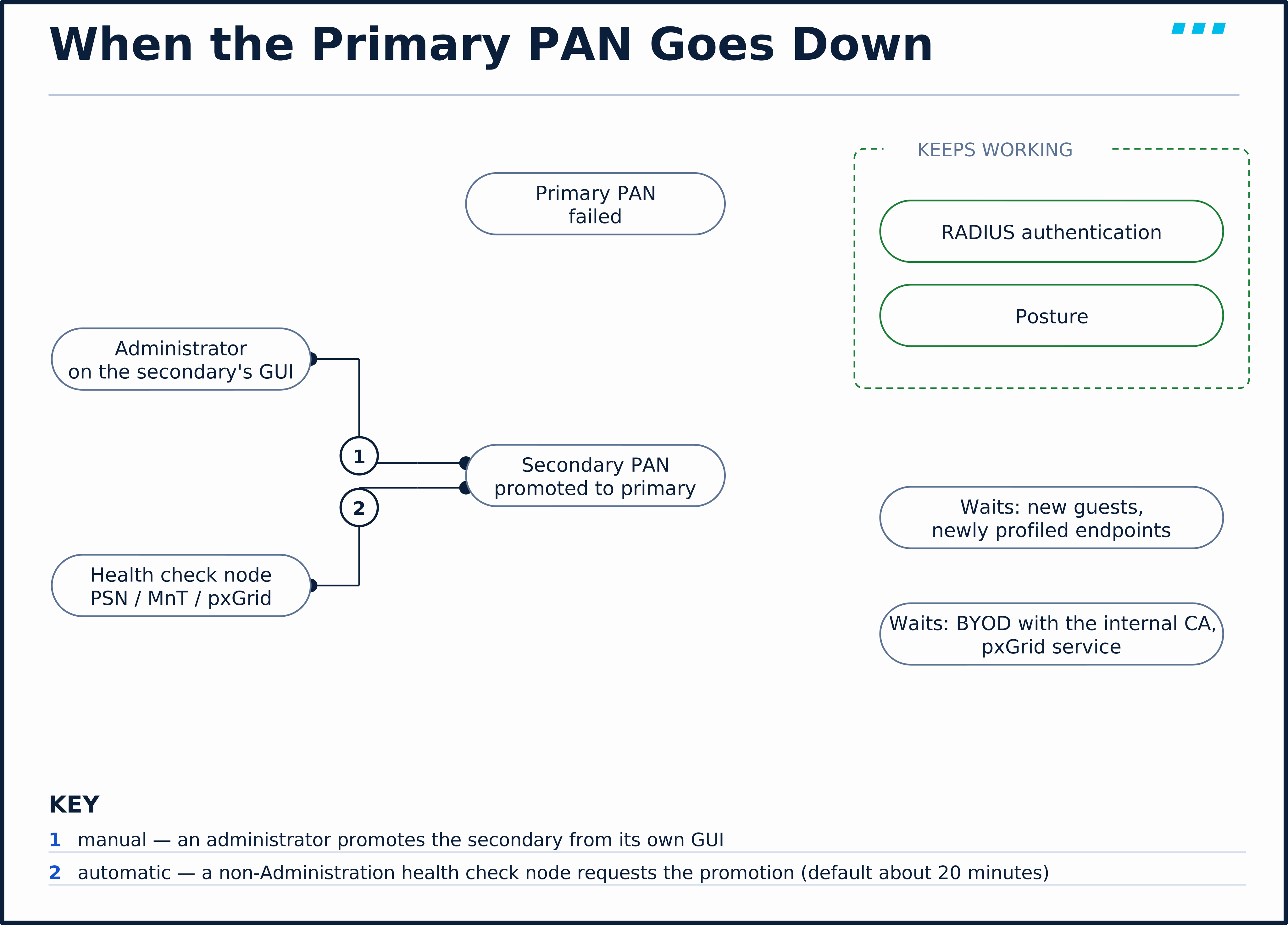
There are two ways to get the secondary PAN promoted:
- Manual promotion — an administrator logs in to the secondary PAN’s own GUI and promotes it. No extra nodes are needed.
- PAN auto-failover — a health check node watches the primary PAN and asks the secondary to take over when the primary stops answering.
Auto-failover has requirements that are easy to miss:
- At least three nodes — the two Administration nodes and a health check node that is not an Administration node (a PSN, MnT or pxGrid node)
- A health check node per data centre — if the two PANs are in different data centres, each needs its own
- About 20 minutes by default — Cisco’s Administrator Guide puts the default failure-detection time at 10 minutes and the promotion at another 10
- No automatic failback — when the old primary returns it becomes the secondary and must be synchronised by hand
- Symptom: The primary PAN dies, auto-failover is enabled, and nothing happens.
- Root Cause: The only health check node was the one that failed, or it sat in the same failure domain as the primary. With a single health check node, losing it means automatic failover will not happen.
- Fix: Put the health check node where it survives what kills the primary, and add a second when the PANs are in different data centres.
Design Choice: PSN Node Groups
A node group is a set of Policy Service nodes on the same fast LAN that share session information and heartbeat each other. It solves one specific failure.
Guest, posture and MDM flows park an endpoint in a URL-redirect state on one PSN while the user completes a portal or a posture check. If that PSN dies mid-flow, the endpoint is stranded: the network device still holds a redirect that points at a dead node. In a node group, a surviving peer knows which sessions were on the failed node and sends a Change of Authorization (CoA) for them, so each endpoint restarts its flow on a live PSN.
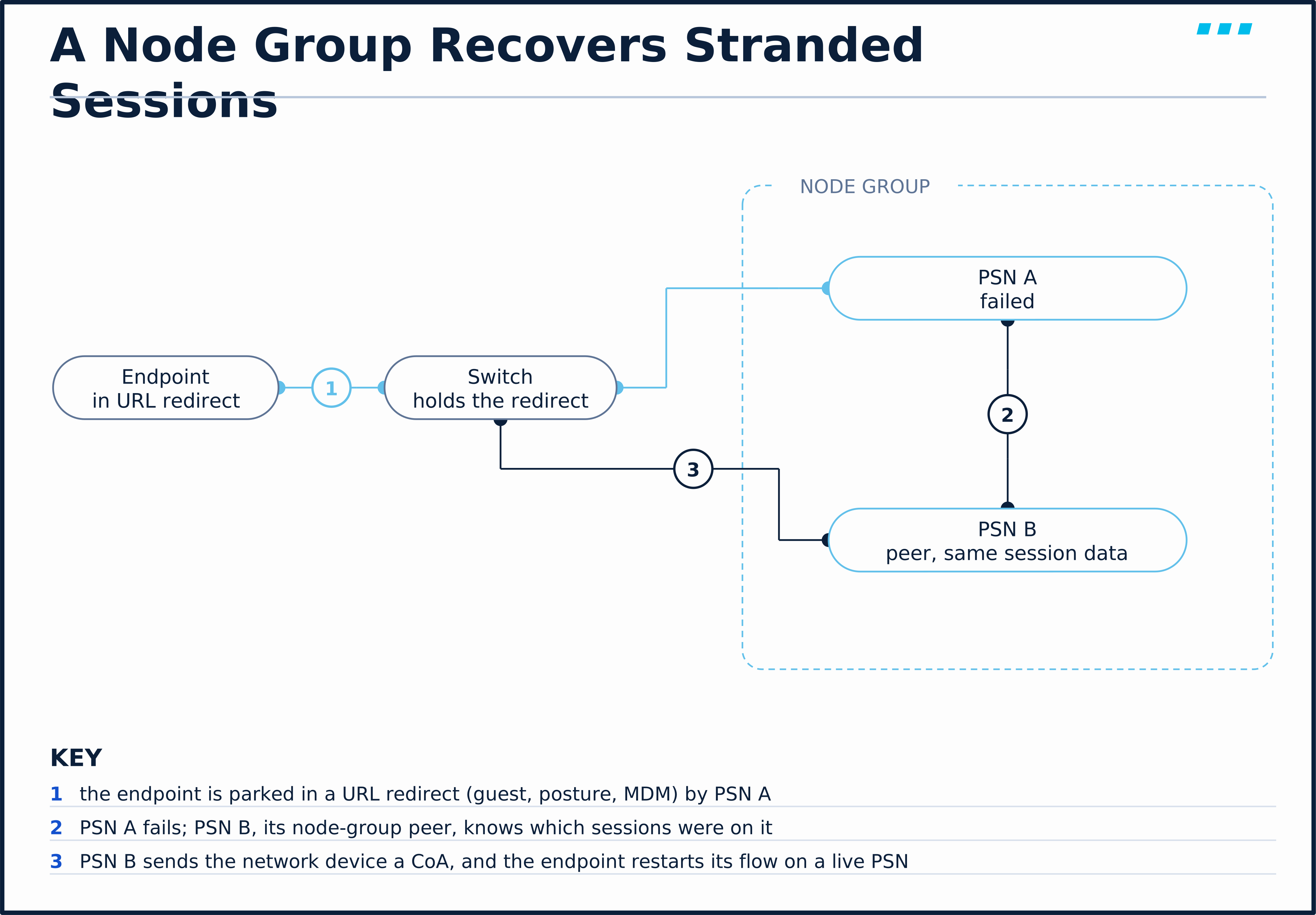
What a node group needs:
- CoA from every member — Cisco’s wording is that every node in the group is configured on the network device “as RADIUS clients and authorized for CoA”; on a Cisco switch that means each PSN is listed as a dynamic-authorization client with its shared key
- A fast LAN between members — Layer 2 adjacency is not required but is highly recommended; members talk over TCP port 7800
- A reason to exist — Cisco recommends node groups when the deployment uses URL-redirect services, with N+1 or N+2 redundancy inside the group
Does putting PSNs in a node group spread RADIUS load across them?
No. Which PSN gets a request is decided by the network device’s RADIUS server list or by a load balancer in front of the PSNs. The node group only decides who cleans up after a member fails.
Scale & Limits: Distance Between Nodes
A distributed deployment can span sites, but not arbitrary distances. Cisco’s scale-limits table sets 300 milliseconds as the maximum network latency between the primary PAN and any other node, including the secondary PAN, the Monitoring nodes and every PSN. Every node also has to resolve every other node’s name in DNS, forward and reverse — Cisco says registration fails without it — and Cisco’s guidelines say to use the same NTP server on every node.
Cisco’s performance figures were measured with all nodes in one data centre at under 5 ms. Treat 300 ms as the limit a deployment is supported at, and the published session numbers as sizing guidance under Cisco’s test conditions — real capacity still depends on the hardware, the services enabled and the traffic mix.
🔬 See It in the Lab: Name the Lab’s Deployment Model
This reads the deployment the previous lesson built. Nothing here changes configuration.
Step 1 — list the nodes and what they run. From WS-ADMIN-01, ask the primary PAN, ISE-01 (10.82.22.161), for its deployment table through the OpenAPI, with the admin credentials in a .netrc file:
WS-ADMIN-01$ curl -sk --netrc-file ~/.netrc -H 'Accept: application/json' https://ise-01.securitylessons.lab/api/v1/deployment/node | python3 -m json.tool
{
    "response": [
        {
            "hostname": "ise-01",
            "fqdn": "ise-01.securitylessons.lab",
            "ipAddress": "10.82.22.161",
            "roles": [
                "PrimaryAdmin",
                "PrimaryMonitoring"
            ],
            "services": [
                "Session",
                "Profiler"
            ],
            "nodeStatus": "Connected"
        },
        {
            "hostname": "ise-02",
            "fqdn": "ise-02.securitylessons.lab",
            "ipAddress": "10.82.22.165",
            "roles": [
                "SecondaryAdmin",
                "SecondaryMonitoring"
            ],
            "services": [
                "Session",
                "Profiler"
            ],
            "nodeStatus": "Connected"
        }
    ],
    "version": "1.0.0"
}
Two nodes; each carries an Administration role, a Monitoring role and the Session service, which is the Policy Service persona. The three core personas run on both nodes, primary and secondary, and pxGrid is off. Measured against the table in this lesson, that is the small deployment — the smallest shape Cisco recommends for production.
Step 2 — check whether this pair can fail over by itself. In the GUI, open Administration › System › Deployment and click PAN Failover.

The page offers one check box, Enable PAN Auto Failover — and in this lab ISE will not let you tick it: the box is rendered disabled. That matches the rule above. Auto-failover needs a health check node that is not an Administration node, and both of this deployment’s nodes are Administration nodes. With two nodes, the recovery path for this lab is manual promotion from ISE-02’s own GUI.
The course lab will register a third node, ISE-03, as a Policy Service and pxGrid node. Which shape is the lab then, and what does ISE-03 add?
Still a small deployment — plus the one extra node the small shape allows. It does not raise the session limit. What it adds is a non-Administration node that can act as a health check node, which is the missing piece for PAN auto-failover.
🎥 [Video: node, persona, role; the four shapes as one repeated drawing; the session numbers that pick a size and why an extra node does not move a small deployment’s limit; the primary PAN dying on the whiteboard with manual promotion against auto-failover; the node group as a stranded-session fix; the lab’s deployment table read aloud. Matches video.script_outline. Runtime: ~9 minutes]
Key Takeaways
The shapes:
- Describe a deployment by shape, not by count. Node is the box, persona is what it runs, role is primary or secondary — and only Administration and Monitoring have roles.
- Four shapes. Standalone (one node; labs and proofs of concept, not recommended for production); small (two nodes with every persona, up to 50,000 sessions); medium (PAN/MnT on two nodes, up to 6 dedicated PSNs, up to 150,000 sessions); large (everything dedicated, up to 50 PSNs, 58 nodes). Session figures are from Cisco’s Performance and Scalability Guide.
- An extra node does not change a small deployment’s limits. Moving up a size means taking personas off the nodes that hold the configuration.
What happens when something fails:
- Losing the primary PAN doesn’t stop authentication. PSNs keep authenticating from replicated configuration, and posture continues; new guests, newly profiled endpoints, BYOD with the internal CA and pxGrid wait for a PAN.
- Auto-failover needs a third node. Two PANs plus a non-Administration health check node, about 20 minutes with default timers, and no automatic failback.
- Node groups recover URL-redirected sessions. They do not load-balance; the RADIUS server list or a load balancer does that.
Up next: Zero-Touch Provisioning: Image and VM User Data Bring-Up, the Config File & Automated Onboarding — bringing a new node up without typing the setup wizard — zero-touch provisioning.
Knowledge Check
No grade, no timer. Wrong picks turn coral — change your answer until everything's green.
1 · A customer has 30,000 concurrent endpoints today and runs two ISE nodes that each carry every persona. They add a third node as a dedicated PSN to 'get more headroom'. What changes about the deployment's supported scale?
Cisco's Performance and Scalability Guide allows an optional extra PSN, pxGrid or health check node in a small deployment and says outright that it does not change the small deployment's scale limits. Moving to the medium model means taking the PSN persona off the Administration and Monitoring nodes, not just adding a node.
2 · The primary PAN of a two-node deployment fails. PAN auto-failover is not configured. Which of these keeps working until someone intervenes?
Policy Service nodes keep authenticating against the replicated configuration, so existing RADIUS authentication and posture carry on. Cisco's table of features available while the PAN is down lists new guests, newly profiled endpoints, BYOD with the internal CA and the pxGrid service as unavailable until a PAN is promoted.
3 · What is the minimum node count for PAN auto-failover, and why?
The failover request has to come from a health check node that is not itself an Administration node, so two PANs alone cannot do it. A second health check node is required only when the two PANs sit in different data centres; with one health check node, losing it means automatic failover will not happen.
4 · Which symptom does a PSN node group exist to fix?
Group members share session information and heartbeat each other. When one fails, a peer issues a Change of Authorization for the URL-redirected sessions — posture, guest, MDM — that were on the failed node, so the endpoint restarts its flow on a live PSN. Load distribution is the job of the network device's RADIUS server list or a load balancer, not the node group.
You just proved the method works — the rest of the mountain is waiting. All-Access unlocks every lesson in every course — $489/yr, with $647 of founders bonuses while the window is open.
Reserve founders rate →📚 Official Documentation — every source behind this page · verified 26 Sept 2026
Revision Updated September 8, 2026 · accessed 26 Sept 2026
Revision Updated September 23, 2026 · accessed 26 Sept 2026
Revision Updated September 10, 2026 · accessed 26 Sept 2026
Revision Updated September 10, 2026 · accessed 26 Sept 2026
Revision Updated September 10, 2026 · accessed 26 Sept 2026