Concept Lesson · Deployment: Firewall & NGIPS Modes
Virtual Appliances and Cloud-Delivered Management: FTDv, FMCv and cdFMC
Free Lesson All-Access unlocks every lesson in every course — $489/yr, with $647 of founders bonuses while the window is open, and it carries The Next Year Promise. Reserve founders bonuses →
Walking out of this lesson, you can:
- Size and license a virtual Threat Defense (FTDv) and a virtual Management Center (FMCv) — performance tiers for one, device-count platform licences for the other
- Explain how a virtual appliance’s first boot depends on how it is deployed, and why that matters for automation
- Describe cloud-delivered FMC (cdFMC) — what Cisco runs for you, what a device needs to reach it, and where events go instead
FMCv needs a platform licence sized to the number of devices it manages. A Smart-Licensed (BYOL) FTDv takes a performance-tier licence on top of the usual feature licences; a marketplace PAYG FTDv is billed through the cloud instead.
Overview
The virtual appliances run the same Secure Firewall software as the hardware and take the same FMC policy model, within each platform’s own capabilities and limits. What changes is everything the hardware used to decide for you: how big the box is, which throughput you are entitled to, how it gets its first address, and, with cdFMC, whether the manager is yours at all. Get those wrong and the symptoms look like software faults: a firewall capped below the link it sits on, an appliance that “deployed successfully” and boots unconfigured, a cloud migration whose event history stays behind on the old manager.
Secure Firewall Platform Architecture: Threat Defense, FMC and the Snort/LINA Split introduced FTDv, FMCv and cdFMC as options. This lesson is about operating them.
Scale & Limits: Two Licence Axes and a Sizing Table
The two virtual appliances are licensed on different axes, and each axis is tied to how big you make the VM:
| Appliance | Licensed by | What the licence sets |
|---|---|---|
| FTDv (BYOL) | Performance tier: FTDv5, 10, 20, 30, 50, 100, or FTDvU (no licence-enforced throughput cap) | Throughput and remote-access VPN session ceiling |
| FMCv | Platform licence: 2, 10, 25 or 300 devices | How many devices it may manage |
On VMware, each licence assumes a VM size (public clouds map tiers to their own supported instance types instead):
| Licence | vCPU | Memory | Disk |
|---|---|---|---|
| FTDv5, FTDv10, FTDv20 | 4 | 8 GB | 100 GB thin-provisioned, whatever the tier |
| FTDv30 | 8 | 16 GB | the same |
| FTDv50 | 12 | 24 GB | the same |
| FTDv100 | 16 | 32 GB | the same |
| FTDvU | 32 or 64 (the VMware guide’s two FTDvU rows) | 64 or 128 GB | the same |
| FMCv (2, 10 or 25 devices) | 4 (up to 16) | 32 GB as deployed | 250 GB |
| FMCv300 | 32 | 64 GB | 2.2 TB |
The FTDv sizes come from the FTDv on VMware guide, the FMCv sizes from the FMCv on VMware guide. Read the VMware table as a sizing calculator that works in both directions:
- Throughput first: the tier you need sets the vCPU and memory. A tier licensed onto a smaller VM is a ceiling the VM cannot reach.
- Fleet first: the device count sets the FMCv licence. Moving between the 2-, 10- and 25-device licences does not change the minimum VM; only FMCv300 does, and it is a different class of machine — built for fleets, not labs.
Three rules from the FMC 10.0 licensing chapter round it out:
- A new Smart-Licensed FTDv starts at FTDv50. On an FMC-managed FTDv, you change it in FMC: Administration › Licenses › Smart Licenses › Edit Performance Tier.
- Of the customer-managed FMCs, only the virtual one is licensed for itself. A physical FMC “does not require a license for its own use”; FMCv’s platform licence “correlates with the number of devices it can manage.”
- Don’t trim FMCv below its defaults. The FMCv guide is blunt: “Do not decrease the default settings, as they are the minimum required to run the system software.” It also names a hard floor under that: below 28 GB, upgrades to 6.6.0 and later fail.
FTDv runs on more than the two hypervisors this course uses. The Threat Defense Virtual 10.0 getting started guide has a deployment chapter for VMware, KVM, Hyper-V, Cisco HyperFlex, Nutanix and OpenStack, and for AWS, Azure, OCI, GCP and Alibaba Cloud.
The FTDv limit that shapes every design is its interface count. On VMware and KVM it has ten virtual NICs: one management, one diagnostic, and eight data interfaces. Every design in this module has to fit a routed, a passive and an inline deployment inside those eight.
Design Choice: The Deployment Template Decides Who Does First Boot
FMCv for VMware ships as an OVF package (Open Virtualization Format): a descriptor file that tells the hypervisor how to build the VM, next to the disk image. There are two descriptors for the same disk, and the choice between them decides whether the appliance configures itself.
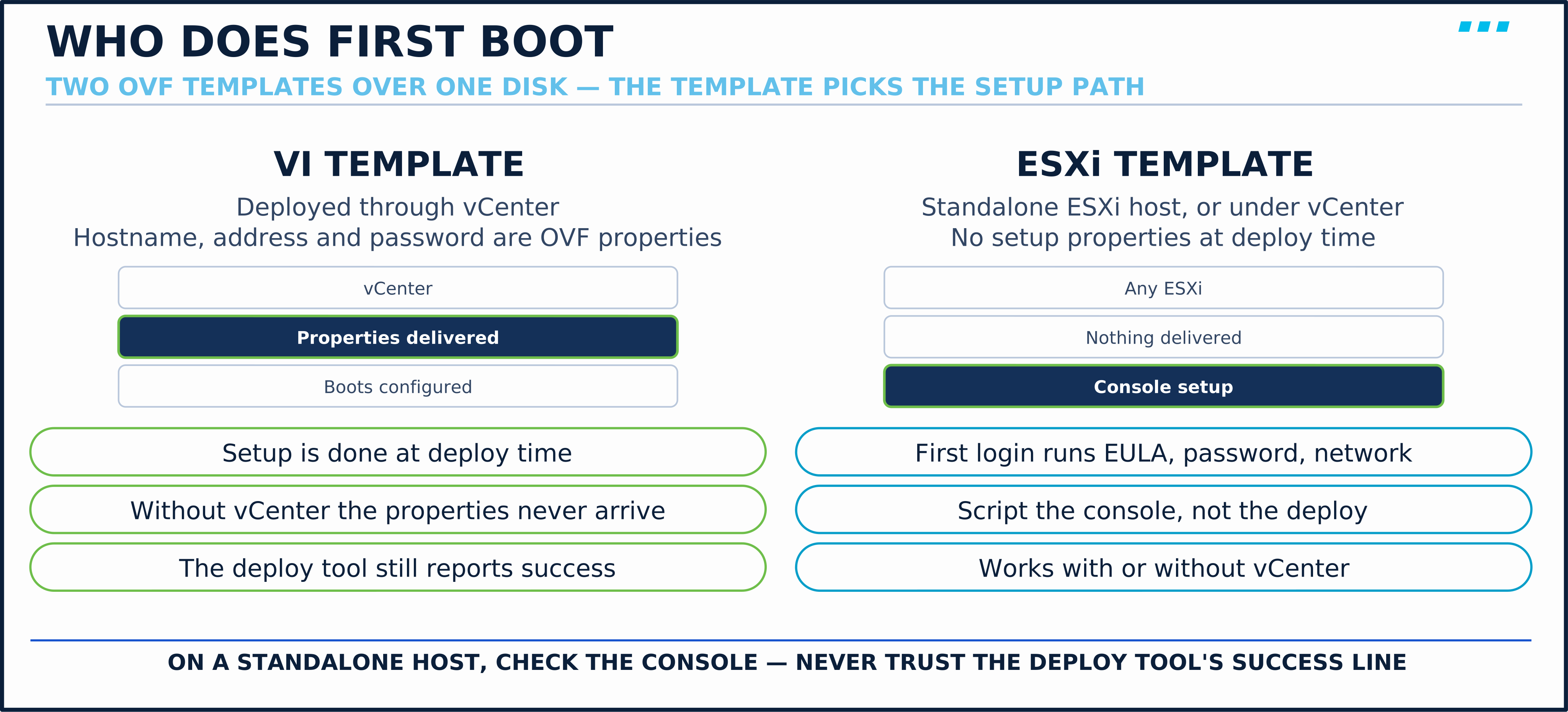
- VI template (for vSphere Infrastructure, meaning vCenter) — Cisco says it “enables complete initial setup during installation.” The hostname, address and admin password are properties you fill in at deploy time, and vCenter hands them to the guest.
- ESXi template — for a standalone ESXi host, or under vCenter. It carries no setup properties; the appliance configures itself on first boot, from the console.
The trap is using the VI template without vCenter. Some deploy tools accept its properties, report success, and leave you with an appliance that boots with none of them.
- Symptom: A scripted FMCv deployment “succeeded,” but the console shows the default
firepower login:prompt and no management address. - Root Cause: Setup properties were supplied through a path that does not deliver them — the VI template deployed without vCenter.
- Fix: Deploy the VI template through vCenter, or use the ESXi template and treat first boot as a console step you script. Either way, check the console; a deploy tool’s success line is not proof the properties arrived.
First boot is also slow: FMCv initialises its databases before it offers a login. Budget for it rather than debugging it.
Terminology: Cloud-Delivered FMC
Cloud-delivered FMC is FMC as a service, inside Security Cloud Control. Per Cisco’s cdFMC overview, Cisco’s operations team deploys and maintains it and updates it as features ship. You get FMC-style policy management, within cdFMC’s own supported-feature list, and you stop running the server it lives on.
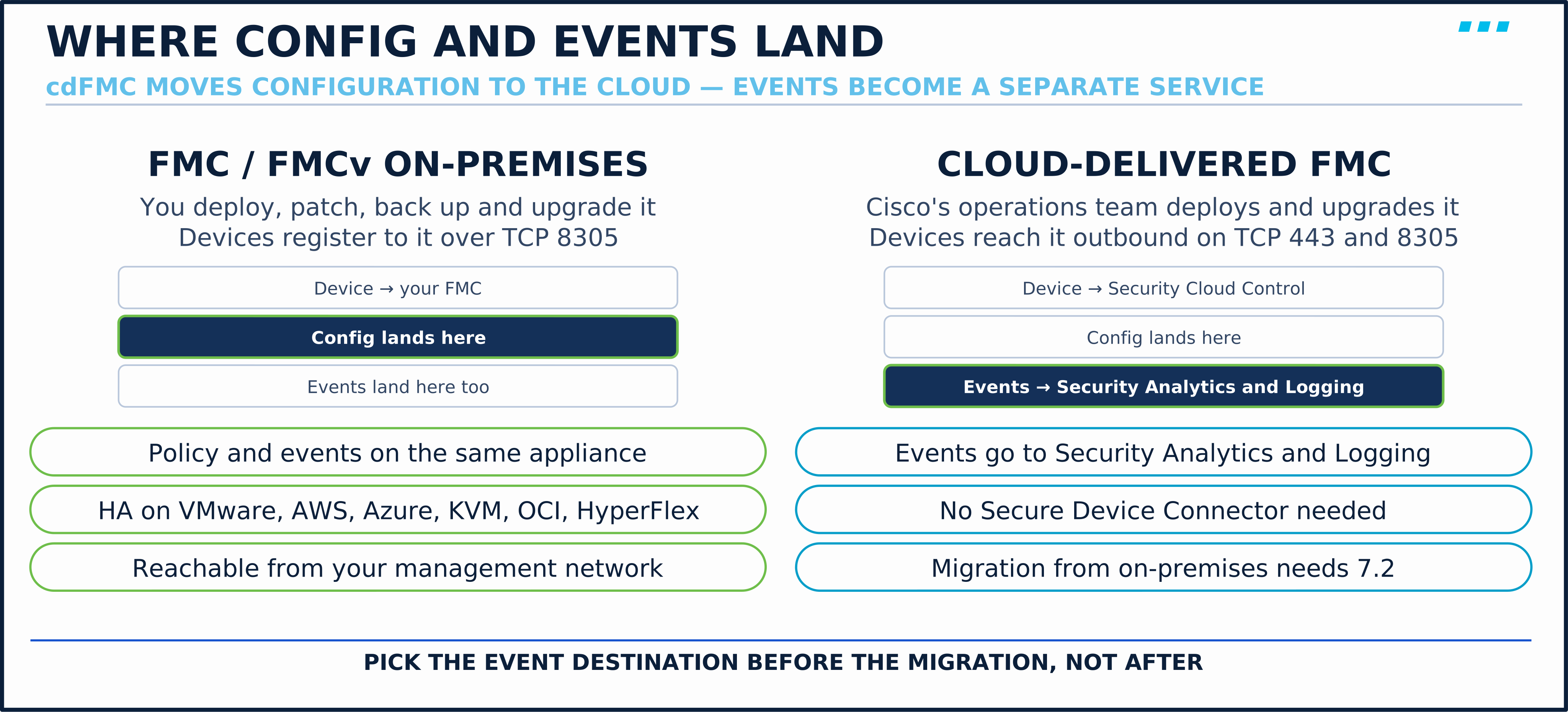
What a device needs, and what changes:
| Question | On-premises FMC / FMCv | Cloud-delivered FMC |
|---|---|---|
| Who deploys, maintains and upgrades the management software | You | Cisco’s operations team |
| What the device must reach | FMC on your management network | Outbound TCP 443 (HTTPS to Cisco’s cloud services) and TCP 8305 (to the cloud-delivered FMC), plus DNS for Cisco’s cloud endpoints. No Secure Device Connector (the on-premises connector Security Cloud Control uses for some other device types) is needed |
| How a device joins | A CLI registration key | A CLI registration key: Security Cloud Control generates the whole registration command, and you paste it into the device’s CLI as admin, typically over SSH. Serial number (zero-touch) for Firepower 1000, 2100 and Secure Firewall 3100 |
| Threat Defense versions | FMC’s supported range | Supported: 7.0.3 and later 7.0.x, and 7.2 and later. Not supported: 7.1 |
| Where security events are analysed | FMC’s own event database | Security Analytics and Logging, SaaS or on-premises, integrated and licensed separately |
| Moving an existing fleet | — | A migration wizard, with FMC and devices at 7.2 or later |
The connectivity and onboarding rows come from Cisco’s cdFMC onboarding page, which is explicit that no connector is needed for this. The event row is the one that surprises people: cdFMC moves the configuration manager to the cloud, and event analysis becomes a separate service you choose and configure. Resilience is yours with a customer-managed FMCv: its high availability is a pair you build, which the FMCv introduction supports on VMware, AWS, Azure, KVM, OCI and HyperFlex.
For one or two FTDv at a branch with no FMC today, I’d start with cdFMC: nothing to patch, and no inbound management connection to the device — it needs outbound TCP 443 and 8305, DNS, and the other prerequisites on Cisco’s onboarding page. The day you need events at scale, budget Security Analytics and Logging alongside it. Anyone already running an FMC with years of event history should plan for that history before anything else: it stays on the old FMC and is not migrated with the devices. Check the current cdFMC feature list for anything you rely on first — the two do not match release for release.
Scale & Limits: FTDv in the Public Cloud
The cloud changes how FTDv is bought and grown, not what it is. Cisco’s FTDv auto scale guide for AWS shows the three decisions; the same 10.0 guide has an equivalent auto scale solution for Azure. The table follows AWS:
| Decision | Options | The catch |
|---|---|---|
| Licensing | BYOL (bring your own Smart Licence) or PAYG (pay as you go, billed through the marketplace) | PAYG is not supported with Firewall Device Manager |
| Scale | Auto scale groups behind a Network Load Balancer, or (7.2 and later) a Gateway Load Balancer | New instances must join a manager on their own |
| Manager | The Firewall Management Center | The guide’s own words: “Works only with the Firewall Management Center; the Firewall Device Manager is not supported.” |
The last row is why the manager decision comes first in the cloud. Auto scale works because Cisco’s automation registers each new instance with the management center, applies its policy, and deregisters it on scale-in. Device Manager has nothing to register to.
🔬 See It in the Lab: The Licences This Module Has Used
This is read-along. By this lesson the module’s FMC-01 (an FMCv 10.1.0 on the lab’s ESXi host) manages two Threat Defense virtuals: FTD-EDGE-01, which has carried every deployment mode, and FTD-HARNESS, the disposable device the transparent-mode lesson converted. M1 · Lab 1: Stand Up the SNCF Firewall Lab — FTD, FMC and the Traffic Generators walked FMC-01 from power-on to evaluation mode; this is what that evaluation licence looks like with devices on it.
Administration › Licenses › Smart Licenses, with two licence rows expanded:

Read it against the two licence axes:
- Marker 1: the FMCv holds a licence for itself. The Firewall Management Center Virtual row lists
fmc-01.securitylessons.lab. That is the platform licence a physical FMC never needs. - Marker 2: Essentials counts both devices. Every registered Threat Defense consumes an Essentials entitlement, so the count is two.
- Marker 3: feature licences are per device. IPS counts one.
FTD-EDGE-01took IPS at registration, ahead of the passive and inline lessons;FTD-HARNESSwas registered with Essentials alone. Malware Defense and URL are at zero because no device asked for them.
The tier sits beside the device name: FTDv5 - Tiered. The registration wizard defaults to FTDv50; Onboarding Threat Defense to FMC: Manager Modes, Registration and Initial Setup chose FTDv5 because these FTDv nodes run on the 4 vCPU / 8 GB that tier assumes.
Edit Performance Tier is where that choice changes later:

Pick a target tier (marker 4), move devices from Available Devices (marker 5) to Selected Devices, and apply. It works on a fleet in one step, but it changes only the licence. It does not resize the VM: move FTD-EDGE-01 to FTDv50 and the tier promises a throughput its 4 vCPU cannot deliver. The dialog was opened and cancelled here; no tier changed.
The model strings name the virtual platforms. show version on each appliance’s own command line:
> show version
-----------[ fmc-01.securitylessons.lab ]-----------
Model                     : Cisco Secure Firewall Management Center for VMware (66) Version 10.1.0 (Build 160)
UUID                      : d7d05060-b986-11f1-8996-ee80d169eb61
Rules update version      : 2026-08-26-001-vrt
LSP version               : lsp-rel-20260908-1734
VDB version               : 433
----------------------------------------------------> show version
------------------[ FTD-EDGE-01 ]-------------------
Model : Cisco Secure Firewall Threat Defense for KVM (75) Version 10.0.0 (Build 140)
UUID : 1da06a12-b9c3-11f1-b7bc-9b4e5d458458
VDB version : 416
----------------------------------------------------The FMC says for VMware; the FTDv, a node in Cisco Modeling Labs, says for KVM. The licence page agrees: its device-type column reads Threat Defense for KVM. Two hypervisors, one manager, and nothing in the management or licensing relationship depends on which is which.
Key Takeaways
Three about running the virtual appliances:
- Two licence axes. BYOL FTDv by performance tier (default FTDv50, changed in FMC under Edit Performance Tier for an FMC-managed device); FMCv by a platform licence for 2, 10, 25 or 300 devices. A hardware FMC needs no licence for itself.
- Size the VM to the licence. An FTDv tier assumes its vCPU and memory; FMCv for 2, 10 or 25 devices deploys at 32 GB and 250 GB of disk (FMCv300 at 64 GB and 2.2 TB), and its defaults are not to be trimmed.
- The template decides who does first boot. The VI template configures the appliance at deploy time through vCenter; the ESXi template leaves it to the console. On a standalone host, check the console rather than trusting the deploy tool.
Three about licences, the cloud and scale:
- Evaluation mode lasts 90 days. After it, FMC cannot deploy configuration changes for licensed features, though devices keep running what they have. It never enables export-controlled functionality.
- Cloud-delivered FMC moves the manager, not the events. Cisco maintains it; devices reach it outbound on 443 and 8305 with no connector; event analysis is a separately configured Security Analytics and Logging service; migration needs 7.2 on both sides.
- In the public cloud, the manager comes first. Cisco’s AWS and Azure auto scale solutions work only with the Management Center, and PAYG is not supported with Device Manager.
Up next: this closes the module. The next module opens with M2 · Lab 1: Add the Second Chassis - Failover Links, Port Channels and the Backup Upstream, which adds a second Threat Defense and pairs it with the first.
Knowledge Check
No grade, no timer. Wrong picks turn coral — change your answer until everything's green.
1 · An FMCv has been running in evaluation mode for 90 days and the evaluation expires before anyone registers it. What stops working?
Cisco's licensing chapter says that once the evaluation ends, FMC 'cannot deploy any configuration changes to devices for features that require licenses.' The devices keep running what they already have; what you lose is the ability to change it. That is why a lab FMC in evaluation mode is fine for 90 days and a production one is not.
2 · You deploy an FMCv on a standalone ESXi host using the VI OVF template and fill in the hostname, address and password during deployment. It boots and asks for all of them again on the console. Why?
The Getting Started Guide separates the two templates: the VI template supports a complete initial setup at deployment but needs vCenter, and the ESXi template works on a standalone host and leaves setup to first boot. Used without vCenter, the VI template's properties are not applied — this lab measured exactly that — so the appliance comes up unconfigured and runs its console setup.
3 · A customer wants to manage their Threat Defense devices from cloud-delivered FMC and keep the event analysis they have today. Where do the security events go?
Cisco's cdFMC overview says events from onboarded devices are analysed with Security Analytics and Logging, either the SaaS service or the on-premises version. The configuration manager moves to the cloud; event analysis is a separate decision you still have to make.
You just proved the method works — the rest of the mountain is waiting. All-Access unlocks every lesson in every course — $489/yr, with $647 of founders bonuses while the window is open.
Reserve founders rate →Sat the exam and passed? Tell us on the day →
📚 Official Documentation — every source behind this page · verified 27 Sept 2026
Revision Updated 2026-09-21 · accessed 26 Sept 2026
Revision Updated 2026-09-21 · accessed 26 Sept 2026
Revision Updated 2026-09-21 · accessed 26 Sept 2026
Revision Updated 2026-09-22 · accessed 26 Sept 2026
Revision Current as published · accessed 26 Sept 2026
Revision Updated 2026-08-31 · accessed 26 Sept 2026
Revision Updated 2026-08-31 · accessed 26 Sept 2026
Revision Updated 2025-12-03 · accessed 26 Sept 2026
Revision Current as published · accessed 26 Sept 2026
Revision Current as published · accessed 27 Sept 2026