Concept Lesson · Deployment: Firewall & NGIPS Modes
Secure Firewall Platform Architecture: Threat Defense, FMC and the Snort/LINA Split
Free Lesson All-Access unlocks every lesson in every course — $489/yr, with $647 of founders bonuses while the window is open, and it carries The Next Year Promise. Reserve founders bonuses →
Objective 1.4 asks you to describe virtual appliance on-premises and cloud management; 3.5.c names the Secure Firewall Management Center as a management tool. Both questions have the same prerequisite: knowing what a Threat Defense device actually is on the inside, because the manager you pick and the form factor you buy are both constrained by it. Walking out of this lesson, you can:
- Trace one packet through a Threat Defense device and name which process handles each step — LINA, Snort, and the one place a flow can leave the path early
- Choose between an appliance, FTDv, and a multi-instance chassis for a given requirement, and say what each one costs you
- Choose between FDM, on-premises FMC/FMCv, and cloud-delivered FMC, and size an FMCv correctly for a given device count
- Map the Essentials, IPS, Malware Defense and URL Filtering licences to the policies each one unlocks
The lab uses an FTDv and an FMCv in evaluation mode, which covers the Essentials, IPS, Malware Defense and URL Filtering licences discussed here. Nothing in this lesson requires a purchased subscription.
🧭 Coming from SCOR? SCOR’s firewall module surveyed deployment options — routed, transparent, inline, passive — in a single lesson, and treated the device itself as a given. This lesson opens the device. Everything from here on in this course depends on the split described below, so it is worth the eighteen minutes even if the form-factor table looks familiar.
Overview
Two engineers can describe the same Threat Defense device in opposite terms. One calls it “an ASA with IPS bolted on.” The other calls it “Snort with a firewall in front.” Both are pointing at the same two processes, and neither has the order right — which matters, because the order is what determines where a policy takes effect, why a prefilter rule is a separate policy from an access control rule, and what happens to production traffic when one of the two processes dies.
This lesson establishes that architecture once, then hangs the three practical decisions off it: which form factor runs the software, which manager drives it, and which licences let you deploy which policy. The rest of the course — onboarding, routed and transparent mode, inline sets, high availability, clustering — is applied consequence of what follows.
Terminology: LINA — the Data Plane That Forwards
LINA is the Threat Defense data plane, and its lineage is direct: it is the ASA’s code. It owns everything a stateful firewall owns — the data interfaces allocated to it (on a chassis, FXOS provisions the physical ports and assigns them to the instance), the routing table, the connection (flow) table, Network Address Translation, quality of service, and both site-to-site and remote-access VPN termination.
LINA is what forwards or drops a packet. That single fact explains several behaviours that otherwise look arbitrary.
LINA is also where the familiar ASA operational commands live. On a Threat Defense device the default CLI is not LINA’s — you reach it deliberately, which the lab section below does.
If you already know the ASA, you already know most of LINA. The connection table, show conn, NAT ordering, ASP drops — the concepts and most of the commands carry straight over, though Threat Defense’s integration and deployment model are its own. What is new in Threat Defense is what happens to a packet between LINA’s decision to permit it and LINA’s act of forwarding it. One ASA habit to drop: security zones group interfaces for policy matching and do not reproduce the implicit trust ordering of ASA security levels.
Terminology: Snort — the Inspection Engine That Decides
Snort is the inspection engine, and it does the work that made this product line a next-generation firewall rather than a stateful one: intrusion detection and prevention, application identification (the basis of application visibility and control), URL category and reputation lookups, and file inspection including malware disposition.
Snort does not forward packets. It receives them from LINA, inspects them, and returns a verdict — for example allow, deny, or continue inspecting the flow. LINA then acts on that verdict.
For traffic submitted to Snort, that division fits in one sentence: Snort decides, LINA acts. LINA still makes header-level decisions of its own — routing, NAT, prefilter Block and Fastpath — but the intrusion, application, URL and file inspection is Snort’s, and forwarding is LINA’s alone.
It also explains a behaviour that confuses people the first time they meet it. If Snort can’t return a verdict — it is restarting, or too busy — what happens to the traffic can’t be Snort’s decision, because Snort is the thing that is unavailable. It is a data-plane setting. On an inline set, FMC exposes it as Snort Fail Open, with separate Busy and Down conditions; by default, traffic passes uninspected when Snort is down and is dropped when it is busy. NGIPS Inline Deployment: Inline Pairs, Inline Sets and Tap Mode reads it on the device with show inline-set.
Concept: One Packet, End to End
Follow a single packet arriving on an inside interface, destined for a web server on the internet.
-
Ingress (LINA). The packet arrives on an interface LINA owns. LINA performs basic sanity and input checks.
-
Flow lookup (LINA). LINA looks the packet up in the connection table. For an established flow, LINA’s earlier decisions are normally reused rather than re-made per packet — including whether the flow goes to Snort at all.
-
Prefilter, LINA side. Prefiltering is the first phase of access control, on header-based criteria — interfaces or zones, networks, VLAN tags, ports and protocol — and nothing that needs application, URL, user, intrusion or file inspection. Cisco’s prefilter TechNote describes two passes: packets meet LINA’s prefilter rules first, then Snort’s, then the access control policy. The note doesn’t list which rules land on which side; what this course measured is that a Fastpath rule matching on interfaces lands in LINA (step 5 of the lab below).
The outcomes that matter here: Block ends the flow; Fastpath means “the flow is handled only by LINA without the need to engage the Snort engine”; Analyze sends it on to access control, and a flow no rule matches meets the prefilter policy’s default action.
-
NAT and routing (LINA). LINA applies address translation and route lookups in their own phases. Where those phases fall relative to the access checks and the handoff to Snort depends on the NAT type and direction;
packet-tracerlists them for any real flow — in Implementing Routed Mode: Interfaces, Security Zones and Sub-interfaces it shows the route lookup ahead of the access-list phase. -
The punt (LINA → Snort). A flow that was not fastpathed and not blocked is handed to Snort for deep inspection.
-
Inspection and verdict (Snort → LINA). Snort applies its side of the prefilter rules, then Security Intelligence — the reputation block lists for IP addresses, URLs and DNS names, checked before any access control rule — then the access control policy’s deeper criteria — application, URL, user identity — and, where the rule says so, the intrusion policy and file policy, then returns a verdict. An access control rule with the Trust action is the Snort-side cousin of Fastpath: the flow passes without further inspection, but only after Snort has seen enough of it to match the rule. An inspected flow keeps sending packets to Snort for as long as its inspection and verdict state require it.
-
Apply the verdict (LINA). LINA acts on the verdict.
-
Forward (LINA). If the verdict permits, LINA forwards the packet out the egress interface.
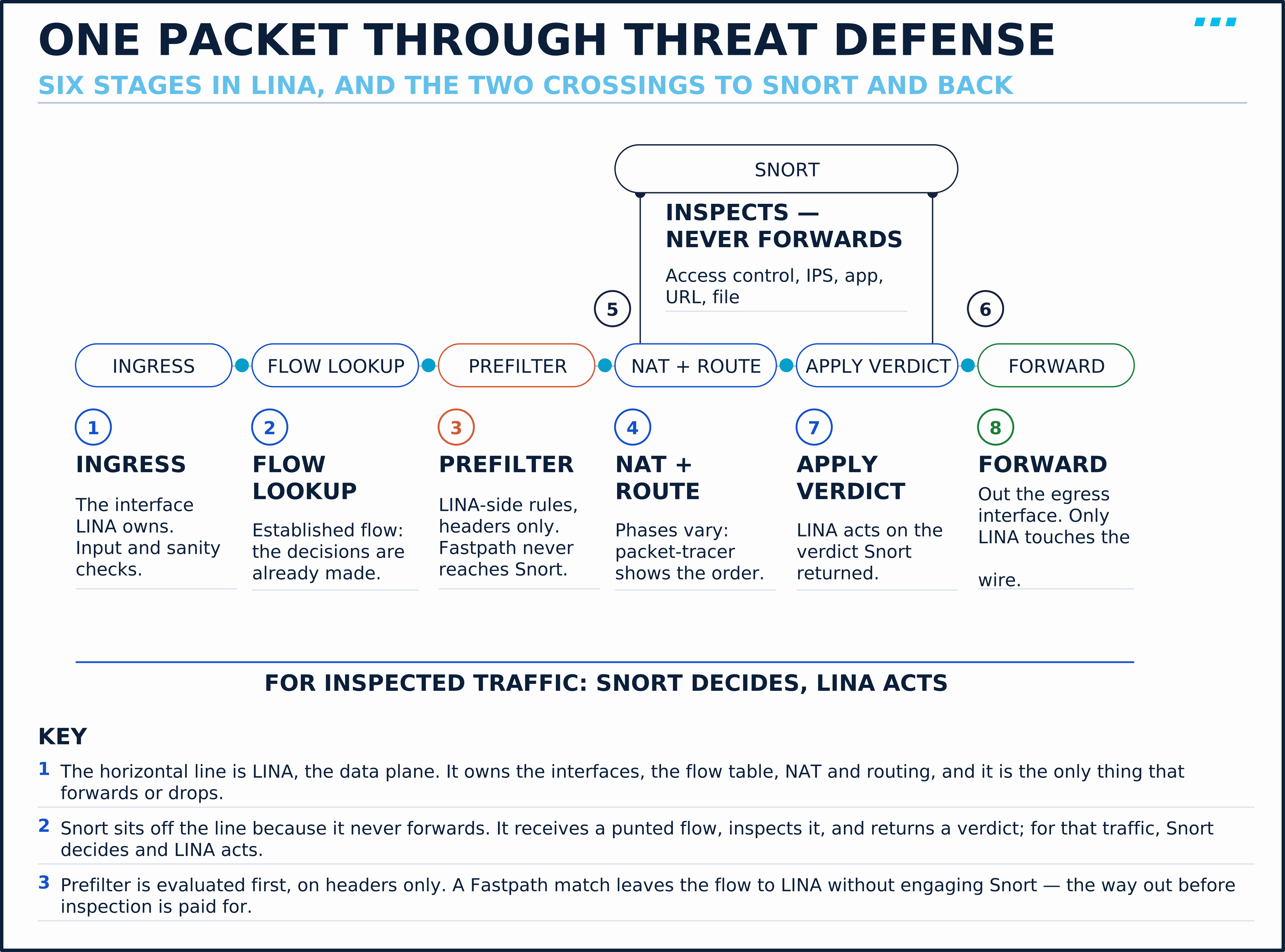
The figure is schematic: it shows which process owns each step, not a fixed per-packet order. NAT and routing can fall on either side of the access checks and the handoff to Snort, and the LINA-side prefilter rules sit on the line while the Snort-side ones are part of step 6.
Step 3 is the one worth dwelling on. A prefilter Fastpath is how a flow is excused from deep inspection before the cost of inspection is paid. That is why prefilter is a separate policy from access control rather than a rule type inside it: access control’s richer criteria — application, URL, user — are evaluated in the Snort stage, so a rule that used them could not be decided before the flow reaches Snort. Prefilter matches on headers because it is evaluated first.
A backup replication stream between two data centres is saturating a Threat Defense device and the intrusion events it generates are all false positives. What is the architecturally correct fix?
If the owner has classified that flow as trusted and accepts losing its inspection: a prefilter rule with a Fastpath action matching it. Tuning the intrusion policy would reduce the noise but not the cost — the traffic would still be handed to Snort and inspected. Fastpath means the flow is handled by LINA alone. The tradeoff is honest and total: you have chosen not to inspect that traffic — no intrusion, application, URL or file inspection — so the decision belongs to whoever owns the risk, not to whoever owns the CPU graph.
Concept: Three Form Factors, One Software
The same two processes run on three quite different things.
Appliance. Purpose-built Secure Firewall hardware, where, depending on the platform, dedicated hardware accelerates cryptographic and flow-handling work — though any published throughput figure still depends on traffic mix, inspection and decryption settings. This is the right answer when throughput, interface density, or port types (high-speed optics) are the binding constraint.
Threat Defense Virtual (FTDv). The same software as a virtual machine (see the FTDv getting started guide), running on a hypervisor on-premises or on a public cloud provider. Performance depends on the vCPU and memory you give it, the platform and virtual networking under it, and the traffic and inspection it carries; Cisco sizes FTDv in licensed tiers, and the tier sets the envelope. FTDv is also available on supported public-cloud platforms, where the firewall sits in the cloud’s own virtual network. This is objective 1.4’s territory, and its appeal is not usually cost: it is that a firewall can be instantiated by the same automation that instantiates the workloads it protects, in a place where you cannot rack anything.
Multi-instance. A single supported chassis carved into container instances (multi-instance mode), each running a complete, independent Threat Defense — its own LINA, its own Snort, its own policy, and its own upgrade schedule (within the chassis’s compatibility rules). Contrast this with native mode, where one Threat Defense instance owns the whole chassis. Each instance gets dedicated CPU cores rather than time-sliced ones, which is what makes the isolation meaningful.
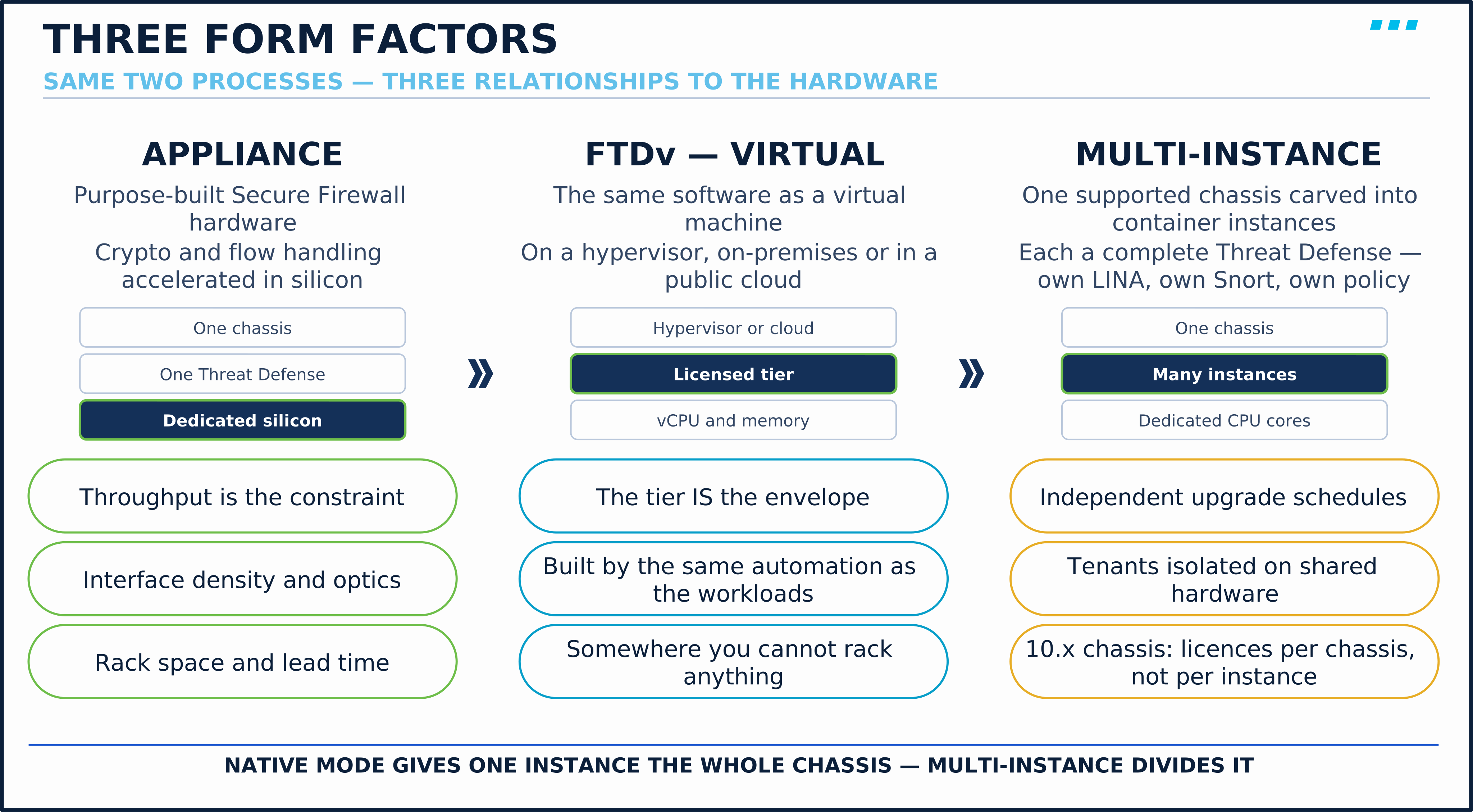
The upgrade property is usually the deciding one. Two business units sharing a chassis in multi-instance mode can be upgraded on different weekends; in native mode they cannot, because there is only one thing to upgrade.
Multi-instance, clustering and high availability are three different answers and are easy to blur. Multi-instance divides one chassis into many firewalls. Clustering joins many devices into one logical firewall for throughput. High availability pairs two devices so one can take over from the other. They combine in real designs, which is exactly why the distinction has to be clean in your head first.
Terminology: The Managers — FDM, FMC, FMCv and Cloud-Delivered FMC
A Threat Defense device is configured by exactly one manager at a time, and the choice is consequential: the question at the end of this section prices what changing it costs.
Secure Firewall Device Manager (FDM) runs on the device itself. It manages that one device (or one high-availability pair), needs no additional infrastructure, and is a reasonable answer for a branch or a single-firewall site. What it cannot do is manage a fleet.
Secure Firewall Management Center (FMC) — objective 3.5.c — is the multi-device manager, available as hardware appliances or as FMCv, the virtual form, which you run yourself on-premises or on a supported public cloud. FMC is what gives you shared policies and reusable objects across a fleet, correlated event analysis from many sensors at once, clustering, and centralised, staged upgrades.
FMCv is licensed by device count: Cisco sells FMCv entitlements to manage 2, 10, 25 or 300 devices, and FMCv300 is a separate, larger image built for the biggest fleets. Pick the entitlement tier for the fleet you expect, not the one you have, then meet that model’s published resource requirements — adding entitlement is routine, but outgrowing the image you deployed is a platform change.
Cloud-delivered FMC (cdFMC), delivered through Cisco Security Cloud Control, is FMC-style management that Cisco hosts, within its own supported-feature list. You stop owning the manager’s own deployment, maintenance and upgrade — which for many organisations is the actual motivation, since an on-premises FMC is itself a server somebody has to patch and back up. This is the other half of objective 1.4’s “on-premises and cloud management” pairing.
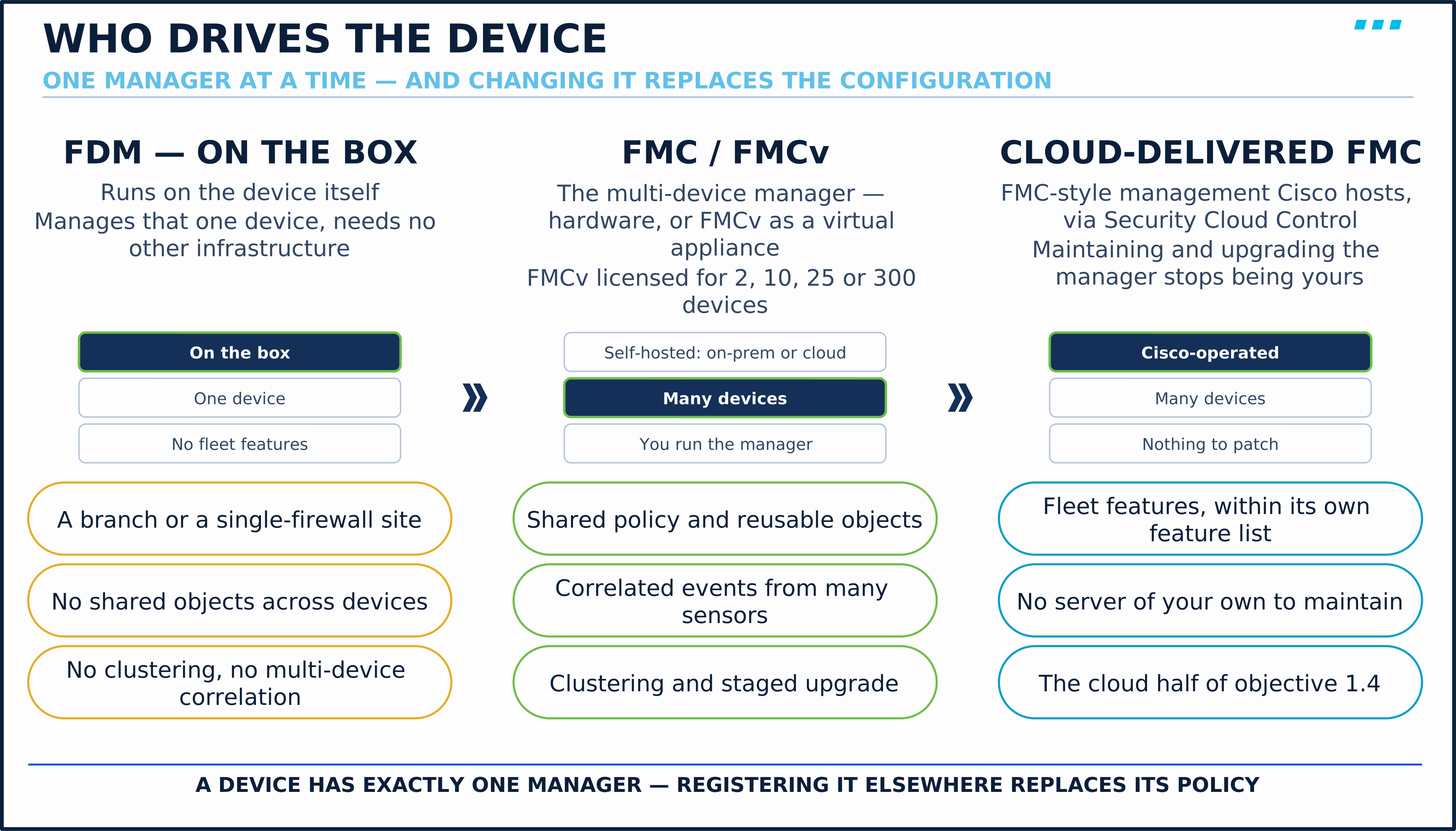
A site runs one Threat Defense device managed by FDM. It is adding a second device with an identical policy and wants both managed from FMC. What does moving the first device to FMC actually cost?
Unless a supported migration workflow is used, the existing device’s policy does not come with it. Switching a device from FDM to FMC replaces its managed configuration, so the FDM policy has to be migrated or rebuilt rather than adopted. This is why the manager decision is worth making deliberately at the point of first deployment even for a single device — “we will move to FMC later if we grow” is a real cost deferred, not avoided.
Terminology: The Licence Map — What Each One Unlocks
Licensing is assigned per managed device in FMC, and it is the last piece of the architecture because it determines which of the policies above FMC will deploy to a device.
| Licence | What it unlocks |
|---|---|
| Essentials | The firewall itself: interfaces, routing, NAT, layer 3/4 access control, user and application control, site-to-site VPN. Required on every managed device. (Remote-access VPN adds a Secure Client licence.) |
| IPS | Intrusion policies, file control, and Security Intelligence (blocklists by IP, URL and domain). |
| Malware Defense | Malware disposition lookups and analysis in file policies. Requires IPS. |
| URL Filtering | URL rules matched by category and reputation, rather than by literal URL. |
Three properties of this map are worth more than the table itself.
First, Essentials is the floor, not a tier — the three subscriptions add to it rather than replacing it, and Essentials is the required base licence for everything a managed Threat Defense does.
Second, and most useful in practice: a missing feature licence shows up as a refused deployment. You can author an access control rule matching a URL category for a device with only Essentials, but FMC blocks deploying a feature whose licence isn’t enabled or assigned to the device; it doesn’t ship a rule that quietly never matches. That inverts the usual troubleshooting instinct — the symptom is a refused deploy, not traffic behaving strangely. (Expiry and out-of-compliance states are different: they follow the Smart Licensing policy, and existing function can continue while FMC raises alerts.)
Third, before you cost a multi-instance design: Cisco’s 10.x multi-instance documentation (Secure Firewall 3100, 4200 and 6100) states that “All licenses are consumed per chassis and not per instance” — “Feature licenses are assigned to each instance, but you only consume one license per feature per chassis.” Carving one of those chassis into six instances does not multiply the licence bill by six, which is a meaningful part of why the option is attractive and easy to get backwards when reasoning from the per-device model above.
The licence boundaries roughly follow the LINA/Snort line, which makes the map easier to remember than four names in a list. Essentials covers the firewall LINA runs, plus the application and user conditions Snort evaluates for access control. IPS, Malware Defense and URL Filtering each unlock a deeper Snort capability. It is a memory aid, not a rule: remote-access VPN runs in LINA and still needs its own Secure Client licence.
🔬 See It in the Lab: Find Both Processes on One Device
This runs against FTD-EDGE-01 and FMC-01, both left running by M1 · Lab 1: Stand Up the SNCF Firewall Lab — FTD, FMC and the Traffic Generators, driven from WS-ADMIN-01. Nothing in Steps 1 to 4 changes configuration — the goal is to see the two processes the lesson has been describing, on a real device.
Step 1 — confirm what the device is and who manages it. SSH to FTD-EDGE-01’s management address and use the Threat Defense CLI, which is the CLISH shell, not LINA:
> show version
------------------[ FTD-EDGE-01 ]-------------------
Model                     : Cisco Secure Firewall Threat Defense for KVM (75) Version 10.0.0 (Build 140)
UUID                      : 1da06a12-b9c3-11f1-b7bc-9b4e5d458458
LSP version               : lsp-rel-20260923-1943
VDB version               : 437
----------------------------------------------------
show version names the model and software version — here Threat Defense Virtual on KVM, the form factor objective 1.4 is about. Then:
> show managers
No managers configured.
That is a device with no manager — this lab’s FTD-EDGE-01 before onboarding, as Onboarding Threat Defense to FMC: Manager Modes, Registration and Initial Setup also measures after a registration is deleted. After onboarding, show managers names the FMC it is registered to and its registration state. This is the first thing to check when a device is not accepting policy from FMC: a device registered to no manager, or to a different one, can’t receive that FMC’s deployments.
Step 2 — cross into LINA. The ASA-derived data plane has its own CLI, reached deliberately:
> system support diagnostic-cli
firepower# show interface ip brief
firepower# show conn
firepower# show nat
firepower# show route
Everything in this prompt is LINA. The connection table you get from show conn is the flow table from step 2 of the packet walk above; show nat is step 4. Note that you had to ask for this CLI — the default Threat Defense prompt is not it, which is itself a reminder that LINA is a component of the device rather than the whole of it.
Step 3 — see both processes at once. Leave the diagnostic CLI and drop to the underlying shell:
firepower# exit
> expert
admin@FTD-EDGE-01:~$ ps -eo pid,comm | grep -E 'lina|snort' | grep -v grep
 4451 fdb_update_lina
 4728 lina_monitor
 4773 lina
14470 snort3
14495 snort3_crash_ha
Two processes matter in that output: lina, and snort3 — on this lab’s FTDv 10.0 the inspection engine is Snort 3. (The others are their helpers.) Seeing them side by side on one device is the entire point of this exercise — the architecture in the Terminology sections above is not a conceptual model layered over the product, it is two processes you can list.
The command above only observes; the shell is a troubleshooting interface, and Cisco TAC uses it that way. Undocumented or unapproved changes made from it are not supported and can put the device into a state FMC cannot reconcile. Look; do not edit.
Step 4 — read the licence map on the real manager. From the browser on WS-ADMIN-01, open FMC-01 and navigate to Administration › Licenses › Smart Licenses. The Smart Licenses table lists the licence types from the table above — Essentials, Malware Defense, IPS, URL and the rest — each with a count of the devices that hold it:

Every count reads (0) at this point in the course: FTD-EDGE-01 is not registered to FMC-01 until the next lesson, and a licence is assigned per registered device. Come back to this page after onboarding and the Essentials row lists it — that per-device assignment is where the deployment-time enforcement in the Terminology section originates.
Step 5 — see where a Fastpath rule lives (read-along). This step ran on the course’s disposable harness firewall (the one Implementing Transparent Mode: Bridge Groups, BVIs and Layer 2 Behaviour uses), and it changed that device’s configuration, so read it rather than repeat it here. A prefilter policy with one Fastpath rule, deployed ahead of an access control policy whose default is Block All Traffic, appears at the top of LINA’s own access list as a trust entry. Before any traffic:
> show access-list CSM_FW_ACL_
access-list CSM_FW_ACL_; 7 elements; name hash: 0x4a69e3f3
access-list CSM_FW_ACL_ line 1 remark rule-id 268434442: PREFILTER POLICY: PF-SNCF-HARNESS-TEST
access-list CSM_FW_ACL_ line 2 remark rule-id 268434442: RULE: Fastpath-BRIDGE-A-to-B
access-list CSM_FW_ACL_ line 3 advanced trust ip ifc bg-a any ifc bg-b any rule-id 268434442 event-log flow-end (hitcnt=0)
...
access-list CSM_FW_ACL_ line 11 remark rule-id 268434440: ACCESS POLICY: ACP-SNCF-HARNESS - Default
access-list CSM_FW_ACL_ line 12 remark rule-id 268434440: L4 RULE: DEFAULT ACTION RULE
access-list CSM_FW_ACL_ line 13 advanced deny ip any any rule-id 268434440 (hitcnt=3) (Last Hit=04:14:48 UTC Sep 27 2026)
Then five pings across the bridge from the switch — four answered, through a policy whose default blocks everything — and the same entry again:
> show access-list CSM_FW_ACL_ | include 268434442
access-list CSM_FW_ACL_ line 1 remark rule-id 268434442: PREFILTER POLICY: PF-SNCF-HARNESS-TEST
access-list CSM_FW_ACL_ line 2 remark rule-id 268434442: RULE: Fastpath-BRIDGE-A-to-B
access-list CSM_FW_ACL_ line 3 advanced trust ip ifc bg-a any ifc bg-b any rule-id 268434442 event-log flow-end (hitcnt=4) (Last Hit=04:33:14 UTC Sep 27 2026)
The prefilter rule matched in LINA’s access list, ahead of the access control policy that would have blocked the traffic. (The test policy was removed afterwards; the harness lesson doesn’t use it.)
You run show managers and it reports no configured manager, but FMC’s Device Management page still lists FTD-EDGE-01. What is the state of the world?
The registration is broken, and FMC’s record may be stale. FMC lists what it believes it manages; show managers is the device’s own view of its configured manager. Check FMC’s device health and the connectivity between them too before deciding which side is wrong. This disagreement is common after a device is re-imaged or its manager is reconfigured locally. Check registration state, connectivity and the registration key/NAT ID first, and follow the release’s re-registration procedure; deleting the device from FMC and re-adding it is the last resort, because it discards the device’s policy assignment. Checking the device side first is the habit worth forming, because the manager’s view is the one that can be confidently wrong.
🎥 [Video: the two-engineers framing; one packet traced across LINA’s flow lookup, prefilter fork and the punt to Snort; the verdict returning to LINA; the three form factors side by side; the manager column with the licence row underneath. Matches video.script_outline. Runtime: ~9 minutes]
Key Takeaways
Two things about how the device works:
- For inspected traffic, Snort decides and LINA acts. LINA owns the interfaces, flows, NAT, routing and VPN, makes its own header-level decisions, and is the only process that forwards or drops. Snort inspects and returns a verdict. Every behaviour in this lesson follows from that order — including why traffic during a Snort outage is a data-plane setting (Snort Fail Open on an inline set), not Snort’s decision.
- A prefilter Fastpath is the way out before inspection is paid for. Prefilter is evaluated before access control, on header-based criteria only, and a Fastpath match leaves the flow to LINA without engaging Snort. It matches on headers because it is evaluated first, not arbitrarily.
Those two are the architecture. The remaining three are the decisions you make on top of it — hardware, who drives the device, and what they are allowed to deploy.
- Appliance, FTDv and multi-instance are the same software with different relationships to hardware — silicon acceleration, an automation-friendly VM, or one chassis carved into independently upgradable instances. Keep multi-instance, clustering and high availability distinct: divide one, join many, pair two.
- The manager is a deliberate, costly choice. FDM on-box for one device; FMC or FMCv on-premises for a fleet, sized by a device-count entitlement (FMCv300, the largest FMCv tier); cloud-delivered FMC when you would rather not run the manager yourself. Changing a device’s manager replaces its managed configuration unless a supported migration workflow is used.
- Licences roughly follow the LINA/Snort line. Essentials covers the firewall; IPS, Malware Defense and URL Filtering each unlock a deeper Snort capability; remote-access VPN needs a Secure Client licence. A feature licence that isn’t enabled or assigned surfaces as a refused deployment, not as a rule that silently never matches.
The next lesson, Onboarding Threat Defense to FMC: Manager Modes, Registration and Initial Setup, onboards a device to FMC for real; its registration handshake is the practical form of the manager relationship described here.
Knowledge Check
No grade, no timer. Wrong picks turn coral — change your answer until everything's green.
1 · A flow is matched by a prefilter rule with a Fastpath action. What happens to the rest of that flow?
Prefiltering is evaluated before the access control policy, and Cisco's prefilter TechNote defines Fastpath as: 'The flow is handled only by LINA without the need to engage the Snort engine.' That is the point of having prefilter as a separate, header-only policy: a decision to skip deep inspection has to be made before the flow is handed to Snort, because once it has been, the cost has been paid.
2 · Snort is restarting on a Threat Defense device whose inline set carries production traffic. What determines whether that traffic keeps flowing?
Snort returns verdicts; LINA is what forwards or drops. So the behaviour when Snort cannot return a verdict has to be a data-plane decision. For an inline set FMC exposes it as Snort Fail Open, with separate Busy and Down conditions; by default traffic passes uninspected when Snort is down and is dropped when it is busy. Expecting Snort to decide what happens when Snort is down is the most common way this architecture gets misremembered.
3 · You need to build an access control rule that blocks traffic to sites categorised as Gambling with a reputation of Questionable or worse. The device has only the Essentials licence. What happens?
You can author the rule without the entitlement, but FMC blocks deployment of a feature whose licence isn't enabled or assigned to the device — here, URL Filtering for category-and-reputation rules. So the symptom of a missing feature licence is a refused deployment rather than a rule that quietly never matches. (What happens when a subscription later expires or falls out of compliance follows the Smart Licensing policy, which is a separate question.)
4 · What distinguishes a multi-instance chassis from a native-mode chassis running a single Threat Defense?
Native mode gives one Threat Defense instance the whole chassis. Multi-instance carves the chassis into container instances, each with dedicated CPU cores and its own complete Threat Defense — its own LINA, its own Snort, its own policy, and its own upgrade schedule. That last property is usually the reason it is chosen: separate tenants or business units can be upgraded independently on shared hardware. Several chassis acting as one logical device is clustering, and an HA pair is two devices where one is standby.
You just proved the method works — the rest of the mountain is waiting. All-Access unlocks every lesson in every course — $489/yr, with $647 of founders bonuses while the window is open.
Reserve founders rate →📚 Official Documentation — every source behind this page · verified 27 Sept 2026
Revision 10.0.x, updated 2025-12-03 · accessed 21 Sept 2026
Revision 10.0.x, current as published · accessed 21 Sept 2026
Revision Updated 2026-08-31 · accessed 21 Sept 2026
Revision Current as published · accessed 21 Sept 2026
Revision 10.0.x, current as published · accessed 21 Sept 2026
Revision Updated 2026-08-18 · accessed 27 Sept 2026
Revision 10.0.x, current as published · accessed 21 Sept 2026
Revision Current as published · accessed 21 Sept 2026