Configuration Lesson · Site-to-Site VPNs: IPsec, DMVPN, FlexVPN & GETVPN
Implement DMVPN: mGRE, NHRP & IPsec Protection Across the Phases
Free Lesson All-Access unlocks every lesson in every course — $489/yr, with $647 of founders bonuses while the window is open, and it carries The Next Year Promise. Reserve founders bonuses →
Objective 1.2 is “Implement DMVPN”; 4.3 asks you to identify the VPN technology from configuration output. Walking out of this lesson, you can:
- Build a DMVPN hub and spokes on IOS with one mGRE interface each, and prove every spoke registered
- Tell Phase 1, 2 and 3 apart from configuration and routing output together, and say what each costs
- Read the NHRP redirect and resolution that take the hub out of a spoke-to-spoke path, packet by packet
- Protect the cloud with IKEv2 and IPsec without touching the routing, and recognise the log line that says one end is not protected yet
No additional IOS feature licence is needed for this lab on the CML IOSv image; CML itself carries its own entitlement.
Overview
Dynamic Multipoint VPN (DMVPN) lets any branch reach any other branch over a tunnel nobody configured, built the moment traffic needs it, and encrypted once you add IPsec. Get the design wrong and branch-to-branch traffic hairpins through headquarters, doubling its latency and loading the hub with traffic that was never meant for it. This lesson builds a hub and two spokes, watches the hub take itself out of the path in a real capture, then encrypts the whole cloud.
Terminology: mGRE, NHRP and the NBMA Address
Three pieces make DMVPN work:
- mGRE (multipoint GRE) — GRE (Generic Routing Encapsulation) wraps one IP packet inside another; multipoint GRE does it on one tunnel interface with no fixed destination. Cisco’s DMVPN guide puts it simply: it “allows a single GRE interface to support multiple IPsec tunnels.” One mGRE interface serves every peer the router has, up to the platform’s own scaling limits.
- NHRP (Next Hop Resolution Protocol, RFC 2332) — the address book. It maps a tunnel address to the underlay address the GRE packet must be sent to.
- NBMA address — that real address. NHRP calls the underlay a non-broadcast multi-access (NBMA) network, so a peer’s underlay address is its NBMA address. On the internet that is usually a public address, but it can be private or behind NAT.
The hub runs as the next-hop server (NHS). Every spoke registers its tunnel-to-NBMA mapping with the hub, so the hub knows where every spoke lives for as long as each registration stays valid. A spoke only needs to be told where the hub is.
Think of NHRP as ARP for a tunnel. ARP turns an IP address into a MAC address on one segment. NHRP turns a tunnel IP into the underlay IP to send GRE to. It answers by registration and resolution, not broadcast, because the internet does not broadcast.
Design Choice: Three Phases, One Cloud
The hub runs the same mGRE tunnel in all three phases. (Classic Phase 1 spokes run point-to-point GRE to the hub instead; Phase 2 and 3 spokes run mGRE too.) What changes is what the routing protocol (EIGRP, Enhanced Interior Gateway Routing Protocol, in this lesson) advertises and what NHRP is allowed to do with it:
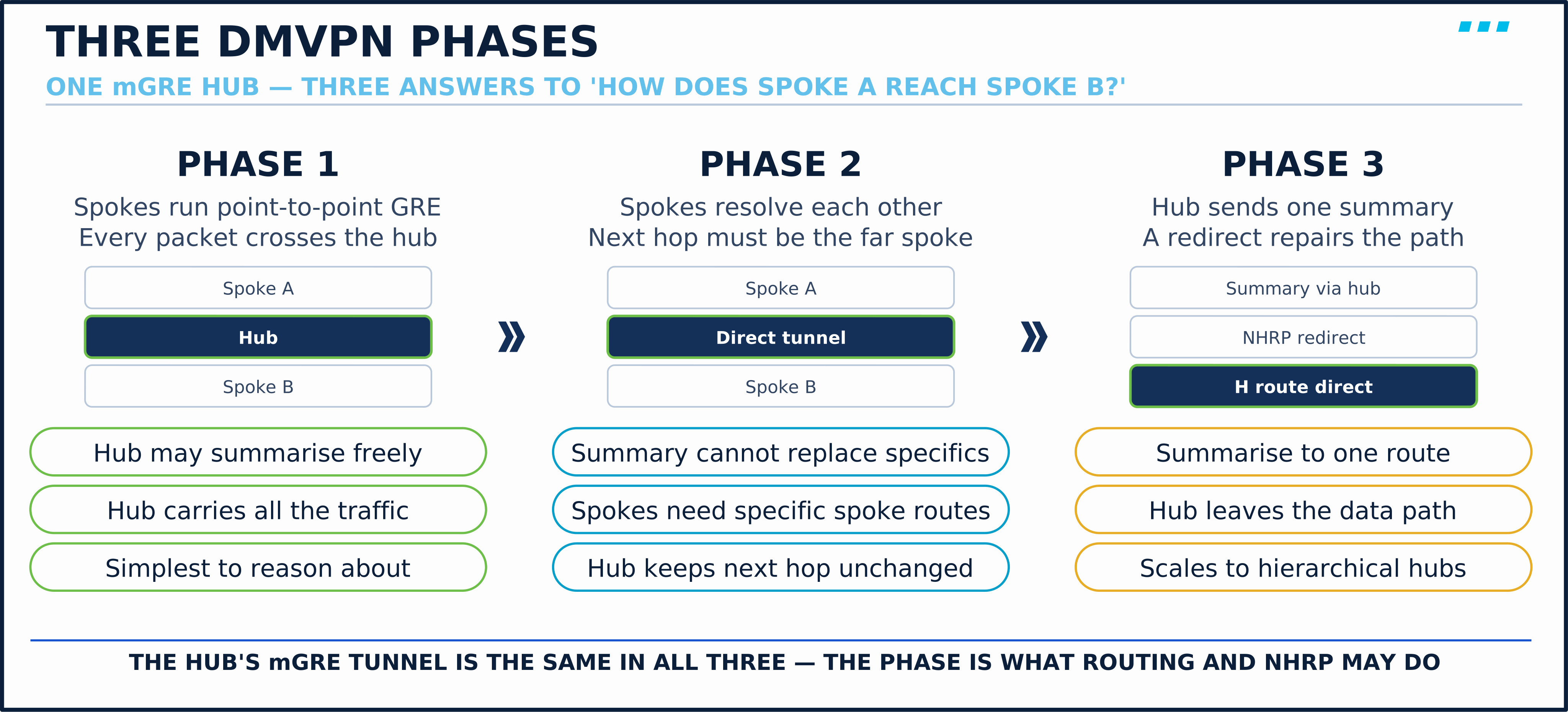
Phase 3 is the one to build today. It keeps Phase 2’s direct path and drops Phase 2’s routing burden. Cisco’s NHRP shortcut-switching guide lists the payoff as letting the hub “advertise the few or one summary route to each spoke rather than all of the individual spoke routes.”
💬 Real Talk: If you are building a new DMVPN on current IOS, start with Phase 3 unless something specific rules it out, such as a platform or release that cannot run it or a migration you have to stage. Phase 2 pays for its direct paths with specific routes: every spoke needs a route to each destination it should reach directly, with the far spoke as next hop. The day someone adds a summary on the hub to shrink those tables, spoke-to-spoke traffic quietly starts hairpinning through headquarters again. Phase 3 gives the same direct paths behind one summary. Learn Phase 2 well enough to recognise it in someone else’s config, and plan its migration.
How do you tell the phase from configuration output alone (objective 4.3)?
Read the indicators together; no single line decides it. The configuration that tells them apart, side by side:
- Phase 1: the spoke’s tunnel has
tunnel destination <hub>and notunnel mode gre multipoint. Every spoke-to-spoke packet crosses the hub. - Phase 2: spokes run
tunnel mode gre multipoint, and the hub’s tunnel hasno ip split-horizon eigrp 100andno ip next-hop-self eigrp 100, so a spoke’s routes arrive at the other spokes with the far spoke as next hop. The spokes need those specific routes: a hub may advertise summaries alongside them, but a summary that replaces them sends spoke-to-spoke traffic back through the hub. - Phase 3:
ip nhrp redirecton the hub,ip nhrp shortcuton the spokes, usually a summary such asip summary-address eigrp 100 ...on the hub, and H routes in the spokes’ tables once traffic has flowed. A summary on its own does not decide the phase; the redirect and shortcut commands do.
Engine Behavior: How Phase 3 Takes the Hub Out of the Path
The spoke’s routing table never changes its mind about the summary. NHRP installs a more specific route that wins the lookup instead.
Here is the sequence on the first flow from a host behind one spoke to a host behind another. The lab section below shows it in a capture:
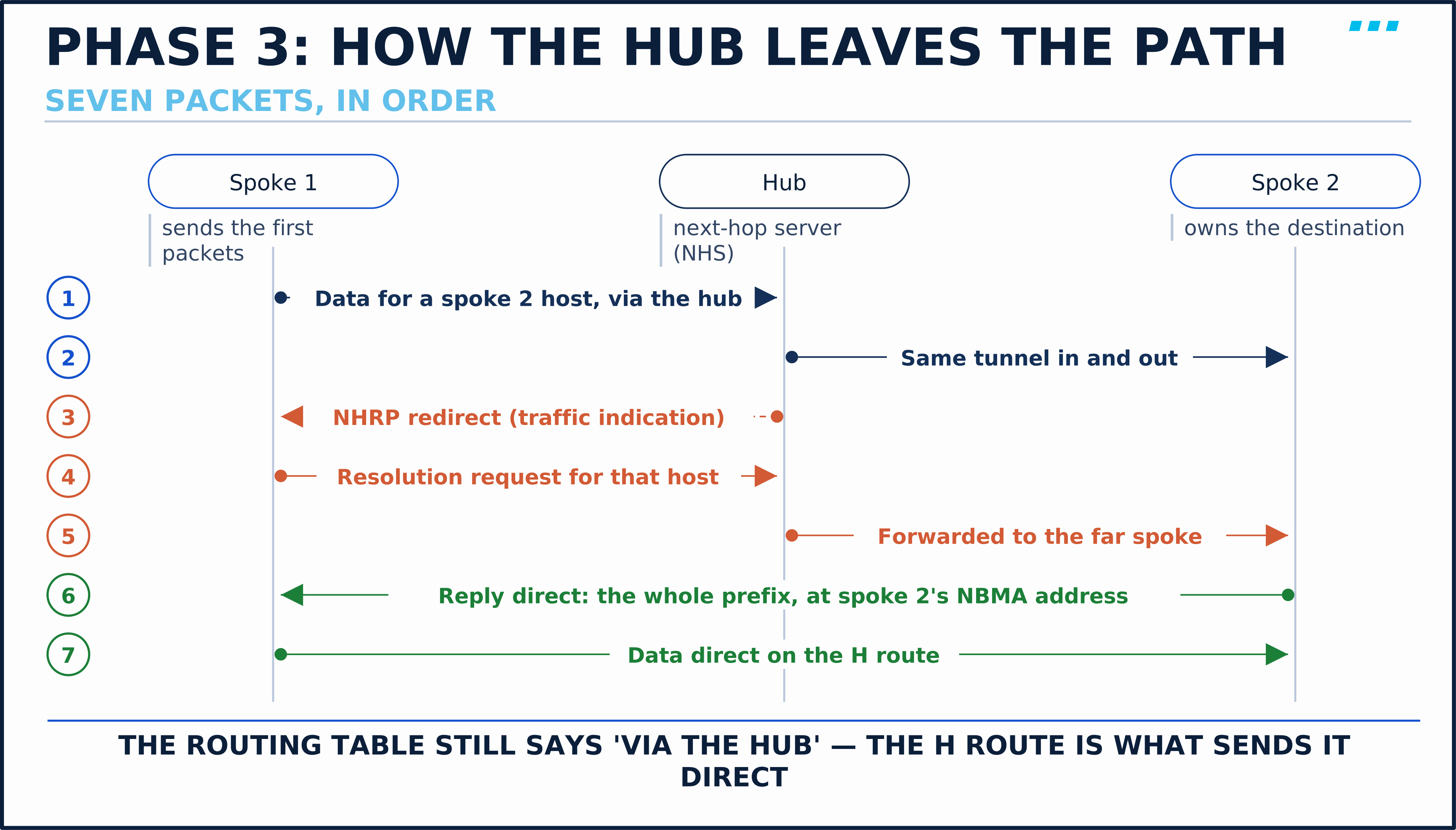
- The first packets follow the summary to the hub. The sending spoke has no better route, so it sends the traffic to the hub.
- The hub forwards them to the owning spoke and notices a hairpin. In Cisco’s words, the hub “detects that this data packet has been received on and forwarded out the same tunnel interface.”
- The hub sends an NHRP redirect (a traffic indication) back to the sending spoke. The traffic still arrives; the redirect is advice, not a drop.
- The spoke asks who owns the destination. It sends a resolution request for the destination host along the routed path, through the hub.
- The hub forwards the request to the spoke that owns the prefix.
- The owning spoke answers directly. It replies straight to the sending spoke’s NBMA address with the prefix it routes the destination by (here the branch’s whole
/24), not just the one host. - The spoke installs an NHRP route for that prefix, and following packets to it go direct. That shortcut is cached per prefix, not per flow: a new connection to a host behind the same spoke uses the direct path at once.
- Symptom: Spoke-to-spoke traffic works but always shows the hub as a hop, in a design meant to be Phase 3.
- Root Cause:
ip nhrp redirectis missing from the hub. Without it the hub forwards the hairpin forever and never tells the spoke. - Fix: Add it on the hub’s tunnel. Cisco recommends it on every DMVPN node, not just the hub, so that any node that forwards traffic in and out of the same multipoint tunnel can send the redirect. That matters in hierarchical designs, where hubs and regional hubs forward between peers.
Design Choice: Protecting the Cloud with IKEv2
GRE carries the traffic but encrypts nothing. tunnel protection ipsec profile wraps every GRE packet on the tunnel in ESP (Encapsulating Security Payload; with the AES transform this lesson uses, it encrypts as well as authenticates). Because the tunnel has no fixed destination, the IPsec sessions are built on demand: one to the hub when the spoke registers, and one to each spoke it resolves.
Three decisions go into the profile:
- Transport mode. GRE already provides the outer IP header that carries the tunnel, so tunnel mode only adds a second one. Cisco’s DMVPN guide requires transport mode for its NAT-transparency support, which makes it the normal choice.
- A wildcard pre-shared key. Any spoke can appear from any address, so the hub’s keyring matches peer
0.0.0.0 0.0.0.0. In production, use certificates with the peer identity checked: a single shared key across every branch means one compromised branch holds the key to all of them. - An explicit IKEv2 proposal. On this lab’s IOSv 15.9 image, the IKEv2 smart-default proposal offers Diffie-Hellman groups 5 and 2 only (the 15M&T IKEv2 guide lists both; other releases differ). Both are legacy MODP groups (modular-exponentiation Diffie-Hellman, 1536 and 1024 bits) that no new deployment should use. Leave the default alone and your cloud is keyed with group 5. Group 19, a 256-bit elliptic-curve group, is a sound current choice.
🔬 Lab Starting State
This lesson starts from the SVPN lab’s baseline. Before you configure anything:
- ✅
R-ISP-01routes between the perimeter transit (198.51.100.254), branch 1 (192.0.2.1) and branch 2 (192.0.2.5), and knows no private prefix - ✅
R-HUB-01,R-BRANCH-01andR-BRANCH-02have their outside and LAN addresses and a default route toR-ISP-01 - ✅
WS-BRANCH-01(10.20.1.10) andWS-BRANCH-02(10.20.2.10) use their branch router as the gateway - ✅
R-BRANCH-01can ping198.51.100.10, andWS-BRANCH-01cannot reach10.20.2.10— nothing private is routable until a tunnel exists
Not all checkboxes green? See the SVPN lab definition in labs/SVPN/blueprint.yaml, and import labs/SVPN/cml/svpn.yaml into CML.
Lab Reference
This lesson uses the SVPN lab topology. All examples reference these specific devices and IP addresses.
| Device | Interface | Address | Role |
|---|---|---|---|
R-HUB-01 | GigabitEthernet0/0 | 198.51.100.10/24 | Hub outside, on the perimeter transit (NBMA address) |
R-HUB-01 | Loopback10 | 10.10.10.254/24 | HQ servers prefix |
R-HUB-01 | Tunnel0 | 10.255.10.254/24 | DMVPN hub, NHS |
R-BRANCH-01 | GigabitEthernet0/0 | 192.0.2.2/30 | Spoke 1 outside (NBMA address) |
R-BRANCH-01 | GigabitEthernet0/1 | 10.20.1.1/24 | Branch 1 LAN gateway |
R-BRANCH-01 | Tunnel0 | 10.255.10.1/24 | DMVPN spoke |
R-BRANCH-02 | GigabitEthernet0/0 | 192.0.2.6/30 | Spoke 2 outside (NBMA address) |
R-BRANCH-02 | GigabitEthernet0/1 | 10.20.2.1/24 | Branch 2 LAN gateway |
R-BRANCH-02 | Tunnel0 | 10.255.10.2/24 | DMVPN spoke |
R-ISP-01 | Gi0/0, Gi0/2, Gi0/3 | 198.51.100.254, 192.0.2.1, 192.0.2.5 | The internet |
WS-BRANCH-01 | ens2 | 10.20.1.10/24 | Branch 1 host |
WS-BRANCH-02 | eth0 | 10.20.2.10/24 | Branch 2 host |
Topology
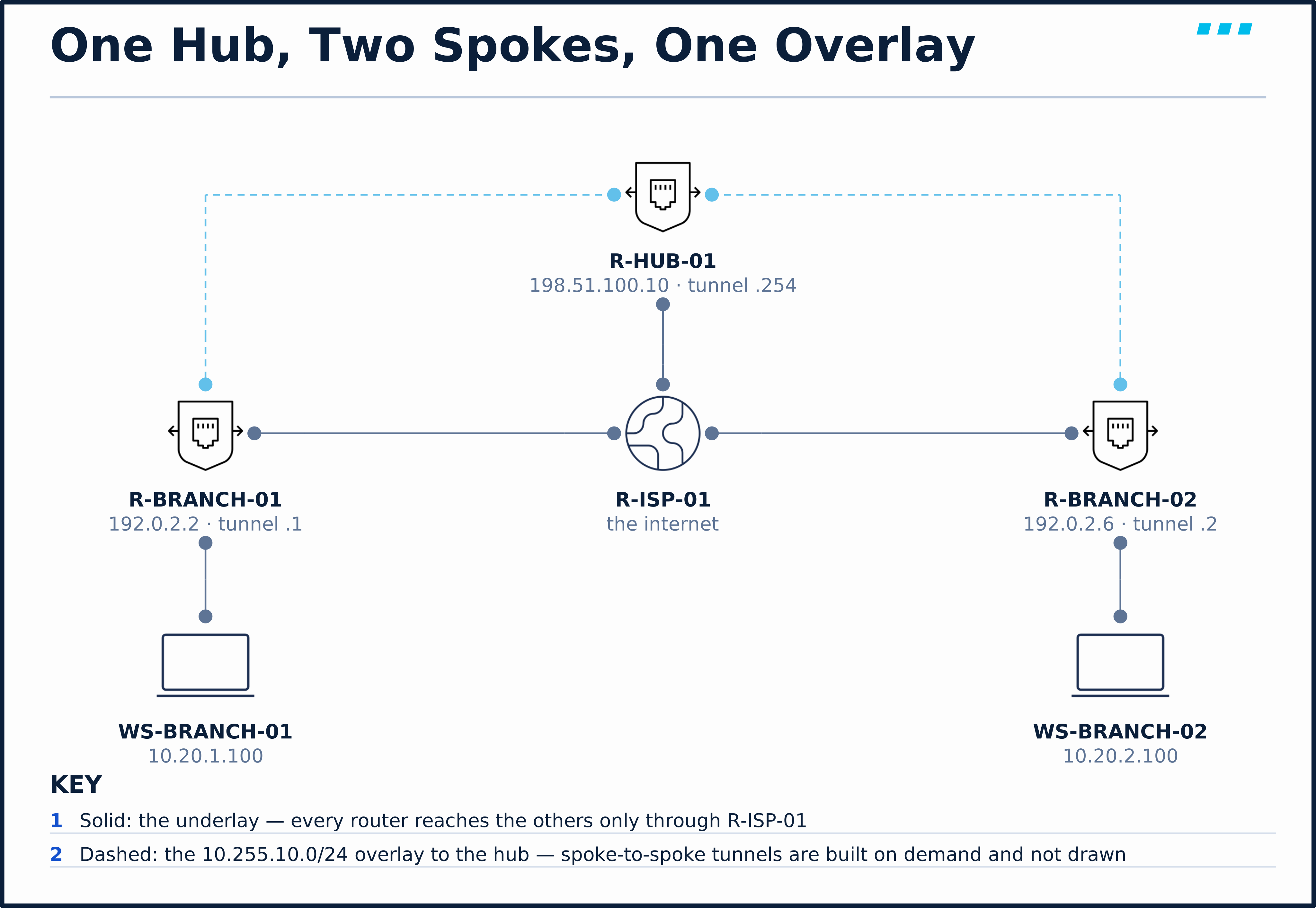
The hub sits beside the HQ firewalls, not behind them. That makes it a dedicated VPN concentrator: the overlay comes up without changing a single firewall rule, and no other lesson’s traffic moves. The underlay is deliberately dumb. R-ISP-01 knows only the routable underlay addresses (documentation ranges standing in for the internet), so any private traffic that crosses the lab is crossing a tunnel.
Configuration
Scenario 1: Put Both Branches and HQ on One DMVPN Cloud
The two branches need to reach HQ and each other, and a third branch next quarter must not mean editing the other two.
| Parameter | Value |
|---|---|
| Tunnel interface | Tunnel0 on every router |
| Overlay | 10.255.10.0/24 — hub .254, spokes numbered by site |
| NHRP network-id / tunnel key | 10 / 10 |
| Routing | EIGRP AS 100 over the tunnel; the hub sends one summary, 10.0.0.0/8 |
Step 1 — build the hub. On R-HUB-01:
! Step 1a: the multipoint tunnel, sourced from the outside interface
interface Tunnel0
 description DMVPN hub - NHRP next-hop server
 ip address 10.255.10.254 255.255.255.0
 no ip redirects
 ip mtu 1400
ip tcp adjust-mss 1360! Step 1b: NHRP — the address book, and the hub's two Phase 3 duties
ip nhrp network-id 10
ip nhrp map multicast dynamic
ip nhrp redirect
tunnel source GigabitEthernet0/0
tunnel mode gre multipoint
tunnel key 10! Step 1c: routing over the cloud — one summary down the tunnel
router eigrp 100
network 10.255.10.0 0.0.0.255
network 10.10.10.0 0.0.0.255
interface Tunnel0
ip summary-address eigrp 100 10.0.0.0 255.0.0.0ip nhrp map multicast dynamic adds each spoke to the multicast list as it registers, which is what lets EIGRP hellos reach the spokes at all. On this lab’s IOSv 15.9(3)M12 image it is also on by default: show running-config all lists it, and the running config omits it. Type it anyway; Cisco’s DMVPN examples configure it explicitly, and your hub’s software may not share this image’s default.
Step 2 — build a spoke. On R-BRANCH-01 (on R-BRANCH-02, use .2 and 10.20.2.0):
! Step 2a: same tunnel shape, the spoke's own address
interface Tunnel0
 description DMVPN spoke - registers with R-HUB-01
 ip address 10.255.10.1 255.255.255.0
 no ip redirects
 ip mtu 1400
ip tcp adjust-mss 1360! Step 2b: where the hub is, and permission to shortcut
ip nhrp network-id 10
ip nhrp nhs 10.255.10.254 nbma 198.51.100.10 multicast
ip nhrp shortcut
tunnel source GigabitEthernet0/0
tunnel mode gre multipoint
tunnel key 10! Step 2c: advertise the branch LAN
router eigrp 100
network 10.255.10.0 0.0.0.255
network 10.20.1.0 0.0.0.255ip nhrp nhs ... nbma ... multicast does three jobs on one line. It names the hub’s tunnel address, maps it to the hub’s NBMA address, and sends multicast (the EIGRP hellos) to it.
Type ip nhrp shortcut and then look for it: it is not there. On this IOSv image it is on by default, so the running configuration hides it, exactly as the hub hides ip nhrp map multicast dynamic. The saved end-state configurations at the end of this lesson were taken from these routers and omit both lines. To confirm a default is in force, read show running-config all, not show running-config.
ip mtu 1400 and ip tcp adjust-mss 1360 in Step 1a and 2a leave room for the headers the tunnel adds. ip mtu sets the IP MTU (maximum transmission unit) of the tunnel interface: the largest IP packet it forwards without fragmenting. ip tcp adjust-mss lowers the MSS (maximum segment size) option in TCP SYN and SYN-ACK packets crossing the interface whenever the advertised value is higher, so the two hosts agree on segments small enough to fit once the tunnel headers are added.
Verify: The hub sees both spokes register
R-HUB-01# show dmvpn
Legend: Attrb --> S - Static, D - Dynamic, I - Incomplete
	N - NATed, L - Local, X - No Socket
	T1 - Route Installed, T2 - Nexthop-override
	C - CTS Capable, I2 - Temporary
	# Ent --> Number of NHRP entries with same NBMA peer
	NHS Status: E --> Expecting Replies, R --> Responding, W --> Waiting
	UpDn Time --> Up or Down Time for a Tunnel
==========================================================================

Interface: Tunnel0, IPv4 NHRP Details
Type:Hub, NHRP Peers:2,

 # Ent  Peer NBMA Addr Peer Tunnel Add State  UpDn Tm Attrb
 ----- --------------- --------------- ----- -------- -----
     1 192.0.2.2           10.255.10.1    UP 00:01:25     D
     1 192.0.2.6           10.255.10.2    UP 00:00:35     D
Both spokes are D (dynamic): they registered themselves, and the hub has no configuration for either. Adding a third branch touches only the third branch.
Registrations are refreshed, not permanent. Cisco’s NHRP guide says a spoke re-registers every one-third of the NHRP holdtime unless ip nhrp registration timeout sets its own interval. On this IOSv image, show running-config all lists ip nhrp holdtime 600 and ip nhrp registration timeout 200, and the capture below shows the refresh arriving 200 seconds apart.
Verify: The spoke knows only the hub, and only the summary
R-BRANCH-01# show ip route eigrp | begin Gateway
Gateway of last resort is 192.0.2.1 to network 0.0.0.0

      10.0.0.0/8 is variably subnetted, 5 subnets, 3 masks
D        10.0.0.0/8 [90/27008000] via 10.255.10.254, 00:01:12, Tunnel0
One route to all of 10.0.0.0/8, via the hub. Branch 2’s LAN is nowhere in this table, which is the Phase 3 bargain.
Verify: The first trace uses the hub, the second does not
From WS-BRANCH-01:
WS-BRANCH-01:~$ traceroute -n -w 2 10.20.2.10
traceroute to 10.20.2.10 (10.20.2.10), 30 hops max, 46 byte packets
 1  10.20.1.1  2.155 ms  1.927 ms  1.936 ms
 2  10.255.10.254  7.003 ms  4.581 ms  4.480 ms
 3  10.255.10.2  12.901 ms  6.759 ms  5.583 ms
 4  10.20.2.10  4.805 ms  4.594 ms  4.713 ms
WS-BRANCH-01:~$ traceroute -n -w 2 10.20.2.10
traceroute to 10.20.2.10 (10.20.2.10), 30 hops max, 46 byte packets
 1  10.20.1.1  2.845 ms  2.665 ms  3.214 ms
 2  10.255.10.2  6.927 ms  4.805 ms  7.162 ms
 3  10.20.2.10  5.815 ms  6.049 ms  4.244 ms
Four hops became three with nothing reconfigured. The hub (10.255.10.254) is gone from the second trace. Here is why, on R-BRANCH-01:
R-BRANCH-01# show ip route | begin Gateway
Gateway of last resort is 192.0.2.1 to network 0.0.0.0

S*    0.0.0.0/0 [1/0] via 192.0.2.1
      10.0.0.0/8 is variably subnetted, 7 subnets, 3 masks
D        10.0.0.0/8 [90/27008000] via 10.255.10.254, 00:14:20, Tunnel0
C        10.20.1.0/24 is directly connected, GigabitEthernet0/1
L        10.20.1.1/32 is directly connected, GigabitEthernet0/1
H        10.20.2.0/24 [250/255] via 10.255.10.2, 00:01:50, Tunnel0
C        10.255.10.0/24 is directly connected, Tunnel0
L        10.255.10.1/32 is directly connected, Tunnel0
H        10.255.10.2/32 is directly connected, 00:01:50, Tunnel0
The EIGRP summary is unchanged. Two H (NHRP) routes appeared beside it, and 10.20.2.0/24 is more specific than 10.0.0.0/8, so it wins. That is Phase 3 in one table. show dmvpn agrees, now listing R-BRANCH-02 as a dynamic peer with attribute DT1 (dynamic, route installed).
— Download
Captured while R-BRANCH-01’s tunnel was being built. Open it and apply nhrp. Watch for:
- Packets 1–4 — Registration Requests to
198.51.100.10with no GRE key, sent beforetunnel key 10was typed. None is answered. - Packet 5 — the first request with key
0xa(10); packet 6 — the hub’s Registration Reply, 17 ms later. - Packets 103 and 104 — the next registration and its reply, about 200 seconds on.
— Download
Captured on the R-ISP-01–R-BRANCH-01 link. Open it and apply nhrp || icmp. Watch for:
- Packets 8, 10 and 12 — ICMP time-exceeded from
10.255.10.254: the first traceroute’s second hop is the hub. - Packet 14 — the NHRP Traffic Indication from the hub, carrying the original packet’s destination.
- Packet 17 — the spoke’s Resolution Request for
10.20.2.10, request ID 3, sent to the hub. - Packet 23 — the Resolution Reply for request ID 3, sourced from
192.0.2.6, not from the hub. - Packets 32 onward — the traceroute and replies run as GRE between
192.0.2.2and192.0.2.6directly. From here on, what still goes to the hub in this capture is EIGRP hellos (NHRP registration refreshes and hub-owned prefixes would too).
The reverse direction resolves too (packets 28 and 29): R-BRANCH-02’s replies hairpinned through the hub once, and it learned the path back to branch 1 the same way.
Scenario 2: Encrypt the Cloud Without Touching the Routing
Everything in Scenario 1 crossed the internet in clear GRE. Security wants it encrypted, with no change to routing and no outage longer than the cut-over itself.
| Parameter | Value |
|---|---|
| IKEv2 proposal | AES-CBC-256, SHA-256, DH group 19 |
| Authentication | Pre-shared key SVPN-lab-DMVPN-psk (lab only — see Production) |
| IPsec transform | esp-aes 256 esp-sha256-hmac, transport mode |
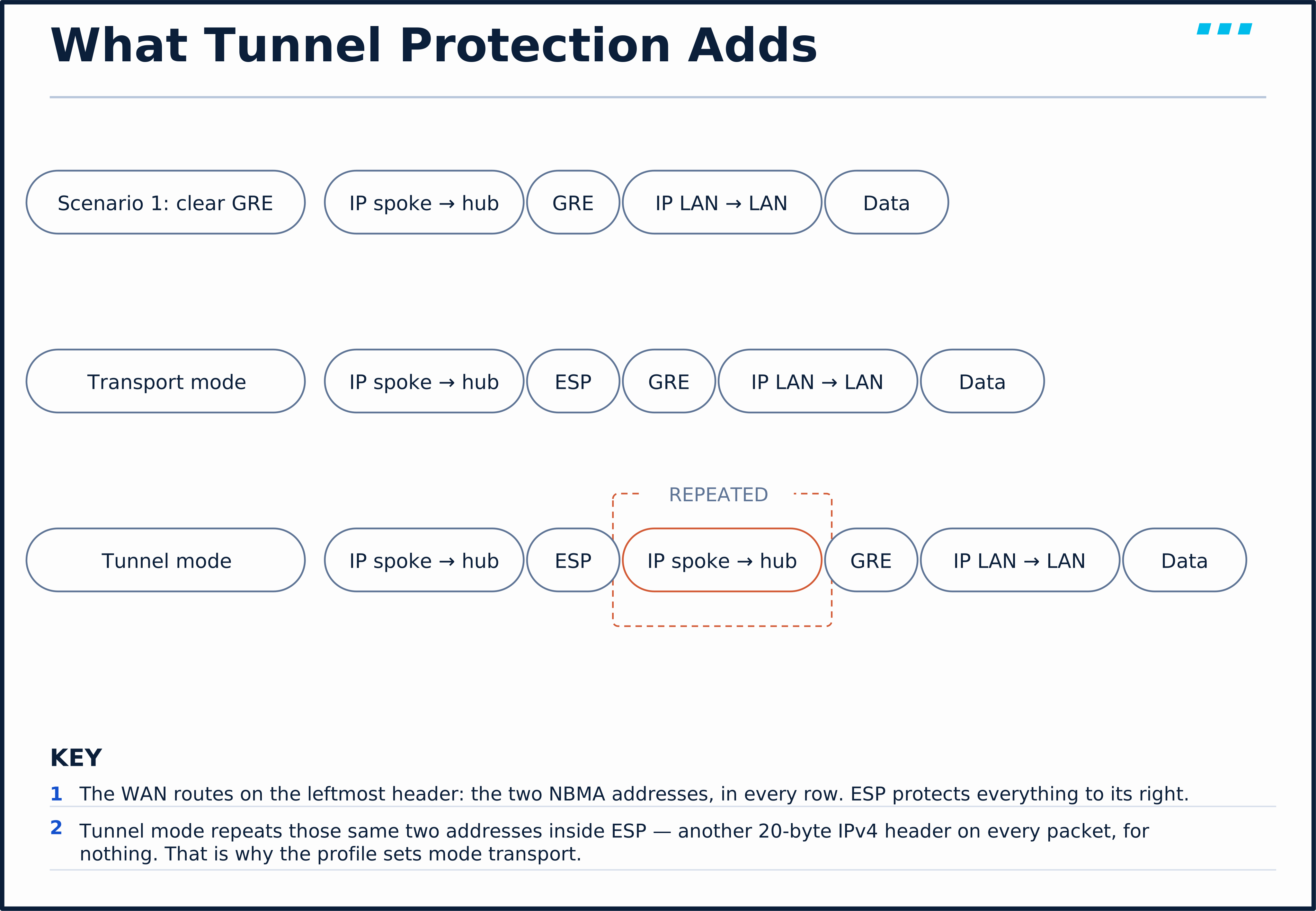
Transport mode inserts ESP and changes nothing else about the packet Scenario 1 already sent. Tunnel mode would repeat the spoke and hub addresses a second time inside ESP, 20 bytes per packet that carry nothing the outer header does not.
Step 3 — the same crypto block on all three routers:
! Step 3a: the proposal — replace the smart default's DH groups 5 and 2
crypto ikev2 proposal PROP-DMVPN
 encryption aes-cbc-256
 integrity sha256
 group 19
crypto ikev2 policy POL-DMVPN
proposal PROP-DMVPN! Step 3b: who to trust — any peer, one key
crypto ikev2 keyring KR-DMVPN
peer ANY-SPOKE
address 0.0.0.0 0.0.0.0
pre-shared-key SVPN-lab-DMVPN-psk
crypto ikev2 profile IKEV2-DMVPN
match identity remote address 0.0.0.0
authentication remote pre-share
authentication local pre-share
keyring local KR-DMVPN! Step 3c: what to encrypt with, and where to apply it
crypto ipsec transform-set TS-DMVPN esp-aes 256 esp-sha256-hmac
mode transport
crypto ipsec profile IPSEC-DMVPN
set transform-set TS-DMVPN
set ikev2-profile IKEV2-DMVPN
interface Tunnel0
tunnel protection ipsec profile IPSEC-DMVPNApply it hub first, then each spoke. The moment the hub is protected, an unprotected spoke’s GRE stops being accepted:
*Sep 26 02:01:04.069: %CRYPTO-4-RECVD_PKT_NOT_IPSEC: Rec'd packet not an IPSEC packet. (ip) vrf/dest_addr= /198.51.100.10, src_addr= 192.0.2.6, prot= 47prot= 47 is GRE: R-BRANCH-02 is still sending clear tunnels, and the hub now insists on ESP. On the other spoke, EIGRP says the same thing its own way:
*Sep 26 02:01:16.531: %DUAL-5-NBRCHANGE: EIGRP-IPv4 100: Neighbor 10.255.10.254 (Tunnel0) is down: holding time expired
*Sep 26 02:01:44.230: %DUAL-5-NBRCHANGE: EIGRP-IPv4 100: Neighbor 10.255.10.254 (Tunnel0) is up: new adjacency
The outage per spoke runs from “hub protected” to “that spoke protected”, so do all three in one change window.
Verify: Two IKEv2 SAs on a spoke, one of them to the other spoke
After a spoke-to-spoke ping:
R-BRANCH-01# show crypto ikev2 sa
 IPv4 Crypto IKEv2  SA

Tunnel-id Local                 Remote                fvrf/ivrf            Status
2         192.0.2.2/500         192.0.2.6/500         none/none            READY
      Encr: AES-CBC, keysize: 256, PRF: SHA256, Hash: SHA256, DH Grp:19, Auth sign: PSK, Auth verify: PSK
      Life/Active Time: 86400/12 sec

Tunnel-id Local                 Remote                fvrf/ivrf            Status
1         192.0.2.2/500         198.51.100.10/500     none/none            READY
      Encr: AES-CBC, keysize: 256, PRF: SHA256, Hash: SHA256, DH Grp:19, Auth sign: PSK, Auth verify: PSK
      Life/Active Time: 86400/69 sec
One SA to the hub, built when the spoke’s first registration needed a protected path, and one straight to 192.0.2.6, built on demand when NHRP resolved branch 2. Both read DH Grp:19. Before Step 3a they read DH Grp:5, the smart default, which is the reason Step 3a exists.
Verify: Only GRE is protected, and it is counted
R-BRANCH-01# show crypto session
Crypto session current status

Interface: Tunnel0
Profile: IKEV2-DMVPN
Session status: UP-ACTIVE
Peer: 198.51.100.10 port 500
  Session ID: 1
  IKEv2 SA: local 192.0.2.2/500 remote 198.51.100.10/500 Active
  IPSEC FLOW: permit 47 host 192.0.2.2 host 198.51.100.10
        Active SAs: 2, origin: crypto map

Interface: Tunnel0
Profile: IKEV2-DMVPN
Session status: UP-ACTIVE
Peer: 192.0.2.6 port 500
  Session ID: 3
  IKEv2 SA: local 192.0.2.2/500 remote 192.0.2.6/500 Active
  IPSEC FLOW: permit 47 host 192.0.2.2 host 192.0.2.6
        Active SAs: 2, origin: crypto map
permit 47 again: the IPsec flow is GRE between two NBMA addresses, nothing else. IPsec here protects the GRE packet, and the GRE packet carries the user and routing traffic.
On its own, permit 47 says GRE over IPsec, not DMVPN: a point-to-point GRE tunnel with tunnel protection shows the same flow. What makes it DMVPN for objective 4.3 is that line together with tunnel mode gre multipoint and the NHRP commands on the same tunnel, or a show dmvpn with dynamic peers. By contrast, a policy-based crypto map usually shows selectors for the protected subnets, and an SVTI (static virtual tunnel interface) often shows a broad permit ip any any.
— Download
Captured on the R-ISP-01–R-BRANCH-01 link while Step 3 was applied. Open it and apply isakmp || esp || gre. Watch for:
- Packets 17, 18, 20, 23 and 28 — the protected hub sending
IKE_SA_INITto a spoke that has no IKEv2 yet. Nothing answers. - Packets 32–35 — the four-message exchange (
IKE_SA_INITandIKE_AUTH, request and response) onceR-BRANCH-01is protected. - Packet 36 onward — ESP only. Clear GRE between
192.0.2.2and198.51.100.10stops at packet 30.
Troubleshooting
Symptom: A spoke never appears in the hub’s show dmvpn.
show ip nhrp nhson the spoke. (Should show the hub withRE: R, responding, and E, expecting replies.) If it shows onlyE, requests go out and nothing comes back.- Compare
tunnel keyon both ends. (Should match.) If not: the hub silently ignores the spoke, exactly as packets 1–4 of the registration capture show. Fix the key. Keepip nhrp network-ididentical across the cloud as well; Cisco’s NHRP guide says all stations in one NBMA network should share it. ping 198.51.100.10from the spoke. (Should succeed.) If not: the underlay is broken and no overlay setting will help.
Symptom: Spoke-to-spoke traffic works but always crosses the hub.
show ip routeon the spoke. (Should show an H route to the far branch after the first packets.) If only the summary is there, no shortcut was installed.show running-config interface Tunnel0 | include redirecton the hub. (Should showip nhrp redirect.) If not: the hub never tells the spoke. Add it.show running-config all | include nhrp shortcuton the spoke. (Should showip nhrp shortcut.) If not: the spoke ignores redirects. Add it.
Symptom: After adding protection, spokes flap and the hub logs %CRYPTO-4-RECVD_PKT_NOT_IPSEC.
- Read
src_addrin the log. (It names the spoke that is still unprotected.) Protect it. show crypto ikev2 saon that spoke. (Should showREADYto the hub.) If it is missing, compare the keyring, the profile’smatch identityand the proposal.debug crypto ikev2names the failing payload. Run it on one spoke only; on a busy hub it can flood the console.
💾 Lab End State
R-HUB-01, R-BRANCH-01 and R-BRANCH-02 now run a Phase 3 DMVPN on Tunnel0, protected by IKEv2 and IPsec, with EIGRP carrying one summary from the hub. Save each router: write memory.
configs/SVPN/svpn-dmvpn-implementation/r-hub-01-end-state.txtconfigs/SVPN/svpn-dmvpn-implementation/r-branch-01-end-state.txtconfigs/SVPN/svpn-dmvpn-implementation/r-branch-02-end-state.txtconfigs/SVPN/svpn-dmvpn-implementation/r-isp-01-end-state.txt
Implement Site-to-Site FlexVPN with Local AAA Authorization starts from exactly this state and migrates the same branches to FlexVPN.
🏢 Production Considerations
- Use certificates, not a shared key. A wildcard pre-shared key means every branch can impersonate every other. Certificates fix that only when the profile also checks the certificate’s identity. Common cause of a painful incident: a stolen branch router. Fix: IKEv2 with certificates from your enterprise CA, and revoke the one that walked.
- Two hubs, not one. A single NHS is a single point of failure for registration and for the first packets to any spoke prefix that has no shortcut yet. Spokes accept more than one
ip nhrp nhsline; configure a second hub. - Watch the MTU. GRE plus ESP costs tens of bytes per packet. The
ip mtu 1400andip tcp adjust-mss 1360in this lab are the usual guard (see Step 2). Common cause of “the VPN works but some web pages hang”: a missing MSS clamp. Fix: set both on every tunnel. - Spokes behind NAT need transport mode. That is one more reason to keep
mode transport: DMVPN’s NAT-transparency support depends on it.
🎥 [Video: the two traceroutes; mGRE, NHRP and the NHS; the three phases on one board; building the hub and a spoke and reading show dmvpn; the Phase 3 capture replayed packet by packet; tunnel protection applied hub first, the refused GRE, the IKEv2 SAs, and the DH group fixed. Matches video.script_outline. Runtime: ~10 minutes]
Key Takeaways
- Phase 2 and 3 DMVPN is one mGRE tunnel per router, plus NHRP as the address book. The hub is the NHS; spokes register their NBMA address, and the hub needs no per-spoke configuration.
- Phase 3 lets the hub summarise. The first packets follow the summary through the hub, the hub sends an NHRP redirect, the spoke resolves the destination, and an H route more specific than the summary sends the rest direct.
Three more that come up in practice:
- Read the phase from several signals together.
ip nhrp redirectand shortcuts, a summary via the hub, and H routes once traffic has flowed point to Phase 3; specific spoke prefixes with the far spoke as next hop point to Phase 2. - A tunnel key mismatch produces no reply and no error in normal output. The spoke keeps registering and the hub never answers; a capture shows it at once.
- Tunnel protection encrypts the GRE packet that carries the traffic.
permit 47inshow crypto sessionsays GRE over IPsec; withtunnel mode gre multipointand NHRP on the same tunnel, it says DMVPN. Use transport mode and an explicit IKEv2 proposal: on this lab’s image the smart default negotiated legacy DH group 5.
Up next: Implement Site-to-Site FlexVPN with Local AAA Authorization moves the same two branches onto FlexVPN, where the hub hands each spoke its routes through IKEv2 itself, with no routing protocol on the tunnel at all.
nhrp nhrp || icmp isakmp || esp || gre Knowledge Check
No grade, no timer. Wrong picks turn coral — change your answer until everything's green.
1 · In the lab's Phase 3 cloud, R-BRANCH-01's routing table shows 10.0.0.0/8 via 10.255.10.254 — the hub. Yet a second traceroute to 10.20.2.10 shows the hub gone. What sends the traffic direct?
show ip route on the spoke lists H 10.20.2.0/24 [250/255] via 10.255.10.2 — the H code is NHRP. The summary still points at the hub; the longer NHRP prefix wins the lookup.
2 · A spoke's registration requests leave it every few seconds and the hub never replies. The NHS address and NBMA mapping are correct. What is the first thing to compare?
The lab capture shows exactly this: four registration requests with no GRE key went unanswered, and the first request after tunnel key 10 was applied got its reply 17 ms later. A key mismatch raises no error in normal output.
3 · You enable tunnel protection on the hub first. What happens to a spoke that has not been protected yet?
The lab logged Rec'd packet not an IPSEC packet ... src_addr= 192.0.2.6, prot= 47 the second protection went on, and the other spoke's EIGRP neighbour went down on its hold timer because it stayed unprotected longer than the hold time.
4 · With no IKEv2 proposal configured, what Diffie-Hellman group did the lab's IOSv routers negotiate?
On this lab's IOSv 15.9 image, the IKEv2 smart-default proposal offers groups 5 and 2 only (other releases differ), and show crypto ikev2 sa read DH Grp:5 until an explicit proposal with group 19 was added.
You just proved the method works — the rest of the mountain is waiting. All-Access unlocks every lesson in every course — $489/yr, with $647 of founders bonuses while the window is open.
Reserve founders rate →📚 Official Documentation — every source behind this page · verified 26 Sept 2026
Revision Last updated 2012-11-29 · accessed 26 Sept 2026
Revision 17.x, current as published · accessed 28 Sept 2026
Revision Last updated 2014-09-02 · accessed 26 Sept 2026
Revision 16.7.x, current as published · accessed 26 Sept 2026
Revision April 1998 · accessed 26 Sept 2026