Concept Lesson · Gateway Administration & Mail Policies
Email Security Landscape: ESA, CES & Cloud vs On-Prem
Free Lesson All-Access unlocks every lesson in every course — $489/yr, with $647 of founders bonuses while the window is open, and it carries The Next Year Promise. Reserve founders bonuses →
“Configure Cisco Secure Email Gateway features (hardware/VM specs, initial configuration, routing and delivery, GUI, certificate authorities, logging).” Walking out of this lesson, you can:
- Explain why SMTP is easy to abuse and name the threats that arrive by email, and the risks that leave by it
- Say which gateway phase answers which threat — the connection, the message, or the delivery
- Choose between an on-premises gateway, the Cloud Gateway and a hybrid, and place Secure Email Threat Defense correctly beside them
- Size a virtual gateway from Cisco’s model table
Scanning engines are licensed features on the gateway; which ones you hold depends on your subscription. The lab gateway is registered with Smart Licensing in M1 · Lab 1: Power On the ESA & Mail Server.
Overview
A message lands in the finance inbox from your CEO’s address, asking for an urgent supplier payment. Nobody hacked anything to send it: the sender connected to your mail server and typed the CEO’s address, and a server with no policy beyond SMTP itself had nothing that could tell the claim was false. Any organisation that accepts public internet mail takes connections from untrusted systems, and base SMTP doesn’t authenticate the envelope sender or the From: author — which is why email stays one of the main delivery channels for phishing, social engineering and malware.
This lesson names the threats, shows where a Cisco Secure Email gateway answers each one, and compares the places that gateway can run. It ends with a lookup you can run from your own terminal against any domain.
Terminology: The Names Changed, the Product Did Not
Cisco has renamed its email products and several of their features since the SESA exam was written, and its documentation and the exam objectives mix both generations. Keep this table beside you for the rest of the course:
| Older name | Current name | What it is |
|---|---|---|
| Email Security Appliance (ESA) | Cisco Secure Email Gateway | The gateway you run, as hardware or a virtual machine (ESAv) |
| Cloud Email Security (CES) | Cisco Secure Email Cloud Gateway | The Cisco-hosted AsyncOS gateway service |
| Security Management Appliance (SMA) | Cisco Secure Email and Web Manager | Central reporting, tracking and quarantine for many gateways |
| Cloud Mailbox Defense | Cisco Secure Email Threat Defense (ETD) | An API-connected service for Microsoft 365, behind the mailbox |
| Advanced Malware Protection (AMP) for email | File Reputation and File Analysis | The gateway’s attachment-verdict feature; the menus still say “Advanced Malware Protection” |
| Threat Grid | Cisco Secure Malware Analytics | The sandbox that detonates files the gateway sends for analysis |
| SenderBase | Cisco Talos reputation | The sender reputation data behind the SenderBase Reputation Score (SBRS) |
Both gateway forms run AsyncOS, Cisco’s operating system for its email and web appliances: Cisco publishes Cloud Gateway release notes under the same AsyncOS version numbers (see the Cloud Gateway’s AsyncOS 15.0 release notes). The lessons use “the gateway” when a statement holds for all of them, and the product name when it does not.
Terminology: Why SMTP Takes the Sender’s Word
The Simple Mail Transfer Protocol (SMTP) moves mail between servers, and a message travels with two sender identities:
| Identity | Where it lives | Who uses it |
|---|---|---|
| Envelope sender | The MAIL FROM command, before the message is sent | Servers: it’s where bounces go |
| Author | The From: header inside the message | People: it’s what a mail client displays |
Nothing requires the two to match, and the session has two more claims around them: the greeting (EHLO, “I am this host”) and the recipients (RCPT TO). A receiving server can apply local policy to any of them — refuse recipients it doesn’t host, refuse to relay, score the greeting — but base SMTP gives it no way to prove the sender domain or the author is genuine.
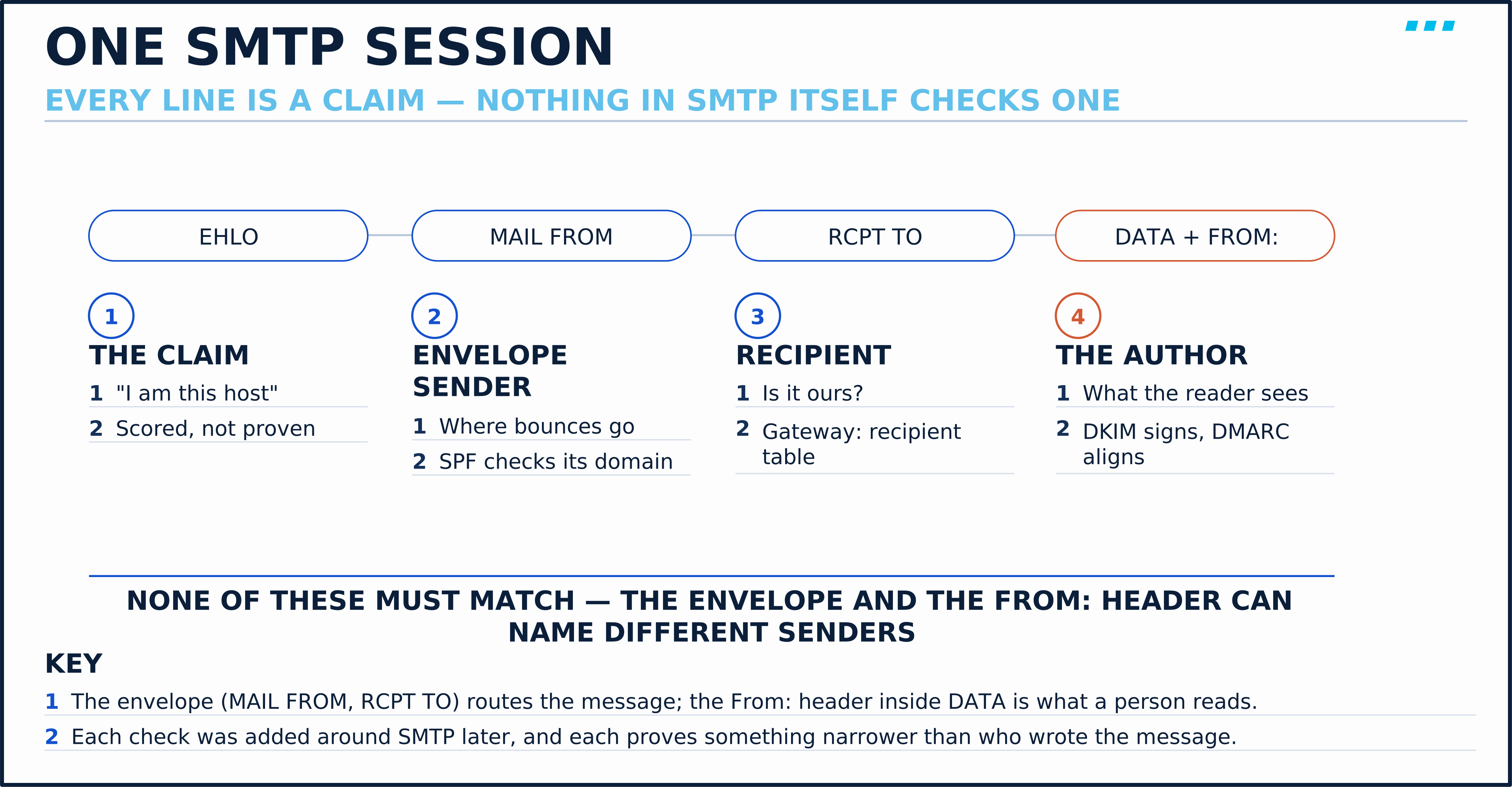
The protocol’s own standard says so. RFC 5321 §7.1 states that SMTP mail “is inherently insecure in that it is feasible for even fairly casual users to negotiate directly with receiving and relaying SMTP servers and create messages that will trick a naive recipient into believing that they came from somewhere else.”
The checks used today were added around SMTP later. Take them as a separate layer, one question each — and notice that none of them asks “which person wrote this”:
- Reputation — how the connecting IP address has behaved across many networks; on the gateway it’s a score, the SBRS
- Sender Policy Framework (SPF) — whether the envelope sender’s domain (or the
HELOname, when the envelope sender is empty) authorises the connecting IP address - DomainKeys Identified Mail (DKIM) — whether a domain signed the message, and that the signed parts were not altered
- Domain-based Message Authentication, Reporting and Conformance (DMARC, RFC 7489) — whether the visible
From:domain aligns with a domain that passed SPF or DKIM, and what the domain owner asks receivers to do when neither does
Any receiving server can evaluate them. A gateway is the place an organisation chooses to evaluate them centrally, for every mailbox it protects.
If the receiving server cannot verify a sender, what does a mail gateway actually add?
Evidence from outside the SMTP conversation. The gateway checks the connecting host’s reputation, queries the sending domain’s published DNS policies, and inspects the content. None of that proves who a person is; together it is enough to make a policy decision.
Threat Types: What Arrives by Email, and What Leaves
This lesson groups inbound threats into five representative categories. They are not the only ones, but the grouping matters because each is answered by different features, at different points:
| Threat | What it abuses | Gateway feature that answers it |
|---|---|---|
| Spam | Volume from senders with no relationship to you | IP reputation filtering, then anti-spam scanning |
| Graymail | Marketing and social mail a user once signed up for | Graymail detection with a safe-unsubscribe option |
| Phishing links | A URL that leads to a credential form or exploit | URL reputation and category filtering, Outbreak Filters |
| Malicious attachments | A file that runs code when opened | Anti-virus (Sophos, McAfee), file reputation and file analysis |
| Impersonation (BEC) | A display name, lookalike domain or spoofed domain that looks like someone you trust | Forged email detection for display names; SPF, DKIM and DMARC for spoofing of a protected domain |
Three of those features need a line of their own, because their names don’t say what they do:
| Feature | What it does |
|---|---|
| Outbreak Filters | Cisco pushes outbreak rules to the gateway while a new campaign spreads, before anti-virus signatures exist. Matching mail is held in a quarantine and re-checked as the rules change, or its links are rewritten through Cisco’s web security proxy (Outbreak Filters) |
| File reputation and file analysis | The gateway looks up an attachment’s fingerprint for a known verdict, and can send an unknown file to be detonated in a sandbox |
| Forged email detection | Compares the From: header with a content dictionary of names you protect, such as your executives, and acts on a message that borrows one (Content Filters) |
Business email compromise (BEC) deserves its own line because it often carries no attachment and no link. The message asks a person to do something — pay an invoice, change a bank account, send a file — and the only malicious thing in it is the claim about who sent it. That claim can take three forms, and domain authentication only answers one of them:
- A spoofed domain — the attacker uses your partner’s real domain; if the mail fails DMARC and the domain publishes an enforcing policy, receivers that apply it quarantine or reject it
- A lookalike domain or display name — a domain the attacker controls can pass SPF, DKIM and DMARC, and a borrowed display name isn’t authenticated by any of them, whatever domain it comes from; this needs impersonation detection
- A compromised real account — the mail genuinely comes from the domain, so domain authentication passes; detection depends on content and behavioural analysis, account-security controls, and verifying requests out of band
The outbound direction adds data loss. A user, or a compromised account, sends something that should not leave. The gateway’s Data Loss Prevention (DLP) and encryption features act on mail your own servers send, which is why a gateway is placed on the outbound path as well as the inbound one. A second outbound risk is to your reputation: a compromised account that sends spam through your servers gets your addresses scored as a spam source, so outbound mail policies can be configured to scan with anti-spam and anti-virus too.
Engine Behavior: Before the Message Exists, and After
Cisco’s user guide divides a gateway’s work into three phases, which it calls the email pipeline (Understanding the Email Pipeline):
- Receipt — while the remote host is still connected: whether this host may send to you at all, connection and message limits, and whether the recipient exists
- Work Queue — after the message is accepted: filtering, safelists and blocklists, anti-spam, anti-virus, Outbreak Filters and quarantining
- Delivery — when the gateway connects outward to deliver, under its own delivery limits and policies
The split explains a design choice you will make again and again. A decision made at Receipt is far cheaper than one made later. Host access, reputation and recipient checks happen before the DATA command, which is where the body crosses the wire — so a refusal there never downloads the message. It isn’t free (the gateway still spends a connection, a lookup and a log line), but accepting the same message means a full download, several engines and disk on top.
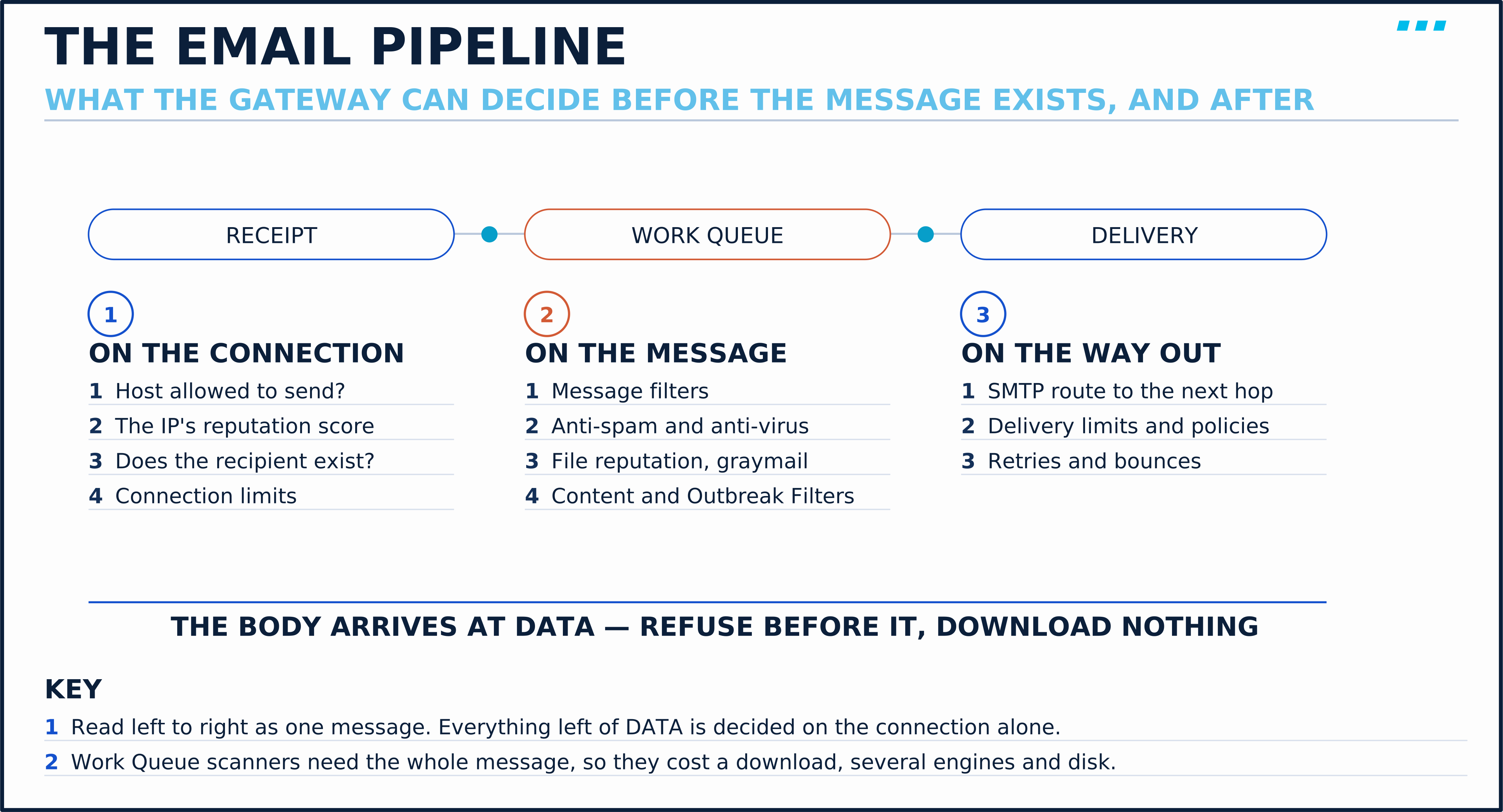
You can watch that split on the course’s own gateway: in M1 · Lab 1: Power On the ESA & Mail Server, the gateway’s mail_logs record the connection decision — the line for the incoming connection (its ICID, injection connection ID), naming the sender group, the class of senders the host was sorted into — before the message even has an ID, and the scanners’ verdicts only after it does.
That is why the gateway front-loads reputation. Cisco describes its anti-spam as a multi-layer approach of reputation filtering followed by content scanning (Getting Started, AsyncOS 15.0) — the cheap test first, the expensive one only for what survives it.
The next lesson, SMTP & the ESA Email Pipeline: Packet Walk, walks the SMTP conversation and each pipeline stage in order.
Design Choice: Where the Gateway Sits
A gateway only protects mail that passes through it, so its position is set by routing: DNS for inbound mail, and your own mail servers’ relay setting for outbound. Cisco’s Setup and Installation chapter asks you to register the gateway in DNS: an A record for the gateway’s hostname, and an MX record that maps your public domain to that hostname. Other mail servers find you through the MX record, so they connect to the gateway rather than to your mailbox server. In the other direction, your mail servers are configured to use the gateway as their relay (smart host).
The same chapter wants the gateway at the perimeter — the first SMTP hop that mail from the internet meets. Reputation filtering is why. It scores the connecting IP address, so an SMTP relay in front of the gateway would hide every sender behind one address, and the best test the gateway has would score the relay instead. A firewall that only filters or translates the destination doesn’t have that problem; the sender’s address still arrives intact.
Traffic is separated by listeners, not by interfaces:
- Public listener — “receives connections from many external hosts and directs messages to a limited number of internal groupware servers” (inbound)
- Private listener — “receives connections from a limited number of internal groupware servers and directs messages to many external mail hosts” (outbound)
Both listeners can share one interface. The guide is explicit that only one Ethernet interface is required, and that you can add a second to segregate your internal network from the Internet connection. That gives the two layouts you will see in designs and exam questions:
| Layout | Interfaces | Where it fits |
|---|---|---|
| One interface | Public and private listeners on the same interface, usually in a DMZ behind the firewall | Often chosen for simplicity: one segment and one set of firewall rules |
| Two interfaces | The public listener on the DMZ-facing interface, the private listener on an inside interface | Designs that must keep the internal mail servers off the DMZ segment |
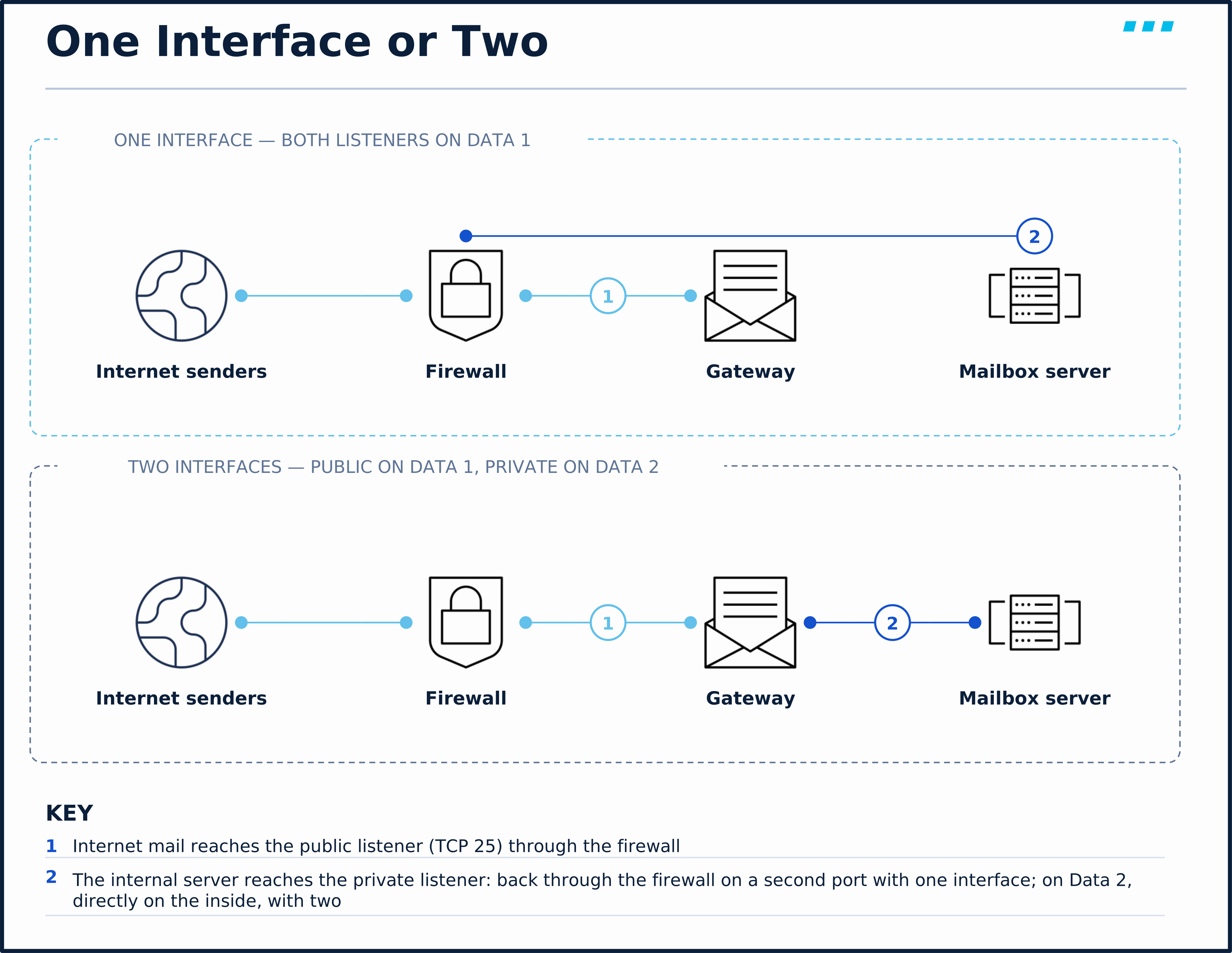
Two listeners can’t share the same IP address and TCP port. On a one-interface gateway, the setup wizard asks for another port for the private listener, and your internal mail server relays to that port instead — M1 · Lab 1: Power On the ESA & Mail Server shows the prompt on the course’s own gateway. A second IP address on the same physical port would let both use TCP 25.
Design Choice: On-Premises, Cloud, or Both
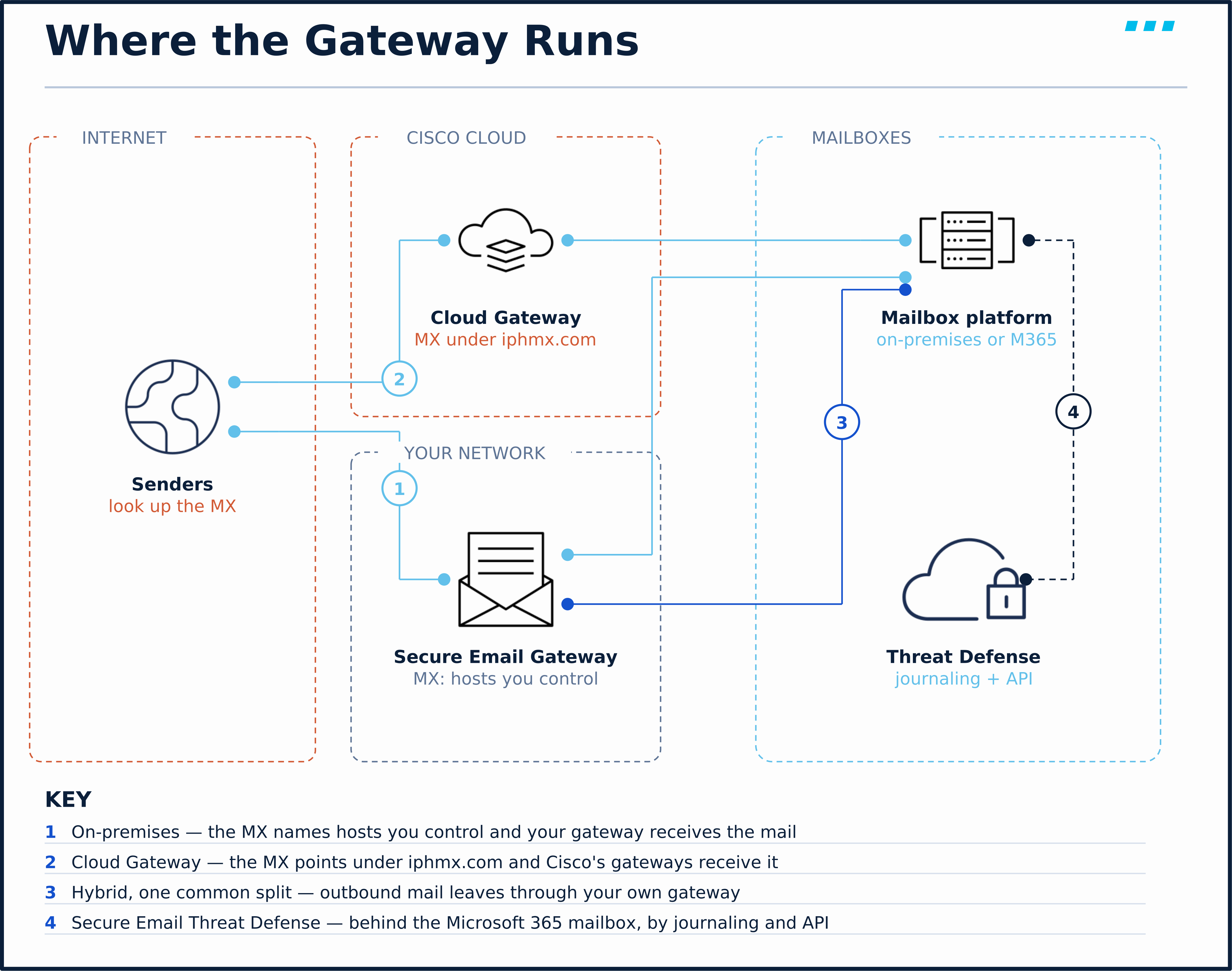
The gateway runs on your infrastructure, on Cisco’s, or on both. Both run AsyncOS; what changes is who owns the infrastructure and where the MX record points.
On-premises (Secure Email Gateway). You run the gateway, as a hardware appliance or a virtual machine. The MX records typically point to hostnames the organisation controls, and you own capacity, patching and availability. This is the form the lab in this course uses, and the one where you control the deployment and every supported configuration choice.
Cloud (Secure Email Cloud Gateway). Cisco hosts the gateways, and you administer their policy. You can spot it in DNS, because Cisco names every allocation’s hosts under iphmx.com. The gateways carry a region in the name — esa.<allocation>.iphmx.com in the US, esa.<allocation>.c3s2.iphmx.com in the UK data centre — and an mx1.<allocation> name resolves to the addresses a customer’s MX records use (DNS Records, Hostnames & IP Addresses).
Hybrid. A combination of the two rather than a third kind of gateway. One common split is for the Cloud Gateway to receive inbound mail from the internet while an on-premises gateway handles outbound mail, where policy wants DLP and encryption decided on your own hardware. A hybrid is also how organisations migrate between the two without a flag day.
If I were starting fresh with Microsoft 365 mailboxes, I’d put the gateway in the cloud and keep on-premises gateways only where a regulator or a DLP policy says the decision must happen on hardware I own. The on-premises gateway earns its rack space when you need that control — or when you’re sitting for SESA, which examines every knob it has.
Secure Email Threat Defense is not a fourth place for the gateway — it is a different position. It connects to Microsoft 365, receives copies of mail through journaling, and uses Microsoft’s APIs to act on messages already in mailboxes (requirements). A gateway decides before delivery; Threat Defense can still act after it. Objective 1.5 covers it in Configure Email Security with Cisco Secure Email Threat Defense.
Whichever you choose, Cisco Secure Email and Web Manager can sit beside on-premises gateways to centralise reporting, message tracking and spam quarantine across many of them; Centralized Management with Cisco Secure Email and Web Manager (SMA) covers it.
- Symptom: A new Cloud Gateway or on-premises gateway is live, yet phishing still reaches users directly.
- Root Cause: The MX record changed, but the mailbox platform still accepts SMTP from any host. Attackers who know the old address skip the MX and deliver around the gateway.
- Fix: Restrict the mailbox platform to accept inbound mail only from the gateway’s addresses. Cisco’s Cloud Gateway guidance on reviewing MX records makes the same point: delivery should be locked down to the gateway’s addresses only.
Scale & Limits: Sizing a Virtual Gateway
Objective 1.1 names hardware and virtual machine specifications. The hardware appliances come with their resources fixed; Cisco’s hardware installation guide lists them, all 1 RU:
| Appliance | Ethernet ports | Disks |
|---|---|---|
| C195 | DATA 1 (built-in, listed as the management port) and DATA 2 (1 GbE) | Two 600 GB SAS, RAID 1 |
| C395 | MGMT, plus five 1 GbE (DATA 1–5) | Two 600 GB SAS, RAID 1 |
| C695 | MGMT, plus DATA 1 (1 GbE) and two fibre ports (DATA 2–3) | Eight 600 GB SAS, RAID 10 |
| C695F | MGMT, plus DATA 1 (1 GbE) and two SFP+ ports (DATA 2–3) | Eight 600 GB SAS, RAID 10 |
For virtual gateways you size the VM yourself, and the source is Cisco’s virtual appliance installation guide (revised 2026-09-04). It carries separate tables per hypervisor, and they do not agree on memory:
| Model | Processor cores | Disk | Memory, KVM | Memory, ESXi |
|---|---|---|---|---|
| C100V | 2 | 200 GB | 6 GB | 8 GB |
| C300V | 4 | 500 GB | 8 GB | 16 GB |
| C600V | 8 | 500 GB | 16 GB | 16 GB |
The memory columns are the guide’s own rows for an AsyncOS 15.0 gateway: the KVM table (page 3) and the ESXi new-install values for 15.0 and later (page 4).
Three rules come out of those guides:
- Meet the table for your release and hypervisor. The KVM and ESXi figures are separate requirements, not a low and a high option.
- Choose a larger model for McAfee. The guide recommends the C300V or C600V for McAfee’s memory needs, and asks C100V users who see McAfee restart errors to consider migrating.
- License before setup. The setup guide warns that a virtual gateway must load its licence before the System Setup Wizard will run.
🔬 See It Yourself: Read Any Domain’s Front Door
You can see where a domain’s inbound mail enters, and what it asks receivers to do with mail that fails DMARC, from your own terminal. No lab is needed. Pick any domain you are curious about and run:
$ dig +short MX <domain>
$ dig +short TXT <domain>
$ dig +short TXT _dmarc.<domain>
The first command lists the hosts that accept the domain’s mail, each with a preference value; sending servers try lower values first. (The order dig prints them in is not significant.) The second returns the domain’s TXT records; the one starting v=spf1 is its SPF policy — the servers allowed to send as its envelope sender. The third returns the DMARC record: what the domain owner asks receivers to do with mail whose From: domain passes neither aligned SPF nor aligned DKIM.
Read the answers with three questions:
- Whose hosts are in the MX?
iphmx.commeans Cisco’s Cloud Gateway receives the mail.mail.protection.outlook.commeans Microsoft’s Exchange Online Protection does. Hostnames in the domain’s own namespace say only that the domain names its own ingress — the service behind them could be on-premises or hosted. - What is the DMARC policy (
p=)?nonerequests no specific delivery action (reports are requested separately, withruaandruf),quarantineasks receivers to treat failing mail as suspicious, andrejectasks them to reject it (RFC 7489 §6.3). These are requests; each receiver applies its own local policy. - Is there a subdomain policy (
sp=)? Without one, subdomains inheritp=.
A worked answer — github.com, looked up on 2026-09-27
$ dig +short MX github.com
0 github-com.mail.protection.outlook.com.
$ dig +short TXT github.com | grep spf1
"v=spf1 ip4:192.30.252.0/22 include:spf.protection.outlook.com include:_netblocks.google.com include:_netblocks2.google.com include:mail.zendesk.com include:_spf.salesforce.com include:servers.mcsv.net include:mktomail.com include:sendgrid.net ip4:62.253.2" "27.114 ip4:166.78.69.169 ip4:166.78.69.170 ip4:166.78.71.131 ~all"
$ dig +short TXT _dmarc.github.com
"v=DMARC1; p=quarantine; sp=reject; pct=100; rua=mailto:dmarc@github.com; ruf=mailto:dmarc@github.com; fo=1"- Front door: one MX under
mail.protection.outlook.com, so Microsoft’s Exchange Online Protection is the public SMTP ingress. No Cisco gateway appears in the MX; what happens behind the ingress is not visible from DNS. - SPF: GitHub’s own address block plus a chain of
include:entries for the services that send as it — Microsoft 365, Google, Zendesk, Salesforce, Mailchimp, Marketo, SendGrid. A longinclude:list is normal; it’s how a domain admits its marketing and support tools. The record is split into two quoted strings because a single DNS TXT string can’t exceed 255 characters, and~allasks for a soft fail on everything else. - Policy:
p=quarantinefor the domain itself andsp=rejectfor its subdomains, applied to all failing mail (pct=100). The owner asks receivers to quarantine DMARC-failing mail claiming@github.com, and to reject DMARC-failing mail claiming@anything.github.com. - Reports: aggregate (
rua) and failure (ruf) reports are requested to the domain’s own mailbox, andfo=1asks for a failure report when any underlying mechanism does not produce an aligned pass. Receivers are not obliged to send either.
Your own lookups will differ; the point is that a domain’s public ingress and spoofing policy are visible to anyone. An attacker planning a BEC campaign reads the same records, which is one reason an enforcing p= matters.
🎥 [Video: one hand-typed SMTP session accepting a forged sender; five representative inbound threats and the outbound risks; a gateway in the MX record, splitting what it can refuse at the connection from what it must scan in the message; the three places the gateway can run and Threat Defense behind the mailbox; a live dig MX and dig TXT _dmarc read aloud. Matches video.script_outline. Runtime: ~8 minutes]
Key Takeaways
Three things about the problem:
- Base SMTP cannot prove a sender. RFC 5321 says so itself. Reputation, SPF, DKIM and DMARC were added around it, each testing something narrower than identity, and the gateway evaluates them centrally.
- Different threats, different features. Spam, graymail, phishing links, malicious attachments and impersonation come in; data loss and a compromised account’s spam go out. Domain authentication answers spoofing, not lookalikes or compromised accounts.
- Refuse at the connection whenever you can. The Receipt phase decides before the message body arrives; the Work Queue scans whole messages. Reputation runs first because it is the cheaper test.
The rest are deployment decisions — where the gateway sits, where it runs and how big it is — and each follows from the first three.
- Routing decides what the gateway protects. The MX record puts it in the inbound path and a relay setting in the outbound path; locking the mailbox platform to the gateway’s addresses keeps attackers from going around it. Listeners, not interfaces, separate inbound from outbound.
- AsyncOS on your hardware, on Cisco’s, or both. On-premises, the Cloud Gateway (
iphmx.com), or a hybrid of the two. Secure Email Threat Defense sits behind the Microsoft 365 mailbox, not in front of it. - Size a virtual gateway from Cisco’s table for your release and hypervisor, take Cisco’s advice of a C300V or C600V for McAfee, and license it before running setup.
Up next: SMTP & the ESA Email Pipeline: Packet Walk follows one message through the SMTP conversation and every pipeline stage.
Knowledge Check
No grade, no timer. Wrong picks turn coral — change your answer until everything's green.
1 · An attacker connects directly to your mail server and gives an envelope sender and a From header that both claim your CEO's domain. What in base SMTP proves or disproves that claim?
RFC 5321 §7.1 says SMTP mail is inherently insecure: a casual user can talk directly to a receiving server and make a message appear to come from somewhere else. A server may score HELO or require TLS as local policy, but neither proves the author, and TLS protects the channel rather than the claim. SPF, DKIM and DMARC were added around SMTP to test the sending domain, and even they do not prove which person wrote the message.
2 · A message is refused before its body is ever transmitted. Which gateway phase made that decision?
The Receipt phase runs while the remote host is still connected: whether this host may send to you, connection and message limits, and whether the recipient is valid. A decision made there generally costs much less, because the message body is never transferred or processed by the scanning engines. Anti-spam, content filters and the other Work Queue scanners need the whole message, so they run after it has been accepted.
3 · A company points its MX records at hostnames under iphmx.com. What does that tell you?
Cisco builds each Cloud Gateway allocation's hostnames under iphmx.com, by region: esa.<allocation>.iphmx.com in the US, for example, with an mx1 name for the MX addresses. Microsoft 365's Exchange Online Protection uses mail.protection.outlook.com, and Secure Email Threat Defense is not an MX at all — it reads mail from Microsoft 365 by API and journaling. A hostname in the company's own domain would not tell you whether the gateway behind it is on-premises or hosted.
4 · Which statement about a two-interface gateway deployment is accurate?
Cisco's setup guide says only one Ethernet interface is required, and that you can configure two to segregate the internal network from the external Internet connection. Inbound and outbound mail are separated by listeners (a public listener and a private listener), which can share one interface.
You just proved the method works — the rest of the mountain is waiting. All-Access unlocks every lesson in every course — $489/yr, with $647 of founders bonuses while the window is open.
Reserve founders rate →📚 Official Documentation — every source behind this page · verified 27 Sept 2026
Revision October 2008 · accessed 27 Sept 2026
Revision March 2015 · accessed 27 Sept 2026
Revision 15.0 GD, updated 2024-08-06 · accessed 27 Sept 2026
Revision 15.0 GD, updated 2024-08-06 · accessed 27 Sept 2026
Revision 15.0 GD, updated 2024-08-06 · accessed 27 Sept 2026
Revision 15.0 GD, updated 2024-08-06 · accessed 27 Sept 2026
Revision 15.0 GD, updated 2024-08-06 · accessed 27 Sept 2026
Revision Revised 2026-09-04 · accessed 27 Sept 2026
Revision 15.0 · accessed 27 Sept 2026
Revision Last updated 2025-06-09 · accessed 27 Sept 2026
Revision Current as published · accessed 27 Sept 2026
Revision Current as published · accessed 27 Sept 2026
Revision Current as published · accessed 27 Sept 2026